
Alignable
अपडेट किया गया
वर्तमान वर्शन
1.4.11
संसाधन

Alignable पर अपनी मोबाइल डेटा सीमा पार करने को अलविदा कहें और छोटी स्क्रीन की सीमाओं से मुक्त होकर बड़े डिस्प्ले के लाभों का अनुभव करें। अब, आप अपने कीबोर्ड और माउस का उपयोग करके फुल-स्क्रीन मोड में टॉपर्स क्लैन की शक्ति का अनुभव कर सकते हैं। MEmu Play में वे सभी बेहतरीन सुविधाएँ हैं जिनकी आप अपेक्षा करते हैं: त्वरित इंस्टॉलेशन और आसान सेटअप, सहज नियंत्रण, बैटरी की आवश्यकता नहीं, और कोई डेटा या कॉल समय सीमा नहीं। नया MEmu 9 आपके कंप्यूटर पर Alignable का उपयोग करने के लिए सबसे अच्छा विकल्प है। हमारा मालिकाना मल्टी-इंस्टेंस मैनेजर एक साथ दो या अधिक खातों को चलाने का समर्थन करता है। इससे भी महत्वपूर्ण बात यह है कि हमारा अनूठा इम्यूलेशन इंजन आपके कंप्यूटर के प्रदर्शन का पूरा उपयोग करता है, जिससे एक सहज और निर्बाध अनुभव मिलता है।
और दिखाएं
MEmu Play के साथ PC पर Alignable इस्तेमाल करने के शानदार अनुभव का आनंद लें। यह एक शक्तिशाली मुफ़्त Android एमुलेटर है जो आपको डेस्कटॉप वर्ज़न के लिए हज़ारों Android ऐप्स उपलब्ध कराता है। दोस्तों से जुड़ने और अपने काम को और भी बेहतर बनाने का आनंद लें! Connect.

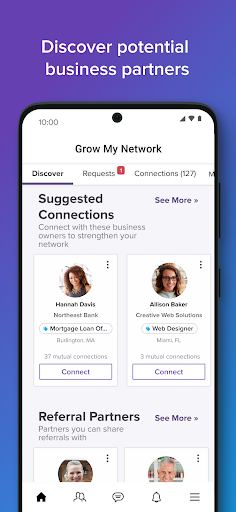
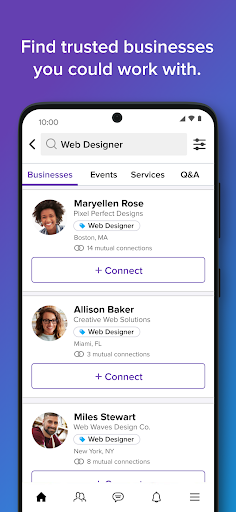
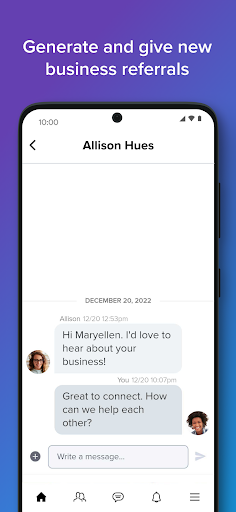
Connect. Refer. Grow. The Business Network Built for Small Business.
Alignable is North America's largest small business network—10M+ business owners helping each other succeed in 30,000+ local communities across the U.S. and Canada.
Discover untapped business potential in your network. Experience the power of precision networking on Alignable. Our technology takes your specific business goals and helps you connect with the most valuable people. And our AI tools help you make personalized introductions at scale.
Note: This app is for existing Alignable Members. New to Alignable? Sign up at Alignable.com
---
WHAT YOU CAN DO
Build Your Network
Connect locally, regionally, and across North America with millions of small business owners who understand your challenges and opportunities.
Generate Real Business Results
- Get referrals from your network and second-degree connections
- Attract new customers through recommendations
- Share products, services, events, and promotions with your community
- Find trusted vendors and partners to help grow your business
Showcase Your Expertise
- Build a business profile that highlights what you do best
- Answer questions in our popular Q&A forum to boost visibility
- Import your existing business connections
Stay Connected On-the-Go
- Message your connections about new opportunities and collaborate wherever you are.
---
WHAT MEMBERS ARE SAYING
"34 requests for quotes and 14 sales in my first 3 days on Alignable!"
— Danielle Cuddie, Velocity Printing
"Great resource for small businesses to network and get referrals"
— Felix L. Griffin, Lord & Griffin IT Solutions
"Alignable brings local business owners together and generates opportunities. What a great platform!"
— Patrick Mbadiwe, Neighbor's Postal Plus
"I already have one lead from here! AWESOME!!"
— Lisa Bell, KCAA Bookkeeping Services, LLC
---
PERMISSIONS
To provide the best experience, Alignable may request access to:
- Contacts – Add your contacts to your network
- Notifications – Stay updated on recommendations and network activity
- Camera & Photos – Add photos to your profile and posts
---
WE'RE HERE TO HELP
Questions or feedback? Email us at Support@alignable.com
Connect with us on Facebook: facebook.com/AlignableNetwork
Privacy Policy: alignable.com/privacy-policy
और दिखाएं

1. MEmu इंस्टॉलर को डाउनलोड करें और इंस्टॉलेशन को पूरा करें

2. MEmu शुरू करें फिर होमपेज पर Google Play खोलें

3. Google Play में Alignable खोजें
Install
4. Alignable डाउनलोड कर इंस्टॉल करें
5. इंस्टॉल पूरा होने पर आइकन दबाएं

6. MEmu का उपयोग करके अपने कंप्यूटर पर Alignable का अनुभव करें
MEmu Play सबसे बेहतरीन मुफ़्त Android एमुलेटर है और 5 करोड़ लोग पहले ही इसके शानदार Android ऐप अनुभव का आनंद ले चुके हैं। MEmu 9 वर्चुअलाइज़ेशन तकनीक आपको अपने PC पर हज़ारों Android ऐप्स, यहाँ तक कि सबसे ज़्यादा ग्राफ़िक्स वाले ऐप्स भी, आसानी से चलाने की सुविधा देती है।
असीमित बैटरी या मोबाइल डेटा के साथ बेहतर ग्राफिक्स के साथ बड़ी स्क्रीन; लंबी अवधि।
कीबोर्ड और माउस या गेमपैड के उत्तम नियंत्रण के लिए संपूर्ण कीमैपिंग का समर्थन करता हैं।
एक ही पीसी पर मल्टी-इंस्टेंस मैनेजर के साथ एक समय में कई गेम खाते या कार्य कर सकते हैं।
Use Alignable on PC by following steps: