
Anime Salt
अपडेट किया गया
वर्तमान वर्शन
1.0.0
संसाधन

Anime Salt पर अपनी मोबाइल डेटा सीमा पार करने को अलविदा कहें और छोटी स्क्रीन की सीमाओं से मुक्त होकर बड़े डिस्प्ले के लाभों का अनुभव करें। अब, आप अपने कीबोर्ड और माउस का उपयोग करके फुल-स्क्रीन मोड में टॉपर्स क्लैन की शक्ति का अनुभव कर सकते हैं। MEmu Play में वे सभी बेहतरीन सुविधाएँ हैं जिनकी आप अपेक्षा करते हैं: त्वरित इंस्टॉलेशन और आसान सेटअप, सहज नियंत्रण, बैटरी की आवश्यकता नहीं, और कोई डेटा या कॉल समय सीमा नहीं। नया MEmu 9 आपके कंप्यूटर पर Anime Salt का उपयोग करने के लिए सबसे अच्छा विकल्प है। हमारा मालिकाना मल्टी-इंस्टेंस मैनेजर एक साथ दो या अधिक खातों को चलाने का समर्थन करता है। इससे भी महत्वपूर्ण बात यह है कि हमारा अनूठा इम्यूलेशन इंजन आपके कंप्यूटर के प्रदर्शन का पूरा उपयोग करता है, जिससे एक सहज और निर्बाध अनुभव मिलता है।
और दिखाएं
MEmu Play के साथ PC पर Anime Salt इस्तेमाल करने के शानदार अनुभव का आनंद लें। यह एक शक्तिशाली मुफ़्त Android एमुलेटर है जो आपको डेस्कटॉप वर्ज़न के लिए हज़ारों Android ऐप्स उपलब्ध कराता है। दोस्तों से जुड़ने और अपने काम को और भी बेहतर बनाने का आनंद लें! Anime Salt is a lightweight application created for anime enthusiasts who enjoy exploring titles, learning background details, and keeping track of their interests in a simple way.
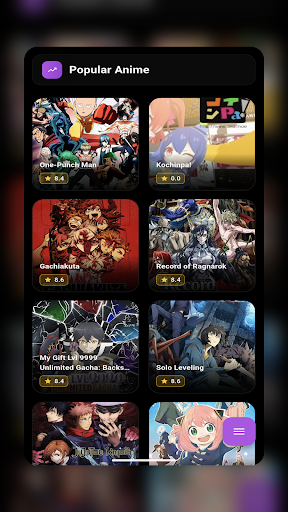
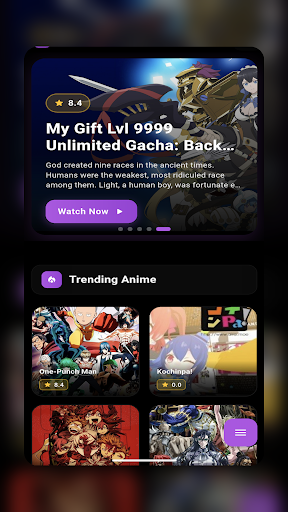
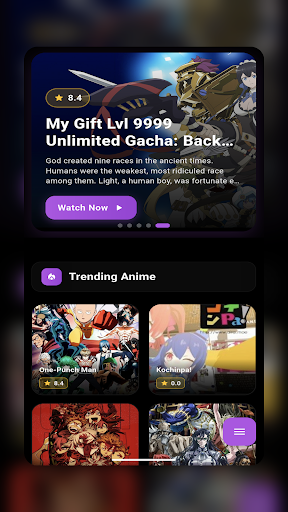
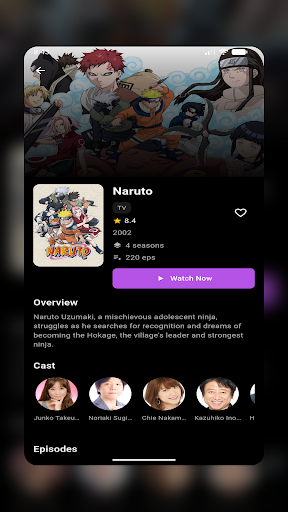
Anime Salt is a lightweight application created for anime enthusiasts who enjoy exploring titles, learning background details, and keeping track of their interests in a simple way.
The app focuses on presenting clear and organized anime information, allowing users to browse titles, read descriptions, and explore related details without distractions. Anime Salt is designed for users who want to stay informed, discover new anime, and manage personal favorites comfortably.
Navigation is straightforward and optimized for quick access, making it easy to move between categories, search for specific titles, and revisit saved items.
Main Features
Browse anime titles with detailed summaries
Explore genres and thematic categories
Discover popular and recently added anime
View general information about characters and studios
Save favorite titles for later reference
Clean, fast, and easy-to-use interface
Disclaimer
This application does not stream, host, download, or allow watching anime online. It is intended for informational and organizational purposes only. All trademarks, images, and copyrighted content belong to their respective owners.
और दिखाएं

1. MEmu इंस्टॉलर को डाउनलोड करें और इंस्टॉलेशन को पूरा करें

2. MEmu शुरू करें फिर होमपेज पर Google Play खोलें

3. Google Play में Anime Salt खोजें
Install
4. Anime Salt डाउनलोड कर इंस्टॉल करें
5. इंस्टॉल पूरा होने पर आइकन दबाएं

6. MEmu का उपयोग करके अपने कंप्यूटर पर Anime Salt का अनुभव करें
MEmu Play सबसे बेहतरीन मुफ़्त Android एमुलेटर है और 5 करोड़ लोग पहले ही इसके शानदार Android ऐप अनुभव का आनंद ले चुके हैं। MEmu 9 वर्चुअलाइज़ेशन तकनीक आपको अपने PC पर हज़ारों Android ऐप्स, यहाँ तक कि सबसे ज़्यादा ग्राफ़िक्स वाले ऐप्स भी, आसानी से चलाने की सुविधा देती है।
असीमित बैटरी या मोबाइल डेटा के साथ बेहतर ग्राफिक्स के साथ बड़ी स्क्रीन; लंबी अवधि।
कीबोर्ड और माउस या गेमपैड के उत्तम नियंत्रण के लिए संपूर्ण कीमैपिंग का समर्थन करता हैं।
एक ही पीसी पर मल्टी-इंस्टेंस मैनेजर के साथ एक समय में कई गेम खाते या कार्य कर सकते हैं।
Use Anime Salt on PC by following steps:









![티비핫 [TVHOT] :: 티비위키 시즌 2 PC](https://dl.memuplay.com/new_market/img/com.tvhot.tvhot.icon.2025-01-16-10-12-57.png)