Anokha Skill Institute
अपडेट किया गया
वर्तमान वर्शन
1.16.1.1
संसाधन

Anokha Skill Institute पर अपनी मोबाइल डेटा सीमा पार करने को अलविदा कहें और छोटी स्क्रीन की सीमाओं से मुक्त होकर बड़े डिस्प्ले के लाभों का अनुभव करें। अब, आप अपने कीबोर्ड और माउस का उपयोग करके फुल-स्क्रीन मोड में टॉपर्स क्लैन की शक्ति का अनुभव कर सकते हैं। MEmu Play में वे सभी बेहतरीन सुविधाएँ हैं जिनकी आप अपेक्षा करते हैं: त्वरित इंस्टॉलेशन और आसान सेटअप, सहज नियंत्रण, बैटरी की आवश्यकता नहीं, और कोई डेटा या कॉल समय सीमा नहीं। नया MEmu 9 आपके कंप्यूटर पर Anokha Skill Institute का उपयोग करने के लिए सबसे अच्छा विकल्प है। हमारा मालिकाना मल्टी-इंस्टेंस मैनेजर एक साथ दो या अधिक खातों को चलाने का समर्थन करता है। इससे भी महत्वपूर्ण बात यह है कि हमारा अनूठा इम्यूलेशन इंजन आपके कंप्यूटर के प्रदर्शन का पूरा उपयोग करता है, जिससे एक सहज और निर्बाध अनुभव मिलता है।
और दिखाएं
MEmu Play के साथ PC पर Anokha Skill Institute इस्तेमाल करने के शानदार अनुभव का आनंद लें। यह एक शक्तिशाली मुफ़्त Android एमुलेटर है जो आपको डेस्कटॉप वर्ज़न के लिए हज़ारों Android ऐप्स उपलब्ध कराता है। दोस्तों से जुड़ने और अपने काम को और भी बेहतर बनाने का आनंद लें! Anokha Skill Academy - Google Play Store Description.
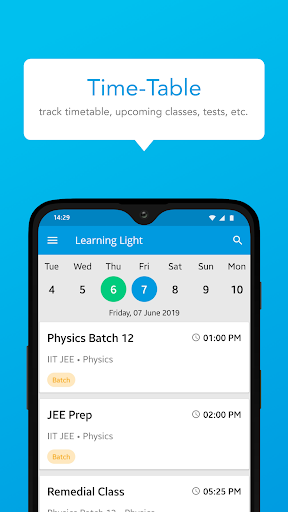
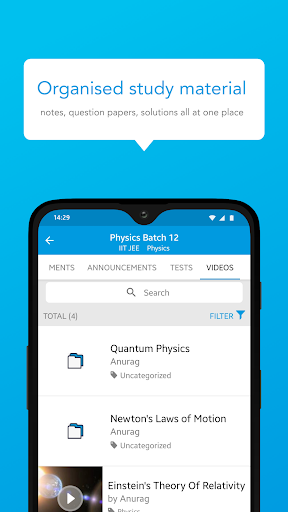
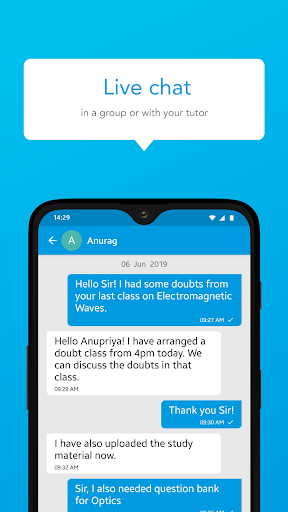
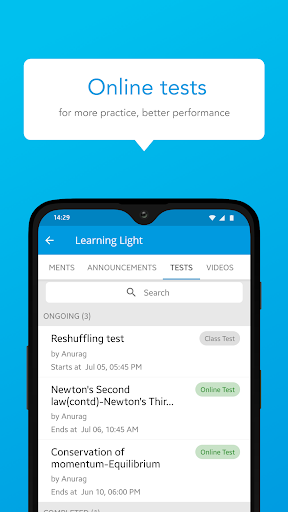
Anokha Skill Academy - Google Play Store Description
Welcome to Anokha Skill Academy, your gateway to mastering new skills and advancing your career. Whether you’re a student looking to enhance your knowledge, a professional seeking to upskill, or a lifelong learner pursuing personal growth, Anokha Skill Academy offers a comprehensive learning platform tailored to your needs.
Anokha Skill Academy is designed by industry experts and educators to provide high-quality educational content across a wide range of disciplines. Our app combines interactive video lessons, practical exercises, and detailed study materials to ensure a holistic and effective learning experience.
Key Features:
Interactive Video Lessons: Learn from engaging video lectures that simplify complex concepts and make learning enjoyable, delivered by experienced instructors.
Diverse Course Catalog: Access a wide variety of courses across different fields, including technology, business, arts, and more, to cater to all your learning needs.
Hands-On Practice: Apply your knowledge with practical exercises and real-world projects that help reinforce learning and build practical skills.
Comprehensive Study Materials: Utilize detailed notes, e-books, and reference materials curated by experts to support your learning journey.
Quizzes and Assessments: Test your understanding with quizzes and assessments designed to gauge your progress and provide feedback.
Personalized Learning Paths: Customize your learning experience with personalized study plans and course recommendations based on your interests and goals.
User-Friendly Interface: Navigate the app effortlessly with an intuitive design that enhances your learning experience.
Offline Access: Download lectures and study materials to continue learning anytime, anywhere, even without an internet connection.
Join the Anokha Skill Academy community and take the first step towards achieving your educational and career aspirations. Whether you want to develop new skills, prepare for exams, or advance in your profession, our app provides the tools and resources you need to succeed.
Download Anokha Skill Academy today and embark on your journey of skill mastery and personal development. Your path to success begins here with Anokha Skill Academy!
और दिखाएं

1. MEmu इंस्टॉलर को डाउनलोड करें और इंस्टॉलेशन को पूरा करें

2. MEmu शुरू करें फिर होमपेज पर Google Play खोलें

3. Google Play में Anokha Skill Institute खोजें
Install
4. Anokha Skill Institute डाउनलोड कर इंस्टॉल करें
5. इंस्टॉल पूरा होने पर आइकन दबाएं

6. MEmu का उपयोग करके अपने कंप्यूटर पर Anokha Skill Institute का अनुभव करें
MEmu Play सबसे बेहतरीन मुफ़्त Android एमुलेटर है और 5 करोड़ लोग पहले ही इसके शानदार Android ऐप अनुभव का आनंद ले चुके हैं। MEmu 9 वर्चुअलाइज़ेशन तकनीक आपको अपने PC पर हज़ारों Android ऐप्स, यहाँ तक कि सबसे ज़्यादा ग्राफ़िक्स वाले ऐप्स भी, आसानी से चलाने की सुविधा देती है।
असीमित बैटरी या मोबाइल डेटा के साथ बेहतर ग्राफिक्स के साथ बड़ी स्क्रीन; लंबी अवधि।
कीबोर्ड और माउस या गेमपैड के उत्तम नियंत्रण के लिए संपूर्ण कीमैपिंग का समर्थन करता हैं।
एक ही पीसी पर मल्टी-इंस्टेंस मैनेजर के साथ एक समय में कई गेम खाते या कार्य कर सकते हैं।
Use Anokha Skill Institute on PC by following steps: