AskMyGuru: Ved Shastras AI
अपडेट किया गया
वर्तमान वर्शन
संसाधन

AskMyGuru: Ved Shastras AI पर अपनी मोबाइल डेटा सीमा पार करने को अलविदा कहें और छोटी स्क्रीन की सीमाओं से मुक्त होकर बड़े डिस्प्ले के लाभों का अनुभव करें। अब, आप अपने कीबोर्ड और माउस का उपयोग करके फुल-स्क्रीन मोड में टॉपर्स क्लैन की शक्ति का अनुभव कर सकते हैं। MEmu Play में वे सभी बेहतरीन सुविधाएँ हैं जिनकी आप अपेक्षा करते हैं: त्वरित इंस्टॉलेशन और आसान सेटअप, सहज नियंत्रण, बैटरी की आवश्यकता नहीं, और कोई डेटा या कॉल समय सीमा नहीं। नया MEmu 9 आपके कंप्यूटर पर AskMyGuru: Ved Shastras AI का उपयोग करने के लिए सबसे अच्छा विकल्प है। हमारा मालिकाना मल्टी-इंस्टेंस मैनेजर एक साथ दो या अधिक खातों को चलाने का समर्थन करता है। इससे भी महत्वपूर्ण बात यह है कि हमारा अनूठा इम्यूलेशन इंजन आपके कंप्यूटर के प्रदर्शन का पूरा उपयोग करता है, जिससे एक सहज और निर्बाध अनुभव मिलता है।
और दिखाएं
MEmu Play के साथ PC पर AskMyGuru: Ved Shastras AI इस्तेमाल करने के शानदार अनुभव का आनंद लें। यह एक शक्तिशाली मुफ़्त Android एमुलेटर है जो आपको डेस्कटॉप वर्ज़न के लिए हज़ारों Android ऐप्स उपलब्ध कराता है। दोस्तों से जुड़ने और अपने काम को और भी बेहतर बनाने का आनंद लें! AskMyGuru is an AI-powered Vedic Shastra Wellness app designed to help you live a balanced, conscious and meaningful life through ancient Vedic wisdom.
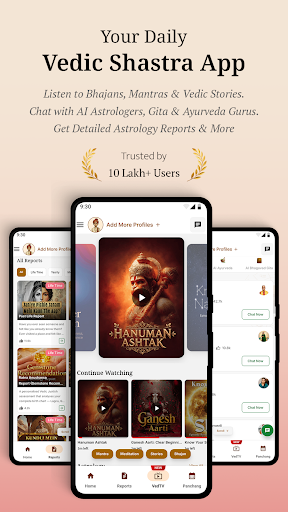
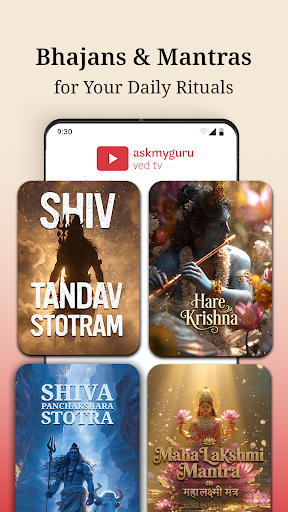
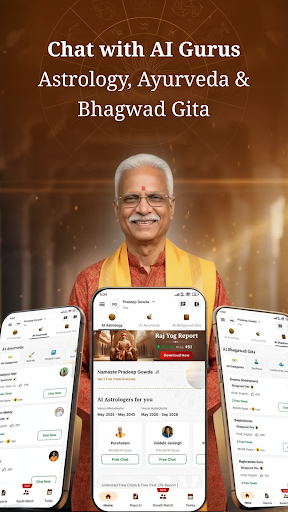

AskMyGuru is an AI-powered Vedic Shastra Wellness app designed to help you live a balanced, conscious and meaningful life through ancient Vedic wisdom.
It brings together Vedic Content in Stories, Mantras, Bhajans, Vedic Astrology, Ayurveda, Bhagavad Gita guidance along with personalised reports to support clarity, emotional balance and long-term well-being.
Built for all seekers, AskMyGuru acts as a daily Vedic companion—helping you understand life patterns, make better decisions and grow with awareness.
WHAT ASKMYGURU HELPS YOU WITH
AskMyGuru supports a holistic Vedic lifestyle focused on:
• Mental clarity and emotional balance
• Better decision-making in career and relationships
• Understanding life patterns through Kundli and Dashas
• Personal growth through Vedic wisdom
• Daily guidance for mindful living
• Spiritual connection through audio, bhajans and mantras
CORE VEDIC WELLNESS FEATURES
Ved TV – Vedic Audio, Bhajans & Spiritual Content
Experience a dedicated space for Vedic learning and devotion through curated content:
• Listen to Vedic audio like Rahu aur Ketu ki Gatha, Fundamentals of Astrology and planetary insights
• Understand Sun, Moon, Mars, Mercury, Jupiter, Venus, Saturn, Rahu, Ketu, Nakshatra and Yog
• Immerse in bhajans and mantras like Hanuman Chalisa, Shiv Tandav, Mahamrityunjaya Mantra, Durga Chalisa and more
• Access devotional content for daily listening, meditation and inner balance
• Explore wallpapers, Gita quotes and spiritual visuals for daily inspiration
AI Astrology Chat
Chat with Vedic-trained AI Guruavataars to understand marriage, career, finances, emotions, remedies and life timing using KP and classical Vedic astrology.
AI Ayurveda Chat
Receive non-medical Ayurvedic lifestyle guidance for beauty, daily routine, balance, weight management, skin, hair and preventive wellness.
AI Bhagavad Gita Chat
Ask questions about stress, purpose, detachment, clarity and inner strength through practical interpretations of the Bhagavad Gita.
Personalised Vedic Reports
Access detailed reports based on your Janam Kundli, including:
• Past Life Karma
• Career & Growth
• Marriage & Relationships
• Health Tendencies
• Personality & Behaviour
• Yearly Forecasts
• Fame & Influence
• Weekly Mood & Energy
Daily Vedic Remedies & Pujas
Receive personalised daily remedies including mantras, sadhanas and recommended pujas to align planetary influences and support balance in daily life.
Kundli Match Making
Understand compatibility, emotional harmony and long-term marriage potential using Vedic matching principles.
Multi-Profile Support
Create profiles for yourself and family members to receive personalised insights for each individual.
HOW ASKMYGURU WORKS
AskMyGuru analyses your birth details using:
• KP Astrology
• Parashara rules
• Nakshatras
• Dashas & Bhuktis
• Divisional Charts
AI Guruavataars then convert complex Vedic calculations into simple, personalised guidance for everyday life.
WHO IS ASKMYGURU FOR?
• Seekers exploring a Vedic lifestyle
• Devotional users looking for bhajans, mantras and spiritual content
• Professionals seeking clarity in career and finances
• Couples looking for relationship and marriage guidance
• Individuals interested in wellness beyond quick predictions
• Anyone wanting daily guidance rooted in Indian wisdom
WHY USERS CHOOSE ASKMYGURU
• Combines Astrology, Ayurveda, Gita and Ved TV in one app
• Personalised insights, not generic horoscopes
• Includes daily remedies and pujas for practical application
• Access to audio, bhajans and spiritual content
• Explained in simple, practical language
• Available anytime as a daily companion
• Designed for Indian seekers and modern life
Begin your journey towards clarity, balance and conscious living with Vedic wisdom.
Download AskMyGuru and experience Vedic wellness for everyday life.
और दिखाएं

1. MEmu इंस्टॉलर को डाउनलोड करें और इंस्टॉलेशन को पूरा करें

2. MEmu शुरू करें फिर होमपेज पर Google Play खोलें

3. Google Play में AskMyGuru: Ved Shastras AI खोजें
Install
4. AskMyGuru: Ved Shastras AI डाउनलोड कर इंस्टॉल करें
5. इंस्टॉल पूरा होने पर आइकन दबाएं

6. MEmu का उपयोग करके अपने कंप्यूटर पर AskMyGuru: Ved Shastras AI का अनुभव करें
MEmu Play सबसे बेहतरीन मुफ़्त Android एमुलेटर है और 5 करोड़ लोग पहले ही इसके शानदार Android ऐप अनुभव का आनंद ले चुके हैं। MEmu 9 वर्चुअलाइज़ेशन तकनीक आपको अपने PC पर हज़ारों Android ऐप्स, यहाँ तक कि सबसे ज़्यादा ग्राफ़िक्स वाले ऐप्स भी, आसानी से चलाने की सुविधा देती है।
असीमित बैटरी या मोबाइल डेटा के साथ बेहतर ग्राफिक्स के साथ बड़ी स्क्रीन; लंबी अवधि।
कीबोर्ड और माउस या गेमपैड के उत्तम नियंत्रण के लिए संपूर्ण कीमैपिंग का समर्थन करता हैं।
एक ही पीसी पर मल्टी-इंस्टेंस मैनेजर के साथ एक समय में कई गेम खाते या कार्य कर सकते हैं।
Use AskMyGuru: Ved Shastras AI on PC by following steps: