AstroChitra: Kundli & Panchang
अपडेट किया गया
वर्तमान वर्शन
8.1
संसाधन

AstroChitra: Kundli & Panchang पर अपनी मोबाइल डेटा सीमा पार करने को अलविदा कहें और छोटी स्क्रीन की सीमाओं से मुक्त होकर बड़े डिस्प्ले के लाभों का अनुभव करें। अब, आप अपने कीबोर्ड और माउस का उपयोग करके फुल-स्क्रीन मोड में टॉपर्स क्लैन की शक्ति का अनुभव कर सकते हैं। MEmu Play में वे सभी बेहतरीन सुविधाएँ हैं जिनकी आप अपेक्षा करते हैं: त्वरित इंस्टॉलेशन और आसान सेटअप, सहज नियंत्रण, बैटरी की आवश्यकता नहीं, और कोई डेटा या कॉल समय सीमा नहीं। नया MEmu 9 आपके कंप्यूटर पर AstroChitra: Kundli & Panchang का उपयोग करने के लिए सबसे अच्छा विकल्प है। हमारा मालिकाना मल्टी-इंस्टेंस मैनेजर एक साथ दो या अधिक खातों को चलाने का समर्थन करता है। इससे भी महत्वपूर्ण बात यह है कि हमारा अनूठा इम्यूलेशन इंजन आपके कंप्यूटर के प्रदर्शन का पूरा उपयोग करता है, जिससे एक सहज और निर्बाध अनुभव मिलता है।
और दिखाएं
MEmu Play के साथ PC पर AstroChitra: Kundli & Panchang इस्तेमाल करने के शानदार अनुभव का आनंद लें। यह एक शक्तिशाली मुफ़्त Android एमुलेटर है जो आपको डेस्कटॉप वर्ज़न के लिए हज़ारों Android ऐप्स उपलब्ध कराता है। दोस्तों से जुड़ने और अपने काम को और भी बेहतर बनाने का आनंद लें! ChitraPoint brings practical astrology tools into one focused app for daily use, chart study, and quick reference.
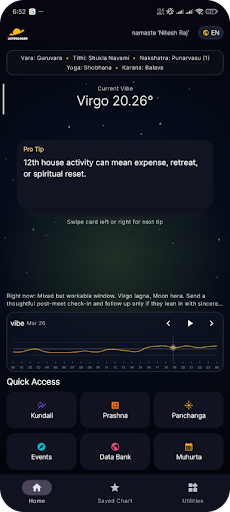
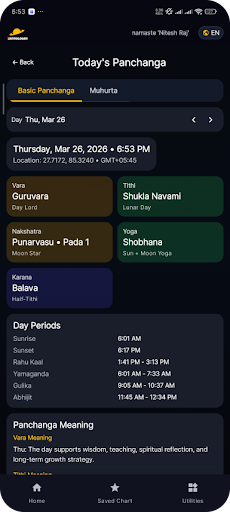
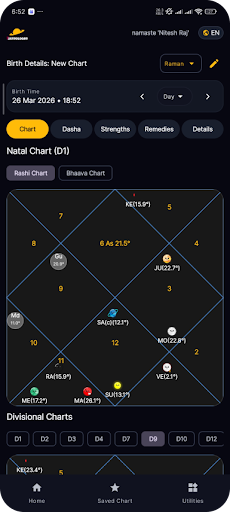
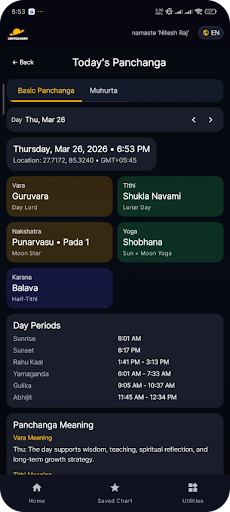
ChitraPoint brings practical astrology tools into one focused app for daily use, chart study, and quick reference. Whether you want to generate a kundli, review today’s panchanga, compare two charts, follow dasha timing, or check upcoming transits, ChitraPoint is designed to keep those tools together in a clean and usable workflow.
The app is built around an offline Swiss Ephemeris-based chart engine, so the core astrology experience works directly on your device without requiring an account. You can calculate charts, save them for later, return to them anytime, and build a personal library of references inside the app.
With ChitraPoint, you can:
- Generate kundli and prashna kundali charts
- Check daily panchanga and hora
- Explore muhurta and important astrology timings
- Review dasha timelines and transit-based insights
- Check dosha indicators including Sade Sati, Mangalik, and Kaal Sarpa
- Compare charts with horoscope matching / compatibility tools
- Save charts and reopen them anytime
- Set reminders for selected transit and tithi events
- Use home screen widgets for quick astrology snapshots
- Export and import saved charts through CSV
- Ask AI Chat questions based on the selected chart
- Browse extra tools such as remedies, gems, rudraksha, baby names, and data bank content
- Use the app in English and Nepali
ChitraPoint is made for people who want both traditional astrology tools and modern convenience. Instead of switching between multiple apps or notes, you can keep chart calculation, timing tools, saved data, reminders, widgets, and guided AI help in one place.
Why users may find it useful:
- Offline-first core astrology calculations
- Fast access to everyday kundli and timing tools
- Helpful for repeat chart review and personal study
- Combines classic astrology workflows with practical mobile features
Privacy note:
Core astrology calculations run locally on your device. Optional features like AI Chat and some synced content use internet access.
If you want an astrology app that helps you move smoothly from chart generation to panchanga, dasha, transit tracking, matching, and follow-up questions, ChitraPoint is built for that experience.
और दिखाएं

1. MEmu इंस्टॉलर को डाउनलोड करें और इंस्टॉलेशन को पूरा करें

2. MEmu शुरू करें फिर होमपेज पर Google Play खोलें

3. Google Play में AstroChitra: Kundli & Panchang खोजें
Install
4. AstroChitra: Kundli & Panchang डाउनलोड कर इंस्टॉल करें
5. इंस्टॉल पूरा होने पर आइकन दबाएं

6. MEmu का उपयोग करके अपने कंप्यूटर पर AstroChitra: Kundli & Panchang का अनुभव करें
MEmu Play सबसे बेहतरीन मुफ़्त Android एमुलेटर है और 5 करोड़ लोग पहले ही इसके शानदार Android ऐप अनुभव का आनंद ले चुके हैं। MEmu 9 वर्चुअलाइज़ेशन तकनीक आपको अपने PC पर हज़ारों Android ऐप्स, यहाँ तक कि सबसे ज़्यादा ग्राफ़िक्स वाले ऐप्स भी, आसानी से चलाने की सुविधा देती है।
असीमित बैटरी या मोबाइल डेटा के साथ बेहतर ग्राफिक्स के साथ बड़ी स्क्रीन; लंबी अवधि।
कीबोर्ड और माउस या गेमपैड के उत्तम नियंत्रण के लिए संपूर्ण कीमैपिंग का समर्थन करता हैं।
एक ही पीसी पर मल्टी-इंस्टेंस मैनेजर के साथ एक समय में कई गेम खाते या कार्य कर सकते हैं।
Use AstroChitra: Kundli & Panchang on PC by following steps: