BACKUP MANAGER: SMS & CALLLOGS
अपडेट किया गया
वर्तमान वर्शन
1.1.2
संसाधन

BACKUP MANAGER: SMS & CALLLOGS पर अपनी मोबाइल डेटा सीमा पार करने को अलविदा कहें और छोटी स्क्रीन की सीमाओं से मुक्त होकर बड़े डिस्प्ले के लाभों का अनुभव करें। अब, आप अपने कीबोर्ड और माउस का उपयोग करके फुल-स्क्रीन मोड में टॉपर्स क्लैन की शक्ति का अनुभव कर सकते हैं। MEmu Play में वे सभी बेहतरीन सुविधाएँ हैं जिनकी आप अपेक्षा करते हैं: त्वरित इंस्टॉलेशन और आसान सेटअप, सहज नियंत्रण, बैटरी की आवश्यकता नहीं, और कोई डेटा या कॉल समय सीमा नहीं। नया MEmu 9 आपके कंप्यूटर पर BACKUP MANAGER: SMS & CALLLOGS का उपयोग करने के लिए सबसे अच्छा विकल्प है। हमारा मालिकाना मल्टी-इंस्टेंस मैनेजर एक साथ दो या अधिक खातों को चलाने का समर्थन करता है। इससे भी महत्वपूर्ण बात यह है कि हमारा अनूठा इम्यूलेशन इंजन आपके कंप्यूटर के प्रदर्शन का पूरा उपयोग करता है, जिससे एक सहज और निर्बाध अनुभव मिलता है।
और दिखाएं
MEmu Play के साथ PC पर BACKUP MANAGER: SMS & CALLLOGS इस्तेमाल करने के शानदार अनुभव का आनंद लें। यह एक शक्तिशाली मुफ़्त Android एमुलेटर है जो आपको डेस्कटॉप वर्ज़न के लिए हज़ारों Android ऐप्स उपलब्ध कराता है। दोस्तों से जुड़ने और अपने काम को और भी बेहतर बनाने का आनंद लें! Backup Manager is a application to restore and backup sms , contacts and call logs.
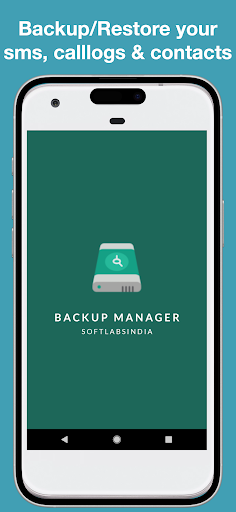
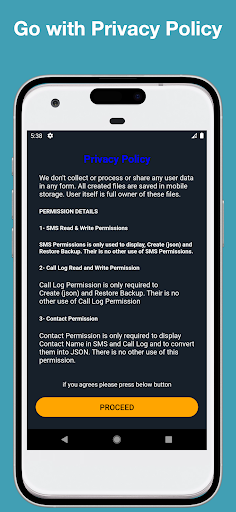
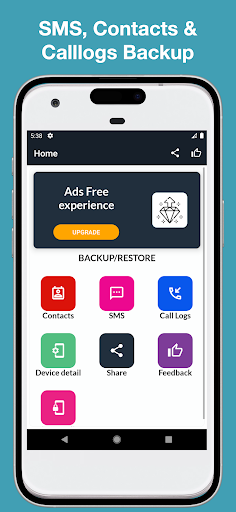
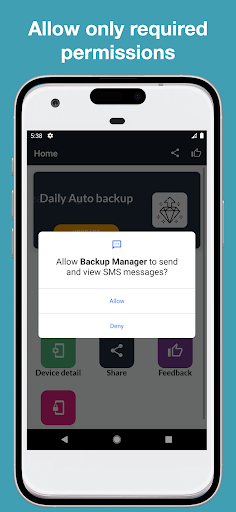
Backup Manager is a application to restore and backup sms , contacts and call logs
The fastest data backup and restore tool on Android phones.
You can backup contacts, text messages, call history to your SD.
Call Logs Backup app is one of the cleanest and fastest way to backup your Android phone call logs. With Call Logs Backup on your Android phone never lose a call log again. Stranded with an old phone from which you want to backup up call logs.
The app quickly generates a backup file for you, which can be shared with your new phone. Just like the backup process, restoring call logs from a backup file has been made equally simple, you just have to View a backup file that you want to restore and tap 'Restore'.
Here are some of the core features of this app,
- Backup your call logs , sms and contacts.
Steps follow for use this application:
Read the privacy policy carefully.
Press on the proceed button.
Grant the permissions by tap on the specific item.
There are four options in each section:
Backup , Restore , View backup files and delete files.
All backup files will store in user's devices.
User is the owner of its own data.
we don't collect any type of the user information or data .
और दिखाएं

1. MEmu इंस्टॉलर को डाउनलोड करें और इंस्टॉलेशन को पूरा करें

2. MEmu शुरू करें फिर होमपेज पर Google Play खोलें

3. Google Play में BACKUP MANAGER: SMS & CALLLOGS खोजें
Install
4. BACKUP MANAGER: SMS & CALLLOGS डाउनलोड कर इंस्टॉल करें
5. इंस्टॉल पूरा होने पर आइकन दबाएं

6. MEmu का उपयोग करके अपने कंप्यूटर पर BACKUP MANAGER: SMS & CALLLOGS का अनुभव करें
MEmu Play सबसे बेहतरीन मुफ़्त Android एमुलेटर है और 5 करोड़ लोग पहले ही इसके शानदार Android ऐप अनुभव का आनंद ले चुके हैं। MEmu 9 वर्चुअलाइज़ेशन तकनीक आपको अपने PC पर हज़ारों Android ऐप्स, यहाँ तक कि सबसे ज़्यादा ग्राफ़िक्स वाले ऐप्स भी, आसानी से चलाने की सुविधा देती है।
असीमित बैटरी या मोबाइल डेटा के साथ बेहतर ग्राफिक्स के साथ बड़ी स्क्रीन; लंबी अवधि।
कीबोर्ड और माउस या गेमपैड के उत्तम नियंत्रण के लिए संपूर्ण कीमैपिंग का समर्थन करता हैं।
एक ही पीसी पर मल्टी-इंस्टेंस मैनेजर के साथ एक समय में कई गेम खाते या कार्य कर सकते हैं।
Use BACKUP MANAGER: SMS & CALLLOGS on PC by following steps: