
CamScan
अपडेट किया गया
वर्तमान वर्शन
3.0.0
संसाधन

CamScan पर अपनी मोबाइल डेटा सीमा पार करने को अलविदा कहें और छोटी स्क्रीन की सीमाओं से मुक्त होकर बड़े डिस्प्ले के लाभों का अनुभव करें। अब, आप अपने कीबोर्ड और माउस का उपयोग करके फुल-स्क्रीन मोड में टॉपर्स क्लैन की शक्ति का अनुभव कर सकते हैं। MEmu Play में वे सभी बेहतरीन सुविधाएँ हैं जिनकी आप अपेक्षा करते हैं: त्वरित इंस्टॉलेशन और आसान सेटअप, सहज नियंत्रण, बैटरी की आवश्यकता नहीं, और कोई डेटा या कॉल समय सीमा नहीं। नया MEmu 9 आपके कंप्यूटर पर CamScan का उपयोग करने के लिए सबसे अच्छा विकल्प है। हमारा मालिकाना मल्टी-इंस्टेंस मैनेजर एक साथ दो या अधिक खातों को चलाने का समर्थन करता है। इससे भी महत्वपूर्ण बात यह है कि हमारा अनूठा इम्यूलेशन इंजन आपके कंप्यूटर के प्रदर्शन का पूरा उपयोग करता है, जिससे एक सहज और निर्बाध अनुभव मिलता है।
और दिखाएं
MEmu Play के साथ PC पर CamScan इस्तेमाल करने के शानदार अनुभव का आनंद लें। यह एक शक्तिशाली मुफ़्त Android एमुलेटर है जो आपको डेस्कटॉप वर्ज़न के लिए हज़ारों Android ऐप्स उपलब्ध कराता है। दोस्तों से जुड़ने और अपने काम को और भी बेहतर बनाने का आनंद लें! Turn your phone into a powerful document scanner.
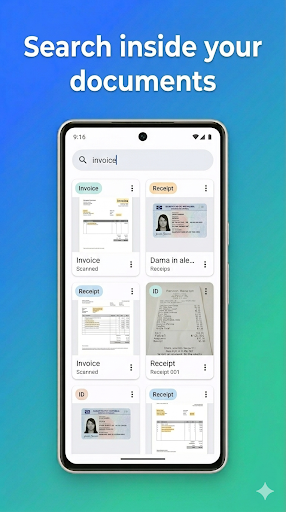
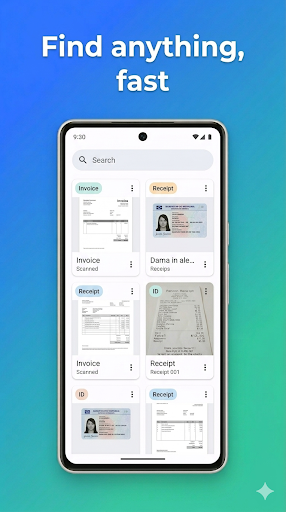
Turn your phone into a powerful document scanner. CamScan detects page edges automatically, crops and enhances your scans, and turns them into clean PDFs — in seconds, and entirely on your device.
Why CamScan
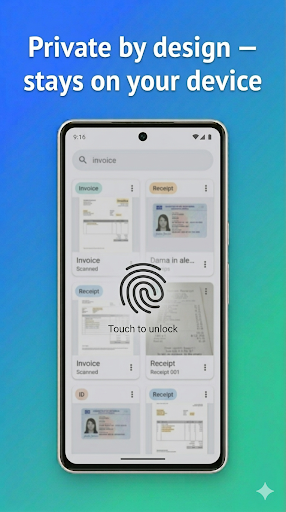
Private by design — your documents stay on your phone.
No account, no sign-up.
Fast & accurate — automatic edge detection, perspective correction, and filters.
Free to use — ad-supported.
Scan Anything
Document mode — multi-page scanning with auto edge detection
ID card mode — front and back combined onto a single page
Receipt mode — long single-page receipts
Book mode — facing pages
Import from your gallery, too
Smart & Searchable
On-device OCR (text recognition) extracts text from every page
Full-text search — find any document by title or content
Auto-categorization — invoices, receipts, IDs, contracts, and more are tagged for you
Organize & Edit
Add, delete, and reorder pages
Pinch to zoom, thumbnail strip to navigate
Rename, categorize, search, and filter
Export & Share
Export PDFs in original, high, or small (compressed) quality
Export recognized text as a .txt file
Share anywhere with the system share sheet
Private & Secure
Lock sensitive documents and the app with fingerprint or face
Everything is stored locally on your device
Beautiful & Yours
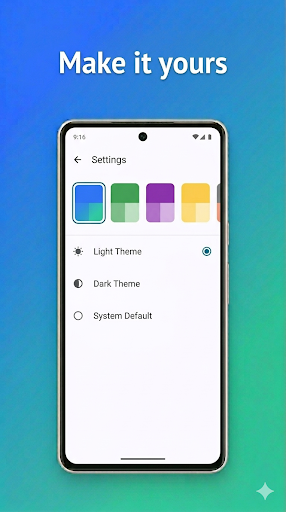
Modern Material You design
Multiple color themes: Light / Dark / System
Languages: English, Français, Español, Português
Download CamScan and start scanning — fast, private, and free.
Keywords / ASO
document scanner, pdf scanner, scan to pdf, ocr, receipt scanner, id scanner, camera scanner, scanner app, pdf maker, scan documents, text recognition
और दिखाएं

1. MEmu इंस्टॉलर को डाउनलोड करें और इंस्टॉलेशन को पूरा करें

2. MEmu शुरू करें फिर होमपेज पर Google Play खोलें

3. Google Play में CamScan खोजें
Install
4. CamScan डाउनलोड कर इंस्टॉल करें
5. इंस्टॉल पूरा होने पर आइकन दबाएं

6. MEmu का उपयोग करके अपने कंप्यूटर पर CamScan का अनुभव करें
MEmu Play सबसे बेहतरीन मुफ़्त Android एमुलेटर है और 5 करोड़ लोग पहले ही इसके शानदार Android ऐप अनुभव का आनंद ले चुके हैं। MEmu 9 वर्चुअलाइज़ेशन तकनीक आपको अपने PC पर हज़ारों Android ऐप्स, यहाँ तक कि सबसे ज़्यादा ग्राफ़िक्स वाले ऐप्स भी, आसानी से चलाने की सुविधा देती है।
असीमित बैटरी या मोबाइल डेटा के साथ बेहतर ग्राफिक्स के साथ बड़ी स्क्रीन; लंबी अवधि।
कीबोर्ड और माउस या गेमपैड के उत्तम नियंत्रण के लिए संपूर्ण कीमैपिंग का समर्थन करता हैं।
एक ही पीसी पर मल्टी-इंस्टेंस मैनेजर के साथ एक समय में कई गेम खाते या कार्य कर सकते हैं।
Use CamScan on PC by following steps: