Color Analysis AI
अपडेट किया गया
वर्तमान वर्शन
1.0.1
संसाधन

Color Analysis AI पर अपनी मोबाइल डेटा सीमा पार करने को अलविदा कहें और छोटी स्क्रीन की सीमाओं से मुक्त होकर बड़े डिस्प्ले के लाभों का अनुभव करें। अब, आप अपने कीबोर्ड और माउस का उपयोग करके फुल-स्क्रीन मोड में टॉपर्स क्लैन की शक्ति का अनुभव कर सकते हैं। MEmu Play में वे सभी बेहतरीन सुविधाएँ हैं जिनकी आप अपेक्षा करते हैं: त्वरित इंस्टॉलेशन और आसान सेटअप, सहज नियंत्रण, बैटरी की आवश्यकता नहीं, और कोई डेटा या कॉल समय सीमा नहीं। नया MEmu 9 आपके कंप्यूटर पर Color Analysis AI का उपयोग करने के लिए सबसे अच्छा विकल्प है। हमारा मालिकाना मल्टी-इंस्टेंस मैनेजर एक साथ दो या अधिक खातों को चलाने का समर्थन करता है। इससे भी महत्वपूर्ण बात यह है कि हमारा अनूठा इम्यूलेशन इंजन आपके कंप्यूटर के प्रदर्शन का पूरा उपयोग करता है, जिससे एक सहज और निर्बाध अनुभव मिलता है।
और दिखाएं
डाउनलोड करें Color Analysis AI पीसी पर MEmu एंड्रॉयड एमुलेटर के साथ बड़े पर्दे पर खेलने का आनंद लें। Discover your color season and find your perfect colors with Color Analysis AI.
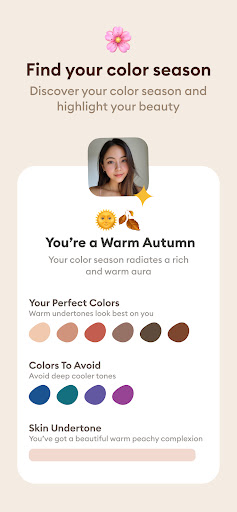
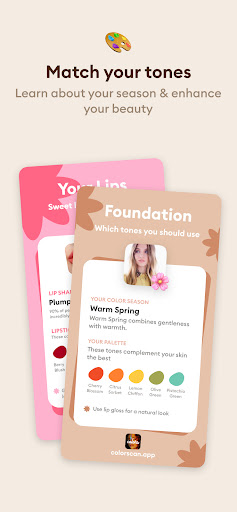

Discover your color season and find your perfect colors with Color Analysis AI
◆ HOW IT WORKS ◆
1) Upload your photos
2) Glowup AI will analyze your facial features
3) Learn about insights your most attractive traits and get personalized tips to highlight your beauty
◆ DISCOVER YOUR COLOR SEASON ◆
- Choose from an effortless automatic color analysis or dive deep with a manual color quiz designed for the pros.
- Embark on a journey through our seasonal color quiz, rooted in the timeless four seasons color theory.
- Find your match among 12 dazzling season colors: from the airy hues of Light - Summer to the rich tones of Deep Autumn, and the vibrant vibes of Bright Spring to the icy shades of Cold Winter.
- Let our personal color analysis reveal the clothing and makeup shades that naturally accentuate your beauty, blending seamlessly with your skin tone, eye color, and hair shade.
◆ CRAFT YOUR PERFECT PALETTE ◆
- Explore over 120 pantone colors from our seasonal palettes to craft looks that speak your style language, from chic and trendy to timeless and elegant.
- Elevate your palette by adding beloved colors through an intuitive color wheel.
- Experiment with fashion and accessories by mixing and matching from an extra palette of complementary color combinations.
◆ MAKEUP, ACCESSORIES & WARDROBE ◆
- Dive into a selection of 70 makeup shades tailored for each color type, including lipsticks, eyeshadows, eyeliners, and blushes.
- Experience a digital transformation with our virtual makeover feature, showcasing your complete look.
Color Analysis AI is here to empower you with the confidence to express your authentic self through colors that resonate with your natural beauty. Get ready to meet the most radiant you. Discover your best colors with Color Analysis AI, your personal AI color analysis guide. Our app unveils the secret to your perfect colors through an innovative personal color analysis. Simply snap a selfie, and instantly learn about your unique season color, along with the best color palettes for your clothes and makeup.
Privacy Policy: https://coloranalysisapp.com/privacy
Terms of Service: https://coloranalysisapp.com/terms
और दिखाएं

1. MEmu इंस्टॉलर को डाउनलोड करें और इंस्टॉलेशन को पूरा करें

2. MEmu शुरू करें फिर होमपेज पर Google Play खोलें

3. Google Play में Color Analysis AI खोजें
Install
4. Color Analysis AI डाउनलोड कर इंस्टॉल करें
5. इंस्टॉल पूरा होने पर आइकन दबाएं

6. MEmu का उपयोग करके अपने कंप्यूटर पर Color Analysis AI का अनुभव करें
MEmu Play सबसे बेहतरीन मुफ़्त Android एमुलेटर है और 5 करोड़ लोग पहले ही इसके शानदार Android ऐप अनुभव का आनंद ले चुके हैं। MEmu 9 वर्चुअलाइज़ेशन तकनीक आपको अपने PC पर हज़ारों Android ऐप्स, यहाँ तक कि सबसे ज़्यादा ग्राफ़िक्स वाले ऐप्स भी, आसानी से चलाने की सुविधा देती है।
असीमित बैटरी या मोबाइल डेटा के साथ बेहतर ग्राफिक्स के साथ बड़ी स्क्रीन; लंबी अवधि।
कीबोर्ड और माउस या गेमपैड के उत्तम नियंत्रण के लिए संपूर्ण कीमैपिंग का समर्थन करता हैं।
एक ही पीसी पर मल्टी-इंस्टेंस मैनेजर के साथ एक समय में कई गेम खाते या कार्य कर सकते हैं।
Use Color Analysis AI on PC by following steps: