Color Analysis AI
更新日
現在のバージョン
1.0.1
提供元

スマートフォンは不要!パソコンと同じようにキーボードとマウスで操作できます。MEmu Playは、あなたが待ち望んでいたすべての楽しみをお届けします。バッテリー残量や小さな画面を気にすることなく、Color Analysis AIをご利用ください。最新のMEmu 9は、Color Analysis AIをPCで体験するのに最適です!完璧なキーマッピングシステムにより、PCのようなスムーズな操作性を実現します。マルチインスタンス機能により、複数のアプリケーションを同時に実行できます。独自の仮想化エンジンがPCのパフォーマンスを最大限に引き出します。アプリを使用するだけでなく、高品質な体験を得ることができます。
もっと見る
Color Analysis AIをPCでダウンロード!大画面でより楽しむ。電源が落ちてしまうとか通信料が足りないとかの問題を心配する必要がなく、PCの大画面でより快適にゲームを楽しましょう! Discover your color season and find your perfect colors with Color Analysis AI.
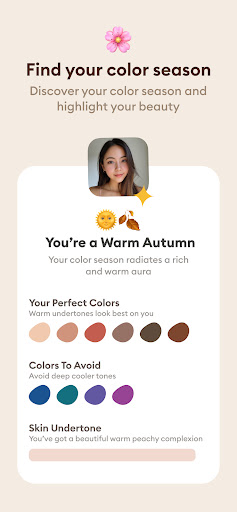
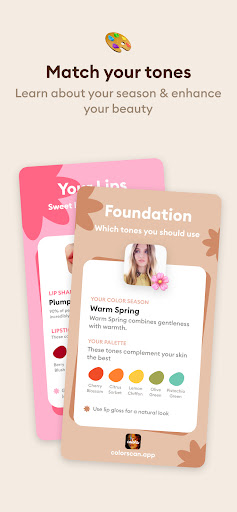

Discover your color season and find your perfect colors with Color Analysis AI
◆ HOW IT WORKS ◆
1) Upload your photos
2) Glowup AI will analyze your facial features
3) Learn about insights your most attractive traits and get personalized tips to highlight your beauty
◆ DISCOVER YOUR COLOR SEASON ◆
- Choose from an effortless automatic color analysis or dive deep with a manual color quiz designed for the pros.
- Embark on a journey through our seasonal color quiz, rooted in the timeless four seasons color theory.
- Find your match among 12 dazzling season colors: from the airy hues of Light - Summer to the rich tones of Deep Autumn, and the vibrant vibes of Bright Spring to the icy shades of Cold Winter.
- Let our personal color analysis reveal the clothing and makeup shades that naturally accentuate your beauty, blending seamlessly with your skin tone, eye color, and hair shade.
◆ CRAFT YOUR PERFECT PALETTE ◆
- Explore over 120 pantone colors from our seasonal palettes to craft looks that speak your style language, from chic and trendy to timeless and elegant.
- Elevate your palette by adding beloved colors through an intuitive color wheel.
- Experiment with fashion and accessories by mixing and matching from an extra palette of complementary color combinations.
◆ MAKEUP, ACCESSORIES & WARDROBE ◆
- Dive into a selection of 70 makeup shades tailored for each color type, including lipsticks, eyeshadows, eyeliners, and blushes.
- Experience a digital transformation with our virtual makeover feature, showcasing your complete look.
Color Analysis AI is here to empower you with the confidence to express your authentic self through colors that resonate with your natural beauty. Get ready to meet the most radiant you. Discover your best colors with Color Analysis AI, your personal AI color analysis guide. Our app unveils the secret to your perfect colors through an innovative personal color analysis. Simply snap a selfie, and instantly learn about your unique season color, along with the best color palettes for your clothes and makeup.
Privacy Policy: https://coloranalysisapp.com/privacy
Terms of Service: https://coloranalysisapp.com/terms
もっと見る

1. MEmuインストーラーをダウンロードしてセットアップを完了する

2. MEmuを起動し、デスクトップでのPlayストアを開く

3. PlayストアでColor Analysis AIを検索する
Install
4. Color Analysis AIをダウンロードしてインストールする
5. インストールが完了したら、アイコンをクリックしてスタート

6. MEmuを使ってパソコンでColor Analysis AIを体験する
MEmu Playは現在、最高の無料Androidエミュレーターであり、5,000万人のユーザーが優れたAndroidアプリ体験を楽しんでいます。MEmuの仮想化テクノロジーにより、数千ものAndroidアプリをコンピューターでスムーズに実行できます。
大画面でより精細;無限の待機、電池とドラフィックの極限を超え
キーボード・マウス・コントローラーを全力でサポート、より快適
マルチインスタンスで複数のゲームを同時に実行
Use Color Analysis AI on PC by following steps: