Aaro Ananda - যা কিছু বাঙালির
अपडेट किया गया
वर्तमान वर्शन
2.2.92
संसाधन

Aaro Ananda - যা কিছু বাঙালির पर अपनी मोबाइल डेटा सीमा पार करने को अलविदा कहें और छोटी स्क्रीन की सीमाओं से मुक्त होकर बड़े डिस्प्ले के लाभों का अनुभव करें। अब, आप अपने कीबोर्ड और माउस का उपयोग करके फुल-स्क्रीन मोड में टॉपर्स क्लैन की शक्ति का अनुभव कर सकते हैं। MEmu Play में वे सभी बेहतरीन सुविधाएँ हैं जिनकी आप अपेक्षा करते हैं: त्वरित इंस्टॉलेशन और आसान सेटअप, सहज नियंत्रण, बैटरी की आवश्यकता नहीं, और कोई डेटा या कॉल समय सीमा नहीं। नया MEmu 9 आपके कंप्यूटर पर Aaro Ananda - যা কিছু বাঙালির का उपयोग करने के लिए सबसे अच्छा विकल्प है। हमारा मालिकाना मल्टी-इंस्टेंस मैनेजर एक साथ दो या अधिक खातों को चलाने का समर्थन करता है। इससे भी महत्वपूर्ण बात यह है कि हमारा अनूठा इम्यूलेशन इंजन आपके कंप्यूटर के प्रदर्शन का पूरा उपयोग करता है, जिससे एक सहज और निर्बाध अनुभव मिलता है।
और दिखाएं
डाउनलोड करें Aaro Ananda - যা কিছু বাঙালির पीसी पर MEmu एंड्रॉयड एमुलेटर के साथ बड़े पर्दे पर खेलने का आनंद लें। Aaro Ananda, an initiative from the ABP Group, celebrates myriad expressions of the Bengali culture like literature, music, movies, theatre, cuisines, fashion and travel.
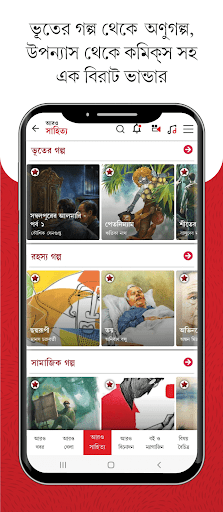
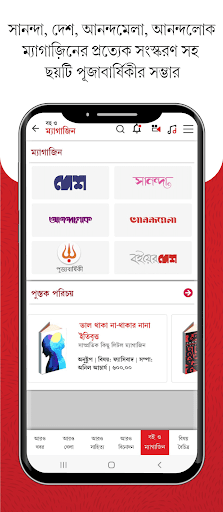
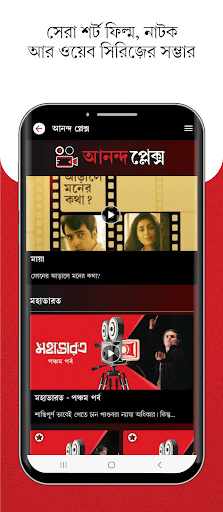
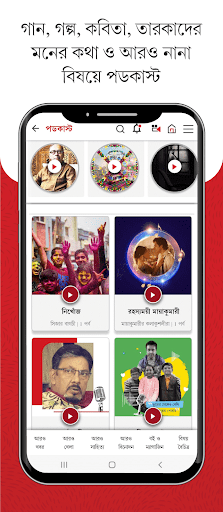
Aaro Ananda, an initiative from the ABP Group, celebrates myriad expressions of the Bengali culture like literature, music, movies, theatre, cuisines, fashion and travel.
You can read the latest versions of the six Pujabarshiki editions. Not just the Puja annuals, you can also savour the taste of the four Bengali magazines — the latest from the world of entertainment in Anandalok; the celebration of womanhood in Sananda; literature along with current affairs, news and analysis in Desh; and children’s magazine Anandamela with which generations of Bengali kids have grown up with.
There are engaging sections like games, photo galleries, science updates, knowledge and news snippets, blogs and glimpses from the Anandabazar Patrika centennial publications, unforgettable Anandabazar Patrika front pages and much more. To embark on a voyage you have never experienced before, launch the app.
और दिखाएं

1. MEmu इंस्टॉलर को डाउनलोड करें और इंस्टॉलेशन को पूरा करें

2. MEmu शुरू करें फिर होमपेज पर Google Play खोलें

3. Google Play में Aaro Ananda - যা কিছু বাঙালির खोजें
Install
4. Aaro Ananda - যা কিছু বাঙালির डाउनलोड कर इंस्टॉल करें
5. इंस्टॉल पूरा होने पर आइकन दबाएं

6. MEmu का उपयोग करके अपने कंप्यूटर पर Aaro Ananda - যা কিছু বাঙালির का अनुभव करें
MEmu Play सबसे बेहतरीन मुफ़्त Android एमुलेटर है और 5 करोड़ लोग पहले ही इसके शानदार Android ऐप अनुभव का आनंद ले चुके हैं। MEmu 9 वर्चुअलाइज़ेशन तकनीक आपको अपने PC पर हज़ारों Android ऐप्स, यहाँ तक कि सबसे ज़्यादा ग्राफ़िक्स वाले ऐप्स भी, आसानी से चलाने की सुविधा देती है।
असीमित बैटरी या मोबाइल डेटा के साथ बेहतर ग्राफिक्स के साथ बड़ी स्क्रीन; लंबी अवधि।
कीबोर्ड और माउस या गेमपैड के उत्तम नियंत्रण के लिए संपूर्ण कीमैपिंग का समर्थन करता हैं।
एक ही पीसी पर मल्टी-इंस्टेंस मैनेजर के साथ एक समय में कई गेम खाते या कार्य कर सकते हैं।
Use Aaro Ananda - যা কিছু বাঙালির on PC by following steps: