Ink AI – Tattoo design maker
अपडेट किया गया
वर्तमान वर्शन
1.2.8
संसाधन

Ink AI – Tattoo design maker पर अपनी मोबाइल डेटा सीमा पार करने को अलविदा कहें और छोटी स्क्रीन की सीमाओं से मुक्त होकर बड़े डिस्प्ले के लाभों का अनुभव करें। अब, आप अपने कीबोर्ड और माउस का उपयोग करके फुल-स्क्रीन मोड में टॉपर्स क्लैन की शक्ति का अनुभव कर सकते हैं। MEmu Play में वे सभी बेहतरीन सुविधाएँ हैं जिनकी आप अपेक्षा करते हैं: त्वरित इंस्टॉलेशन और आसान सेटअप, सहज नियंत्रण, बैटरी की आवश्यकता नहीं, और कोई डेटा या कॉल समय सीमा नहीं। नया MEmu 9 आपके कंप्यूटर पर Ink AI – Tattoo design maker का उपयोग करने के लिए सबसे अच्छा विकल्प है। हमारा मालिकाना मल्टी-इंस्टेंस मैनेजर एक साथ दो या अधिक खातों को चलाने का समर्थन करता है। इससे भी महत्वपूर्ण बात यह है कि हमारा अनूठा इम्यूलेशन इंजन आपके कंप्यूटर के प्रदर्शन का पूरा उपयोग करता है, जिससे एक सहज और निर्बाध अनुभव मिलता है।
और दिखाएं
डाउनलोड करें Ink AI – Tattoo design maker पीसी पर MEmu एंड्रॉयड एमुलेटर के साथ बड़े पर्दे पर खेलने का आनंद लें। Ink AI: Your Personal Tattoo Designs app and Virtual Try-On.
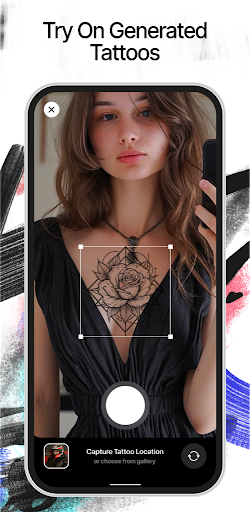
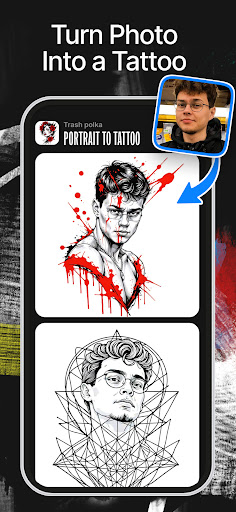
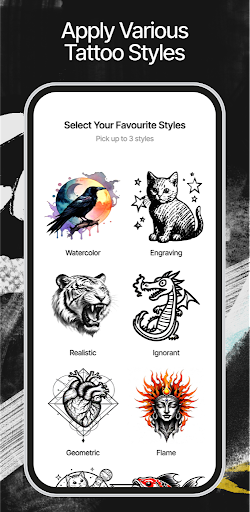
Ink AI: Your Personal Tattoo Designs app and Virtual Try-On
AI Tattoo maker
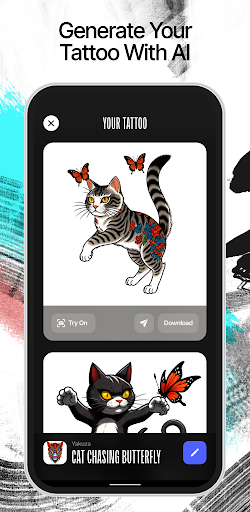
Create personalized ai tattoo design easily with just a few taps, and then see how they look on your body with our virtual try-on feature. Get ready for a new and exciting way to explore and visualize tattoos with Ink AI.
Create Your Unique Tattoo Stencil
Start by choosing your favorite tattoo style, whether it's realistic, minimalistic, surrealistic, or something completely unique. Then, just type out what you're imagining for your tattoo design. Our AI tattoo generator will use your description and style selection to create tattoo stencil just for you.
Virtual Tattoo Try-On
For the try-on feature, upload a high-quality, clear photo of the area you want to tattoo. Make sure the view is unobstructed. Next, select a tattoo design you've created. Our AI tattoo generator will accurately apply the ai tattoo to your photo, showing you how it will look on your skin.
What Makes Ink AI - Tattoo design maker Special
Personalized Tattoo Designs: Break free from standard tatuajes and create ones that are uniquely yours.
Try Before You Ink: Test out different placements and sizes on your body, all without any lasting commitment.
Discover Styles: Explore a variety of ai tattoo styles to find the perfect match for your personality.
Organize and Compare: Easily save your favorite tattoo designs and compare them to make the best choice.
Feedback Sharing: Share your tattoo designs with friends or your tattoo artist to get their opinions
Whether it's your first tattoo or you're an experienced tattoo lover, this AI tattoo generator is perfect for you.
Begin Your Ink Adventure with Ink AI tattoo design maker:
Download Ink AI now and bring your tattoo dreams to life with ease and creativity. Design, see, and start your tattoo maker journey with confidence.
Terms and Conditions: https://ink-ai.app/terms
Privacy Policy: https://ink-ai.app/privacy
और दिखाएं

1. MEmu इंस्टॉलर को डाउनलोड करें और इंस्टॉलेशन को पूरा करें

2. MEmu शुरू करें फिर होमपेज पर Google Play खोलें

3. Google Play में Ink AI – Tattoo design maker खोजें
Install
4. Ink AI – Tattoo design maker डाउनलोड कर इंस्टॉल करें
5. इंस्टॉल पूरा होने पर आइकन दबाएं

6. MEmu का उपयोग करके अपने कंप्यूटर पर Ink AI – Tattoo design maker का अनुभव करें
MEmu Play सबसे बेहतरीन मुफ़्त Android एमुलेटर है और 5 करोड़ लोग पहले ही इसके शानदार Android ऐप अनुभव का आनंद ले चुके हैं। MEmu 9 वर्चुअलाइज़ेशन तकनीक आपको अपने PC पर हज़ारों Android ऐप्स, यहाँ तक कि सबसे ज़्यादा ग्राफ़िक्स वाले ऐप्स भी, आसानी से चलाने की सुविधा देती है।
असीमित बैटरी या मोबाइल डेटा के साथ बेहतर ग्राफिक्स के साथ बड़ी स्क्रीन; लंबी अवधि।
कीबोर्ड और माउस या गेमपैड के उत्तम नियंत्रण के लिए संपूर्ण कीमैपिंग का समर्थन करता हैं।
एक ही पीसी पर मल्टी-इंस्टेंस मैनेजर के साथ एक समय में कई गेम खाते या कार्य कर सकते हैं।
Use Ink AI – Tattoo design maker on PC by following steps: