
Day-to-day Expenses
अपडेट किया गया
वर्तमान वर्शन
6.0.6.3
संसाधन

Day-to-day Expenses पर अपनी मोबाइल डेटा सीमा पार करने को अलविदा कहें और छोटी स्क्रीन की सीमाओं से मुक्त होकर बड़े डिस्प्ले के लाभों का अनुभव करें। अब, आप अपने कीबोर्ड और माउस का उपयोग करके फुल-स्क्रीन मोड में टॉपर्स क्लैन की शक्ति का अनुभव कर सकते हैं। MEmu Play में वे सभी बेहतरीन सुविधाएँ हैं जिनकी आप अपेक्षा करते हैं: त्वरित इंस्टॉलेशन और आसान सेटअप, सहज नियंत्रण, बैटरी की आवश्यकता नहीं, और कोई डेटा या कॉल समय सीमा नहीं। नया MEmu 9 आपके कंप्यूटर पर Day-to-day Expenses का उपयोग करने के लिए सबसे अच्छा विकल्प है। हमारा मालिकाना मल्टी-इंस्टेंस मैनेजर एक साथ दो या अधिक खातों को चलाने का समर्थन करता है। इससे भी महत्वपूर्ण बात यह है कि हमारा अनूठा इम्यूलेशन इंजन आपके कंप्यूटर के प्रदर्शन का पूरा उपयोग करता है, जिससे एक सहज और निर्बाध अनुभव मिलता है।
और दिखाएं
डाउनलोड करें Day-to-day Expenses पीसी पर MEmu एंड्रॉयड एमुलेटर के साथ बड़े पर्दे पर खेलने का आनंद लें। Day To Day Expenses: Your FREE, Simple, and Secure Personal Expense Tracker.
Day To Day Expenses: Your FREE, Simple, and Secure Personal Expense Tracker
Take Control of Your Finances Effortlessly!
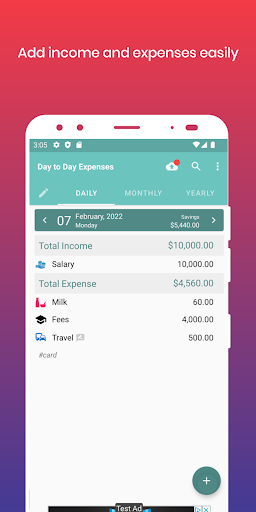
Day To Day Expenses is the ultimate expense and money manager app designed for Android devices. With its intuitive and user-friendly interface, tracking your spending has never been easier. Whether you’re at home or on the go, this app allows you to record your income and expenses quickly and efficiently, just like jotting down notes in a pocket notebook.
Key Features:
Seamless Expense Tracking:
Enter your income and expenses, and let the app handle the calculations for you.
Categorize Your Finances:
Organize your transactions with a range of default categories or create your own. Colorful icons make it easy to identify each category at a glance.
Detailed Reports:
Instantly access daily, monthly, and yearly reports with a simple tap.
Save & Export:
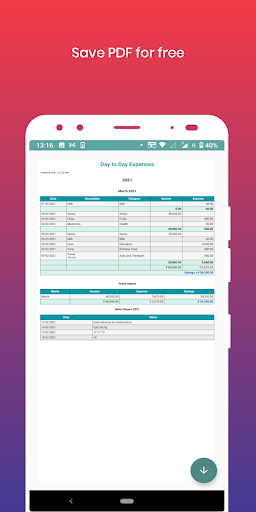
Save your summaries as PDFs or export your data to Excel for easy sharing and further analysis.
Secure Data Backup:
Store your data securely on your Google Drive—Day To Day Expenses does not store any personal information.
Visual Insights:
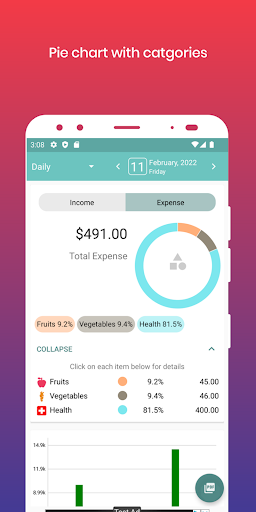
Prefer visuals over numbers? View your spending statistics through vibrant pie charts.
Multiple Profiles & Accounts:
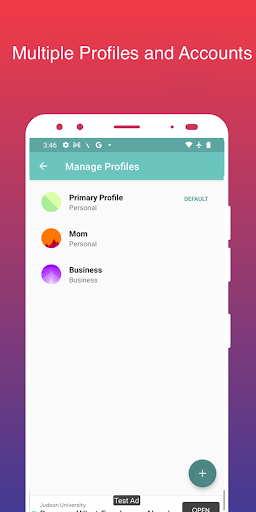
Manage your personal and professional finances with multiple profiles and accounts. Track various bank accounts, credit cards, e-wallets, and more.
Additional Features:
Enjoy a range of options including search functionality, customizable themes, expense reminders, and custom date range reports.
Languages Supported:
English, Tamil, Telugu, Hindi, Marathi, Gujarati, Bengali, Punjabi, Malayalam, Kannada and Spanish.
*Important:* For your security, please download this app exclusively from the Google Play Store.
Transform your financial management with Day To Day Expenses today—your easy-to-use, comprehensive solution for tracking and organizing your personal finances!
और दिखाएं

1. MEmu इंस्टॉलर को डाउनलोड करें और इंस्टॉलेशन को पूरा करें

2. MEmu शुरू करें फिर होमपेज पर Google Play खोलें

3. Google Play में Day-to-day Expenses खोजें
Install
4. Day-to-day Expenses डाउनलोड कर इंस्टॉल करें
5. इंस्टॉल पूरा होने पर आइकन दबाएं

6. MEmu का उपयोग करके अपने कंप्यूटर पर Day-to-day Expenses का अनुभव करें
MEmu Play सबसे बेहतरीन मुफ़्त Android एमुलेटर है और 5 करोड़ लोग पहले ही इसके शानदार Android ऐप अनुभव का आनंद ले चुके हैं। MEmu 9 वर्चुअलाइज़ेशन तकनीक आपको अपने PC पर हज़ारों Android ऐप्स, यहाँ तक कि सबसे ज़्यादा ग्राफ़िक्स वाले ऐप्स भी, आसानी से चलाने की सुविधा देती है।
असीमित बैटरी या मोबाइल डेटा के साथ बेहतर ग्राफिक्स के साथ बड़ी स्क्रीन; लंबी अवधि।
कीबोर्ड और माउस या गेमपैड के उत्तम नियंत्रण के लिए संपूर्ण कीमैपिंग का समर्थन करता हैं।
एक ही पीसी पर मल्टी-इंस्टेंस मैनेजर के साथ एक समय में कई गेम खाते या कार्य कर सकते हैं।
Use Day-to-day Expenses on PC by following steps: