
Edmodo
अपडेट किया गया
वर्तमान वर्शन
10.60.4
संसाधन

Edmodo पर अपनी मोबाइल डेटा सीमा पार करने को अलविदा कहें और छोटी स्क्रीन की सीमाओं से मुक्त होकर बड़े डिस्प्ले के लाभों का अनुभव करें। अब, आप अपने कीबोर्ड और माउस का उपयोग करके फुल-स्क्रीन मोड में टॉपर्स क्लैन की शक्ति का अनुभव कर सकते हैं। MEmu Play में वे सभी बेहतरीन सुविधाएँ हैं जिनकी आप अपेक्षा करते हैं: त्वरित इंस्टॉलेशन और आसान सेटअप, सहज नियंत्रण, बैटरी की आवश्यकता नहीं, और कोई डेटा या कॉल समय सीमा नहीं। नया MEmu 9 आपके कंप्यूटर पर Edmodo का उपयोग करने के लिए सबसे अच्छा विकल्प है। हमारा मालिकाना मल्टी-इंस्टेंस मैनेजर एक साथ दो या अधिक खातों को चलाने का समर्थन करता है। इससे भी महत्वपूर्ण बात यह है कि हमारा अनूठा इम्यूलेशन इंजन आपके कंप्यूटर के प्रदर्शन का पूरा उपयोग करता है, जिससे एक सहज और निर्बाध अनुभव मिलता है।
और दिखाएं
डाउनलोड करें Edmodo पीसी पर MEmu एंड्रॉयड एमुलेटर के साथ बड़े पर्दे पर खेलने का आनंद लें। Edmodo gives teachers the tools to share engaging lessons, keep parents updated, and build a vibrant classroom community.

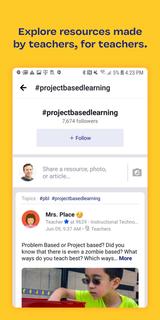
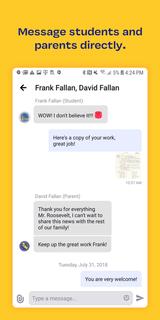
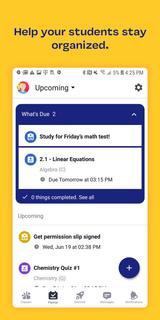
Edmodo gives teachers the tools to share engaging lessons, keep parents updated, and build a vibrant classroom community.The all-new Edmodo app has been redesigned from the ground up to focus on how YOU communicate with your students, parents, and fellow teachers.TOOLS THAT TEACHERS NEED - A home stream for following and discovering resources from teachers across the globe. - All your classes and assignments organized in one place. - Send messages directly to students and parents. - Discover content that empowers your students and encourages mindfulness.ENGAGE YOUR STUDENTSWith Edmodo, you can reach every student in your class. Students can login and participate from any phone, tablet, or computer. Facilitate discussions with your entire class or check in individually with direct messages. Help your students stay organized with an automatically-updated planner.RESOURCES FOR TEACHERSShare and discover new lessons and resources from across your school, district, or a global community. Edmodo makes it easy for you to explore professional content and teacher trends. And the improved home stream means you can find dozens of educational resources for your classroom all at once.EdTech Digest Award Winner – Best ProductFor more information, visit www.edmodo.com.
और दिखाएं

1. MEmu इंस्टॉलर को डाउनलोड करें और इंस्टॉलेशन को पूरा करें

2. MEmu शुरू करें फिर होमपेज पर Google Play खोलें

3. Google Play में Edmodo खोजें
Install
4. Edmodo डाउनलोड कर इंस्टॉल करें
5. इंस्टॉल पूरा होने पर आइकन दबाएं

6. MEmu का उपयोग करके अपने कंप्यूटर पर Edmodo का अनुभव करें
MEmu Play सबसे बेहतरीन मुफ़्त Android एमुलेटर है और 5 करोड़ लोग पहले ही इसके शानदार Android ऐप अनुभव का आनंद ले चुके हैं। MEmu 9 वर्चुअलाइज़ेशन तकनीक आपको अपने PC पर हज़ारों Android ऐप्स, यहाँ तक कि सबसे ज़्यादा ग्राफ़िक्स वाले ऐप्स भी, आसानी से चलाने की सुविधा देती है।
असीमित बैटरी या मोबाइल डेटा के साथ बेहतर ग्राफिक्स के साथ बड़ी स्क्रीन; लंबी अवधि।
कीबोर्ड और माउस या गेमपैड के उत्तम नियंत्रण के लिए संपूर्ण कीमैपिंग का समर्थन करता हैं।
एक ही पीसी पर मल्टी-इंस्टेंस मैनेजर के साथ एक समय में कई गेम खाते या कार्य कर सकते हैं।
Use Edmodo on PC by following steps: