ES File Explorer File Manager
अपडेट किया गया
वर्तमान वर्शन
1.0.1
संसाधन

ES File Explorer File Manager पर अपनी मोबाइल डेटा सीमा पार करने को अलविदा कहें और छोटी स्क्रीन की सीमाओं से मुक्त होकर बड़े डिस्प्ले के लाभों का अनुभव करें। अब, आप अपने कीबोर्ड और माउस का उपयोग करके फुल-स्क्रीन मोड में टॉपर्स क्लैन की शक्ति का अनुभव कर सकते हैं। MEmu Play में वे सभी बेहतरीन सुविधाएँ हैं जिनकी आप अपेक्षा करते हैं: त्वरित इंस्टॉलेशन और आसान सेटअप, सहज नियंत्रण, बैटरी की आवश्यकता नहीं, और कोई डेटा या कॉल समय सीमा नहीं। नया MEmu 9 आपके कंप्यूटर पर ES File Explorer File Manager का उपयोग करने के लिए सबसे अच्छा विकल्प है। हमारा मालिकाना मल्टी-इंस्टेंस मैनेजर एक साथ दो या अधिक खातों को चलाने का समर्थन करता है। इससे भी महत्वपूर्ण बात यह है कि हमारा अनूठा इम्यूलेशन इंजन आपके कंप्यूटर के प्रदर्शन का पूरा उपयोग करता है, जिससे एक सहज और निर्बाध अनुभव मिलता है।
और दिखाएं
डाउनलोड करें ES File Explorer File Manager पीसी पर MEmu एंड्रॉयड एमुलेटर के साथ बड़े पर्दे पर खेलने का आनंद लें। ES File Explorer is a powerful and free local and network file (application, file, multimedia) manager.
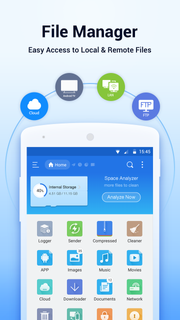
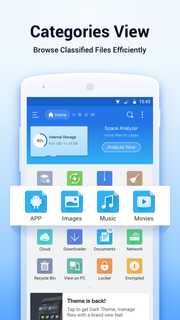
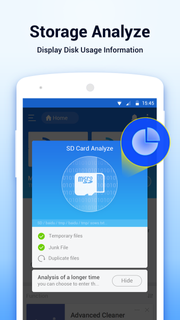
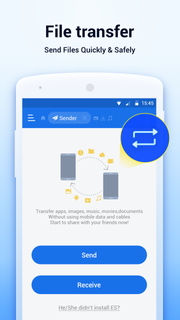
ES File Explorer is a powerful and free local and network file (application, file, multimedia) manager.ES file browser (all-in-one file browser and manager) main features:★File Management: Click to install the application and view the compressed file.★Multimedia browsing: Click to play music, play videos, view pictures, read documents★Cloud storage: support massive network disk space to store dataKey features and benefits of the ES File Browser (all-in-one file browser and manager):► Shortcut Bar: Support all file operations►Local/Network Management: Manage files on mobile phones and LAN computers►Local/Web Search: Search and view files locally and on the web►Application Management: Easily install/uninstall/back up applications►Compression/Decompression: File compression or decompression supports ZIP and RAR►Easy operation/viewing: Support file multi-selection operation, thumbnail display and multiple view modes►Perfect streaming function: support direct playback of music and movies on network devices►Bluetooth support: Browse/operate files in other devices via Bluetooth►Support for network disk binding: You can link your network storage space for free (support includes: Dropbox, Box.net, Sugarsync, Google Drive, OneDrive (SkyDrive), Amazon S3, Yandex, etc.)
और दिखाएं

1. MEmu इंस्टॉलर को डाउनलोड करें और इंस्टॉलेशन को पूरा करें

2. MEmu शुरू करें फिर होमपेज पर Google Play खोलें

3. Google Play में ES File Explorer File Manager खोजें
Install
4. ES File Explorer File Manager डाउनलोड कर इंस्टॉल करें
5. इंस्टॉल पूरा होने पर आइकन दबाएं

6. MEmu का उपयोग करके अपने कंप्यूटर पर ES File Explorer File Manager का अनुभव करें
MEmu Play सबसे बेहतरीन मुफ़्त Android एमुलेटर है और 5 करोड़ लोग पहले ही इसके शानदार Android ऐप अनुभव का आनंद ले चुके हैं। MEmu 9 वर्चुअलाइज़ेशन तकनीक आपको अपने PC पर हज़ारों Android ऐप्स, यहाँ तक कि सबसे ज़्यादा ग्राफ़िक्स वाले ऐप्स भी, आसानी से चलाने की सुविधा देती है।
असीमित बैटरी या मोबाइल डेटा के साथ बेहतर ग्राफिक्स के साथ बड़ी स्क्रीन; लंबी अवधि।
कीबोर्ड और माउस या गेमपैड के उत्तम नियंत्रण के लिए संपूर्ण कीमैपिंग का समर्थन करता हैं।
एक ही पीसी पर मल्टी-इंस्टेंस मैनेजर के साथ एक समय में कई गेम खाते या कार्य कर सकते हैं।
Use ES File Explorer File Manager on PC by following steps: