fctv 33 tv
अपडेट किया गया
वर्तमान वर्शन
1.0
संसाधन

fctv 33 tv पर अपनी मोबाइल डेटा सीमा पार करने को अलविदा कहें और छोटी स्क्रीन की सीमाओं से मुक्त होकर बड़े डिस्प्ले के लाभों का अनुभव करें। अब, आप अपने कीबोर्ड और माउस का उपयोग करके फुल-स्क्रीन मोड में टॉपर्स क्लैन की शक्ति का अनुभव कर सकते हैं। MEmu Play में वे सभी बेहतरीन सुविधाएँ हैं जिनकी आप अपेक्षा करते हैं: त्वरित इंस्टॉलेशन और आसान सेटअप, सहज नियंत्रण, बैटरी की आवश्यकता नहीं, और कोई डेटा या कॉल समय सीमा नहीं। नया MEmu 9 आपके कंप्यूटर पर fctv 33 tv का उपयोग करने के लिए सबसे अच्छा विकल्प है। हमारा मालिकाना मल्टी-इंस्टेंस मैनेजर एक साथ दो या अधिक खातों को चलाने का समर्थन करता है। इससे भी महत्वपूर्ण बात यह है कि हमारा अनूठा इम्यूलेशन इंजन आपके कंप्यूटर के प्रदर्शन का पूरा उपयोग करता है, जिससे एक सहज और निर्बाध अनुभव मिलता है।
और दिखाएं
MEmu Play के साथ PC पर fctv 33 tv इस्तेमाल करने के शानदार अनुभव का आनंद लें। यह एक शक्तिशाली मुफ़्त Android एमुलेटर है जो आपको डेस्कटॉप वर्ज़न के लिए हज़ारों Android ऐप्स उपलब्ध कराता है। दोस्तों से जुड़ने और अपने काम को और भी बेहतर बनाने का आनंद लें! FCTV 33 Player is a lightweight media player designed to provide a simple and stable experience for users who want to load and play their own playlists on Android devices.
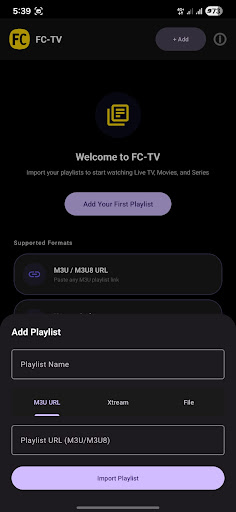
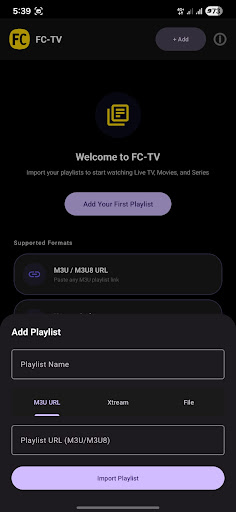
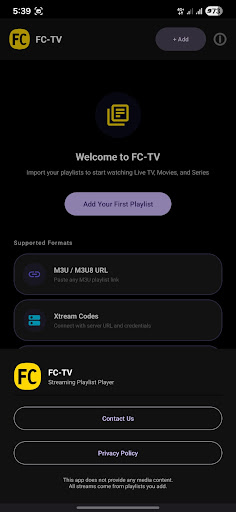
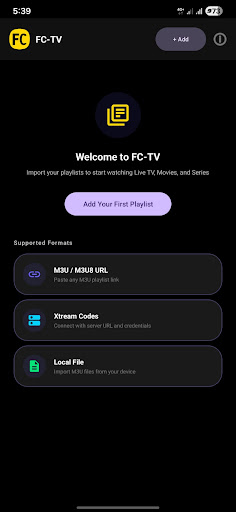
FCTV 33 Player is a lightweight media player designed to provide a simple and stable experience for users who want to load and play their own playlists on Android devices. The application focuses on clean design, smooth performance, and easy navigation without unnecessary complexity.
With FCTV 33 Player, users can import their playlists and access their content in an organized and clear interface. The app is built to remain responsive and efficient, even when handling multiple playlist entries. Every feature in FCTV 33 Player is designed to reduce steps and make playback straightforward.
FCTV 33 Player offers a minimal interface where users can easily browse their playlists and select content for playback. The layout is optimized for usability, allowing quick access to essential functions without confusion. FCTV 33 Player ensures that users can focus on their content instead of dealing with complicated settings.
FCTV 33 Player is developed to work smoothly across a wide range of Android devices. The application maintains stability and performance while keeping the overall size lightweight. FCTV 33 Player prioritizes reliability so users can open and manage playlists without interruptions.
The design approach of FCTV 33 Player is centered around simplicity. Menus are clear, navigation is direct, and all actions are easy to understand. FCTV 33 Player provides a comfortable experience for users who prefer a clean and efficient media player.
FCTV 33 Player does not provide any media content, channels, or playlists. FCTV 33 Player only functions as a player that allows users to load and play their own content.
और दिखाएं

1. MEmu इंस्टॉलर को डाउनलोड करें और इंस्टॉलेशन को पूरा करें

2. MEmu शुरू करें फिर होमपेज पर Google Play खोलें

3. Google Play में fctv 33 tv खोजें
Install
4. fctv 33 tv डाउनलोड कर इंस्टॉल करें
5. इंस्टॉल पूरा होने पर आइकन दबाएं

6. MEmu का उपयोग करके अपने कंप्यूटर पर fctv 33 tv का अनुभव करें
MEmu Play सबसे बेहतरीन मुफ़्त Android एमुलेटर है और 5 करोड़ लोग पहले ही इसके शानदार Android ऐप अनुभव का आनंद ले चुके हैं। MEmu 9 वर्चुअलाइज़ेशन तकनीक आपको अपने PC पर हज़ारों Android ऐप्स, यहाँ तक कि सबसे ज़्यादा ग्राफ़िक्स वाले ऐप्स भी, आसानी से चलाने की सुविधा देती है।
असीमित बैटरी या मोबाइल डेटा के साथ बेहतर ग्राफिक्स के साथ बड़ी स्क्रीन; लंबी अवधि।
कीबोर्ड और माउस या गेमपैड के उत्तम नियंत्रण के लिए संपूर्ण कीमैपिंग का समर्थन करता हैं।
एक ही पीसी पर मल्टी-इंस्टेंस मैनेजर के साथ एक समय में कई गेम खाते या कार्य कर सकते हैं।
Use fctv 33 tv on PC by following steps: