
Hello English: Learn English
अपडेट किया गया
वर्तमान वर्शन
2.9.3
संसाधन

Hello English: Learn English पर अपनी मोबाइल डेटा सीमा पार करने को अलविदा कहें और छोटी स्क्रीन की सीमाओं से मुक्त होकर बड़े डिस्प्ले के लाभों का अनुभव करें। अब, आप अपने कीबोर्ड और माउस का उपयोग करके फुल-स्क्रीन मोड में टॉपर्स क्लैन की शक्ति का अनुभव कर सकते हैं। MEmu Play में वे सभी बेहतरीन सुविधाएँ हैं जिनकी आप अपेक्षा करते हैं: त्वरित इंस्टॉलेशन और आसान सेटअप, सहज नियंत्रण, बैटरी की आवश्यकता नहीं, और कोई डेटा या कॉल समय सीमा नहीं। नया MEmu 9 आपके कंप्यूटर पर Hello English: Learn English का उपयोग करने के लिए सबसे अच्छा विकल्प है। हमारा मालिकाना मल्टी-इंस्टेंस मैनेजर एक साथ दो या अधिक खातों को चलाने का समर्थन करता है। इससे भी महत्वपूर्ण बात यह है कि हमारा अनूठा इम्यूलेशन इंजन आपके कंप्यूटर के प्रदर्शन का पूरा उपयोग करता है, जिससे एक सहज और निर्बाध अनुभव मिलता है।
और दिखाएं
MEmu Play के साथ PC पर Hello English: Learn English इस्तेमाल करने के शानदार अनुभव का आनंद लें। यह एक शक्तिशाली मुफ़्त Android एमुलेटर है जो आपको डेस्कटॉप वर्ज़न के लिए हज़ारों Android ऐप्स उपलब्ध कराता है। दोस्तों से जुड़ने और अपने काम को और भी बेहतर बनाने का आनंद लें! Learn Spoken English Confidently — Made for Indian Learners.
Learn Spoken English Confidently — Made for Indian Learners
Hello English – Learn Offline & AI Tutor is a complete spoken English learning app for India that helps you speak, read, write, and understand English fluently.
Practice daily conversations, prepare for IELTS speaking, job interviews, and competitive exams, and improve grammar & vocabulary with AI-guided speaking practice — anytime, anywhere.
Works fully offline, so you can learn English even without internet.
Perfect for students, beginners, job seekers, and professionals across India.
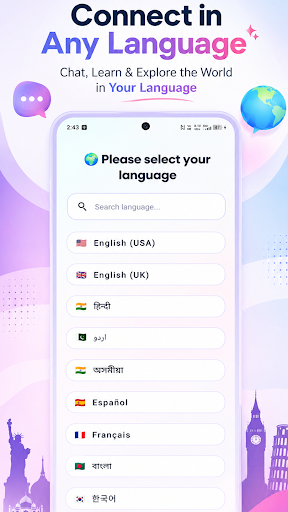
Learn English in Your Own Language (33 Languages)
Understand English easily with explanations in your local language:
Hindi, Assamese, Bengali, Marathi, Gujarati, Punjabi, Telugu, Tamil, Kannada, Malayalam, Urdu, Arabic, Nepali, Amharic, Burmese, Korean, Pashto, Indonesian, Malay, Filipino, Thai, Vietnamese, Chinese, Japanese, Spanish, French, German, Portuguese, Russian, Turkish, Italian, English (US & UK)
English Learning Games (NEW)
Learn English through fun and interactive educational games.
Word Scramble
• Unscramble letters and discover new words
• Improve spelling and vocabulary
• Multiple difficulty levels
Missing Letter
• Complete words by selecting missing letters
• Strengthen spelling skills
• Improve word recognition
Sentence Builder
• Arrange words to form correct sentences
• Learn sentence structure naturally
• Improve grammar and fluency
Grammar Quiz
• Test your English grammar skills
• Practice tenses, articles, prepositions, and more
• Instant feedback and scoring
Game Features
• Multiple difficulty levels
• Score tracking
• Rewards
Phonetics & IPA Pronunciation Training
Improve your pronunciation scientifically:
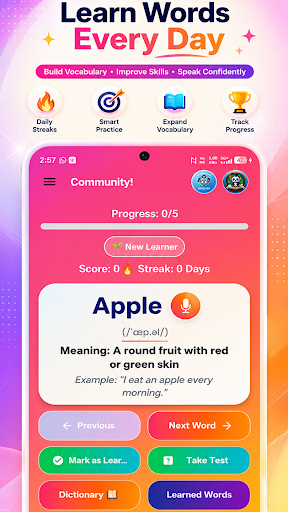
• Learn words with IPA (International Phonetic Alphabet)
• Speak clearly with correct sound patterns
• Improve accent and confidence
• Practice difficult words easily
• Compare your voice with correct pronunciation
Panda AI English Tutor
Meet Panda AI, your personal English teacher:
• Real-time English conversation practice
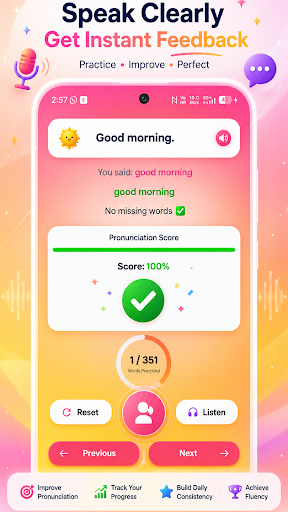
• Instant pronunciation feedback
• Grammar correction suggestions
• Easy / Medium / Hard levels
• Daily speaking practice
Spoken English & IELTS Speaking Practice
• Daily spoken English conversations
• AI pronunciation scoring & correction
• IELTS speaking preparation
• English for job interviews & workplace
• Real-life communication practice
Complete Offline English Course
Learn step-by-step without internet:
• 48 Grammar lessons (Beginner → Advanced)
• 820+ Speaking practice sentences
• 49 Daily conversation topics
• Vocabulary, phrases & idioms
• Reading & listening practice
• Tests for school & competitive exams
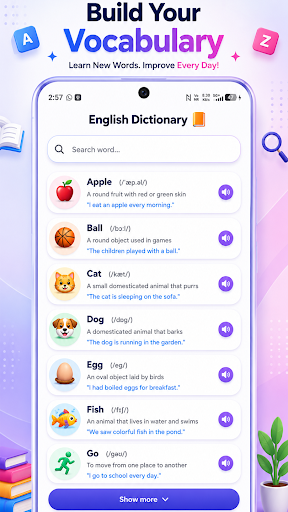
Built-in Offline English Dictionary
• Word meanings with examples
• Phonetics + IPA pronunciation
• Offline support
English Writing & Handwriting
• Writing practice
• Improve spelling
Smart Translator
• Translate English to local languages
• Useful for daily conversation
• Offline saved translations
Stay Motivated Every Day
• Daily streaks & achievement badges
• Study reminders
• Progress tracking dashboard
Who Is This App For?
Beginners learning English
Students & school learners
IELTS & competitive exam aspirants
Job seekers preparing interviews
Professionals improving communication
Anyone who wants spoken English fluency
⭐ Why Choose Hello English?
• Fully offline English learning
• Specially designed for Indian learners
• AI speaking tutor with pronunciation scoring
• Phonetics + IPA pronunciation training
• Grammar + vocabulary + conversation in one app
• 33 local language support
• Simple and easy-to-use interface
Skills You Will Improve
Spoken English & pronunciation
Grammar & sentence formation
Vocabulary building
Writing & spelling
Reading comprehension
Real-life communication
Start Your English Journey Today
Download Hello English – Learn Offline & AI Tutor and start learning today!
और दिखाएं

1. MEmu इंस्टॉलर को डाउनलोड करें और इंस्टॉलेशन को पूरा करें

2. MEmu शुरू करें फिर होमपेज पर Google Play खोलें

3. Google Play में Hello English: Learn English खोजें
Install
4. Hello English: Learn English डाउनलोड कर इंस्टॉल करें
5. इंस्टॉल पूरा होने पर आइकन दबाएं

6. MEmu का उपयोग करके अपने कंप्यूटर पर Hello English: Learn English का अनुभव करें
MEmu Play सबसे बेहतरीन मुफ़्त Android एमुलेटर है और 5 करोड़ लोग पहले ही इसके शानदार Android ऐप अनुभव का आनंद ले चुके हैं। MEmu 9 वर्चुअलाइज़ेशन तकनीक आपको अपने PC पर हज़ारों Android ऐप्स, यहाँ तक कि सबसे ज़्यादा ग्राफ़िक्स वाले ऐप्स भी, आसानी से चलाने की सुविधा देती है।
असीमित बैटरी या मोबाइल डेटा के साथ बेहतर ग्राफिक्स के साथ बड़ी स्क्रीन; लंबी अवधि।
कीबोर्ड और माउस या गेमपैड के उत्तम नियंत्रण के लिए संपूर्ण कीमैपिंग का समर्थन करता हैं।
एक ही पीसी पर मल्टी-इंस्टेंस मैनेजर के साथ एक समय में कई गेम खाते या कार्य कर सकते हैं।
Use Hello English: Learn English on PC by following steps: