JioPOS Lite
अपडेट किया गया
वर्तमान वर्शन
1.0.15-53
संसाधन

JioPOS Lite पर अपनी मोबाइल डेटा सीमा पार करने को अलविदा कहें और छोटी स्क्रीन की सीमाओं से मुक्त होकर बड़े डिस्प्ले के लाभों का अनुभव करें। अब, आप अपने कीबोर्ड और माउस का उपयोग करके फुल-स्क्रीन मोड में टॉपर्स क्लैन की शक्ति का अनुभव कर सकते हैं। MEmu Play में वे सभी बेहतरीन सुविधाएँ हैं जिनकी आप अपेक्षा करते हैं: त्वरित इंस्टॉलेशन और आसान सेटअप, सहज नियंत्रण, बैटरी की आवश्यकता नहीं, और कोई डेटा या कॉल समय सीमा नहीं। नया MEmu 9 आपके कंप्यूटर पर JioPOS Lite का उपयोग करने के लिए सबसे अच्छा विकल्प है। हमारा मालिकाना मल्टी-इंस्टेंस मैनेजर एक साथ दो या अधिक खातों को चलाने का समर्थन करता है। इससे भी महत्वपूर्ण बात यह है कि हमारा अनूठा इम्यूलेशन इंजन आपके कंप्यूटर के प्रदर्शन का पूरा उपयोग करता है, जिससे एक सहज और निर्बाध अनुभव मिलता है।
और दिखाएं
डाउनलोड करें JioPOS Lite पीसी पर MEmu एंड्रॉयड एमुलेटर के साथ बड़े पर्दे पर खेलने का आनंद लें। Become a Jio Partner and start earning now!
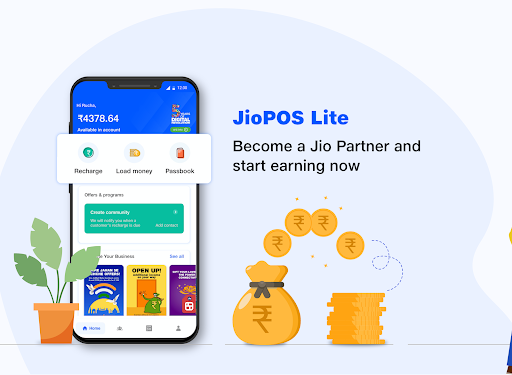


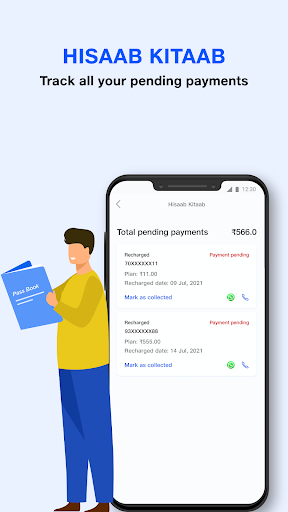
Become a Jio Partner and start earning now! Here’s an app for individuals to become Jio Partner for doing Jio customer recharges. 100% paperless documentation. Self-onboard and get started.
Partner onboarding process has been shortened and simplified for your convenience. No hardcopy of documents, no physical verification. Just fill the details, submit documents and register online. Yes, it is absolutely an online platform!
Features in JioPOS Lite:
* Sign Up - Prospected retailers can sign up by providing Jio mobile number and Email Id
* Add Money - Load money into your wallet and earn attractive returns
* Recharge - Recharge for customers using the money in wallet
* Earnings - Earnings dashboards to monitor your daily earnings
* Offers-Different offers are run to motivate Jio Partners to earn and collaborate
Now there are 3 ways in which you can partner with us.
Recharge Partner
*Recommended for individuals
* No documents required
* Get started in 10 minutes
* Load money in your partner wallet
* Recharge Jio numbers, start earning commission
Activation Partner
*Recommended for individuals
*Only Aadhar card, Pan card and local address proof required
*100% Paperless process
*Get your Jio Partner ID created
*Start doing business and earn commission
Activation & Device Partner
*Recommended for enterprise users
*Only Aadhar card, Pan card and address proof is required
*100% Paperless process
*Get your Jio Partner ID created
*Start doing business and earn commission
You load your wallets with cash and we load your pockets with earnings.
Don't think much, download all new JioPos Lite : "Jio's Chotta packet made with earnings ka bada dhamaka"
और दिखाएं

1. MEmu इंस्टॉलर को डाउनलोड करें और इंस्टॉलेशन को पूरा करें

2. MEmu शुरू करें फिर होमपेज पर Google Play खोलें

3. Google Play में JioPOS Lite खोजें
Install
4. JioPOS Lite डाउनलोड कर इंस्टॉल करें
5. इंस्टॉल पूरा होने पर आइकन दबाएं

6. MEmu का उपयोग करके अपने कंप्यूटर पर JioPOS Lite का अनुभव करें
MEmu Play सबसे बेहतरीन मुफ़्त Android एमुलेटर है और 5 करोड़ लोग पहले ही इसके शानदार Android ऐप अनुभव का आनंद ले चुके हैं। MEmu 9 वर्चुअलाइज़ेशन तकनीक आपको अपने PC पर हज़ारों Android ऐप्स, यहाँ तक कि सबसे ज़्यादा ग्राफ़िक्स वाले ऐप्स भी, आसानी से चलाने की सुविधा देती है।
असीमित बैटरी या मोबाइल डेटा के साथ बेहतर ग्राफिक्स के साथ बड़ी स्क्रीन; लंबी अवधि।
कीबोर्ड और माउस या गेमपैड के उत्तम नियंत्रण के लिए संपूर्ण कीमैपिंग का समर्थन करता हैं।
एक ही पीसी पर मल्टी-इंस्टेंस मैनेजर के साथ एक समय में कई गेम खाते या कार्य कर सकते हैं।
Use JioPOS Lite on PC by following steps: