Kuna-SE
अपडेट किया गया
वर्तमान वर्शन
1.77.2
संसाधन

Kuna-SE पर अपनी मोबाइल डेटा सीमा पार करने को अलविदा कहें और छोटी स्क्रीन की सीमाओं से मुक्त होकर बड़े डिस्प्ले के लाभों का अनुभव करें। अब, आप अपने कीबोर्ड और माउस का उपयोग करके फुल-स्क्रीन मोड में टॉपर्स क्लैन की शक्ति का अनुभव कर सकते हैं। MEmu Play में वे सभी बेहतरीन सुविधाएँ हैं जिनकी आप अपेक्षा करते हैं: त्वरित इंस्टॉलेशन और आसान सेटअप, सहज नियंत्रण, बैटरी की आवश्यकता नहीं, और कोई डेटा या कॉल समय सीमा नहीं। नया MEmu 9 आपके कंप्यूटर पर Kuna-SE का उपयोग करने के लिए सबसे अच्छा विकल्प है। हमारा मालिकाना मल्टी-इंस्टेंस मैनेजर एक साथ दो या अधिक खातों को चलाने का समर्थन करता है। इससे भी महत्वपूर्ण बात यह है कि हमारा अनूठा इम्यूलेशन इंजन आपके कंप्यूटर के प्रदर्शन का पूरा उपयोग करता है, जिससे एक सहज और निर्बाध अनुभव मिलता है।
और दिखाएं
MEmu Play के साथ PC पर Kuna-SE इस्तेमाल करने के शानदार अनुभव का आनंद लें। यह एक शक्तिशाली मुफ़्त Android एमुलेटर है जो आपको डेस्कटॉप वर्ज़न के लिए हज़ारों Android ऐप्स उपलब्ध कराता है। दोस्तों से जुड़ने और अपने काम को और भी बेहतर बनाने का आनंद लें! App controls the Kuna Camera Wall Plate.
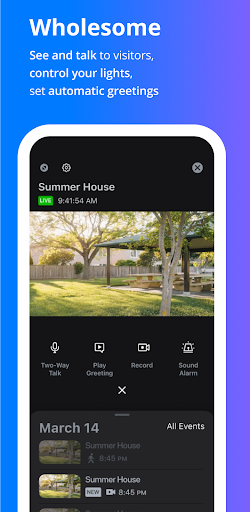
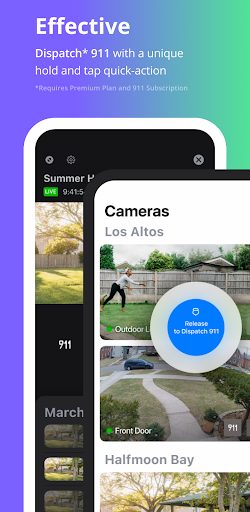
App controls the Kuna Camera Wall Plate. Does NOT work with other Kuna or Maximus devices.
Kuna-SE is designed to help you prevent break-ins and protect what matters to you most, from anywhere in the world.
Have a Kuna Powered security device or smart light? You’ll need the Kuna mobile app to set up and control your Kuna, Maximus, and Toucan smart security devices.
After you’ve created a free Kuna account and connected your Kuna Powered device(s) to your Wi-Fi network, you’ll have access to all of Kuna’s powerful preventative security features:
Security:
- As soon as activity is detected, Kuna starts recording and sends actionable alerts, so you can see what’s happening and decide how to respond.
- With Kuna’s instant two-way intercom and pre-recorded messages, it’s easy to see and communicate with whoever’s outside, anytime.
- In the event of an emergency, you can quickly call the police and/or sound a piercing 100dBA siren right from the Kuna mobile app.
Monitoring:
- Stream live HD video anytime, day or night - so there’s no need to wonder what’s going on outside your home.
- “Smart detection” captures activity 10 seconds before and after an event is triggered, providing recordings that are actually useful.
- Easily share important and memorable footage with family, neighbors, and law enforcement officials.
Convenience:
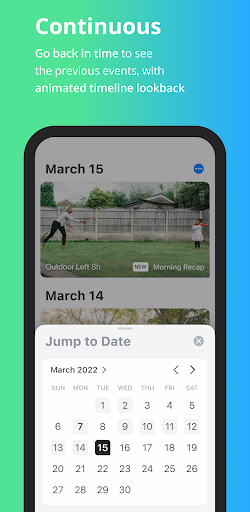
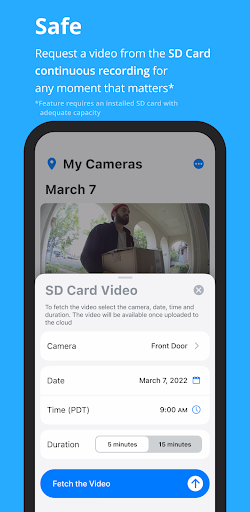
- Go “back in time” to rewind and download every event captured for up to 2 hours free, and up to 30 days on an optional premium plan.
- Turn your Kuna Powered light(s) on and off, easily set to a schedule, enable dawn-to-dusk mode, and adjust motion detection sensitivity.
- Use voice command to control your Kuna Powered security device(s) with our new Alexa integration and automatically play a pre-recorded message or chime as soon a person is detected.
Love Kuna? Leave us a review! It might seem insignificant, but it helps more than you might think.
Have feedback or want to suggest a feature? Get in touch with us at:
Email: support@getkuna.com
Facebook GetKuna
Twitter: @getkuna
और दिखाएं

1. MEmu इंस्टॉलर को डाउनलोड करें और इंस्टॉलेशन को पूरा करें

2. MEmu शुरू करें फिर होमपेज पर Google Play खोलें

3. Google Play में Kuna-SE खोजें
Install
4. Kuna-SE डाउनलोड कर इंस्टॉल करें
5. इंस्टॉल पूरा होने पर आइकन दबाएं

6. MEmu का उपयोग करके अपने कंप्यूटर पर Kuna-SE का अनुभव करें
MEmu Play सबसे बेहतरीन मुफ़्त Android एमुलेटर है और 5 करोड़ लोग पहले ही इसके शानदार Android ऐप अनुभव का आनंद ले चुके हैं। MEmu 9 वर्चुअलाइज़ेशन तकनीक आपको अपने PC पर हज़ारों Android ऐप्स, यहाँ तक कि सबसे ज़्यादा ग्राफ़िक्स वाले ऐप्स भी, आसानी से चलाने की सुविधा देती है।
असीमित बैटरी या मोबाइल डेटा के साथ बेहतर ग्राफिक्स के साथ बड़ी स्क्रीन; लंबी अवधि।
कीबोर्ड और माउस या गेमपैड के उत्तम नियंत्रण के लिए संपूर्ण कीमैपिंग का समर्थन करता हैं।
एक ही पीसी पर मल्टी-इंस्टेंस मैनेजर के साथ एक समय में कई गेम खाते या कार्य कर सकते हैं।
Use Kuna-SE on PC by following steps: