Video Background Changer
अपडेट किया गया
वर्तमान वर्शन
4.5.0
संसाधन

Video Background Changer पर अपनी मोबाइल डेटा सीमा पार करने को अलविदा कहें और छोटी स्क्रीन की सीमाओं से मुक्त होकर बड़े डिस्प्ले के लाभों का अनुभव करें। अब, आप अपने कीबोर्ड और माउस का उपयोग करके फुल-स्क्रीन मोड में टॉपर्स क्लैन की शक्ति का अनुभव कर सकते हैं। MEmu Play में वे सभी बेहतरीन सुविधाएँ हैं जिनकी आप अपेक्षा करते हैं: त्वरित इंस्टॉलेशन और आसान सेटअप, सहज नियंत्रण, बैटरी की आवश्यकता नहीं, और कोई डेटा या कॉल समय सीमा नहीं। नया MEmu 9 आपके कंप्यूटर पर Video Background Changer का उपयोग करने के लिए सबसे अच्छा विकल्प है। हमारा मालिकाना मल्टी-इंस्टेंस मैनेजर एक साथ दो या अधिक खातों को चलाने का समर्थन करता है। इससे भी महत्वपूर्ण बात यह है कि हमारा अनूठा इम्यूलेशन इंजन आपके कंप्यूटर के प्रदर्शन का पूरा उपयोग करता है, जिससे एक सहज और निर्बाध अनुभव मिलता है।
और दिखाएं
डाउनलोड करें Video Background Changer पीसी पर MEmu एंड्रॉयड एमुलेटर के साथ बड़े पर्दे पर खेलने का आनंद लें। Green screen effect and video background changer app is the first app that provides you the ability to change your camera video background in real-time, green screen effect app lets you change the video background with solid color, gradient color, image, or even a video.


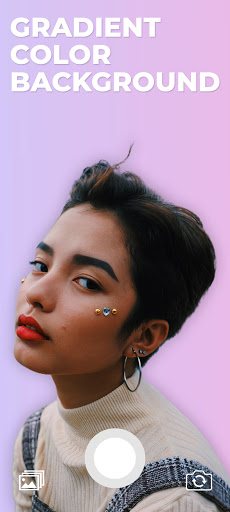
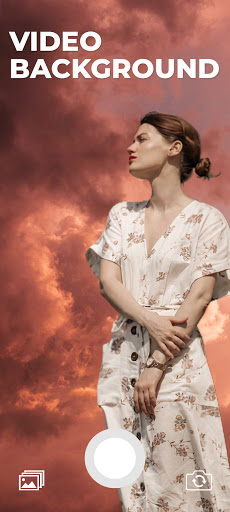
Green screen effect and video background changer app is the first app that provides you the ability to change your camera video background in real-time, green screen effect app lets you change the video background with solid color, gradient color, image, or even a video.
Green screen effect app is a free app video background changer that offers a bunch of features such as change the video background with color, talking about colors, the green screen effect app contains thousands of colors to choose from as well as gradient color, select your favorite one, and change your camera video background with it.
In addition to the colors and gradient color features, the green screen effect let you change the video background with an image from your gallery or even a video, just one click there your video background will be changed.
Green screen effect has two modes of the camera, selfie camera and back camera, one tap to switch between them, you can change the background of your video selfie as well as back camera.
Green screen is one of the darlings of the crowd that likes to make videos more elaborate and fun, but what is green screen? the name refers to a filter that offers several options for funds to use in videos created by the social network.
The feature resembles the green background used in the film super heroes, for example, used as a scenario for people to act. the tool, as expected, is successful on the internet, but what about you, do you know how to use the effect?
How to use :
- Open the green screen effect app.
- Click on the plus button.
- The green screen app will automatically start, you will notice that your camera video background has been removed.
- From the bottom left corner, click on the background icon to change the video background with color, gradient color, image, or even a video
- One tap to save as image and hold tap to start recording a video.
और दिखाएं

1. MEmu इंस्टॉलर को डाउनलोड करें और इंस्टॉलेशन को पूरा करें

2. MEmu शुरू करें फिर होमपेज पर Google Play खोलें

3. Google Play में Video Background Changer खोजें
Install
4. Video Background Changer डाउनलोड कर इंस्टॉल करें
5. इंस्टॉल पूरा होने पर आइकन दबाएं

6. MEmu का उपयोग करके अपने कंप्यूटर पर Video Background Changer का अनुभव करें
MEmu Play सबसे बेहतरीन मुफ़्त Android एमुलेटर है और 5 करोड़ लोग पहले ही इसके शानदार Android ऐप अनुभव का आनंद ले चुके हैं। MEmu 9 वर्चुअलाइज़ेशन तकनीक आपको अपने PC पर हज़ारों Android ऐप्स, यहाँ तक कि सबसे ज़्यादा ग्राफ़िक्स वाले ऐप्स भी, आसानी से चलाने की सुविधा देती है।
असीमित बैटरी या मोबाइल डेटा के साथ बेहतर ग्राफिक्स के साथ बड़ी स्क्रीन; लंबी अवधि।
कीबोर्ड और माउस या गेमपैड के उत्तम नियंत्रण के लिए संपूर्ण कीमैपिंग का समर्थन करता हैं।
एक ही पीसी पर मल्टी-इंस्टेंस मैनेजर के साथ एक समय में कई गेम खाते या कार्य कर सकते हैं।
Use Video Background Changer on PC by following steps: