Maxent TV Remote
अपडेट किया गया
वर्तमान वर्शन
1.0
संसाधन

Maxent TV Remote पर अपनी मोबाइल डेटा सीमा पार करने को अलविदा कहें और छोटी स्क्रीन की सीमाओं से मुक्त होकर बड़े डिस्प्ले के लाभों का अनुभव करें। अब, आप अपने कीबोर्ड और माउस का उपयोग करके फुल-स्क्रीन मोड में टॉपर्स क्लैन की शक्ति का अनुभव कर सकते हैं। MEmu Play में वे सभी बेहतरीन सुविधाएँ हैं जिनकी आप अपेक्षा करते हैं: त्वरित इंस्टॉलेशन और आसान सेटअप, सहज नियंत्रण, बैटरी की आवश्यकता नहीं, और कोई डेटा या कॉल समय सीमा नहीं। नया MEmu 9 आपके कंप्यूटर पर Maxent TV Remote का उपयोग करने के लिए सबसे अच्छा विकल्प है। हमारा मालिकाना मल्टी-इंस्टेंस मैनेजर एक साथ दो या अधिक खातों को चलाने का समर्थन करता है। इससे भी महत्वपूर्ण बात यह है कि हमारा अनूठा इम्यूलेशन इंजन आपके कंप्यूटर के प्रदर्शन का पूरा उपयोग करता है, जिससे एक सहज और निर्बाध अनुभव मिलता है।
और दिखाएं
MEmu Play के साथ PC पर Maxent TV Remote इस्तेमाल करने के शानदार अनुभव का आनंद लें। यह एक शक्तिशाली मुफ़्त Android एमुलेटर है जो आपको डेस्कटॉप वर्ज़न के लिए हज़ारों Android ऐप्स उपलब्ध कराता है। दोस्तों से जुड़ने और अपने काम को और भी बेहतर बनाने का आनंद लें! Maxent TV Remote designed by Illusions Inc I can be used very easily and you will feel like a real Maxent TV Remote because it has all the functionalities which an ordinary Maxent remote control can perform.
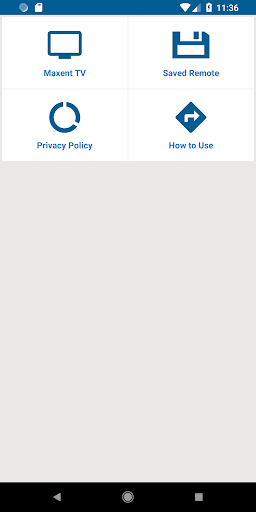
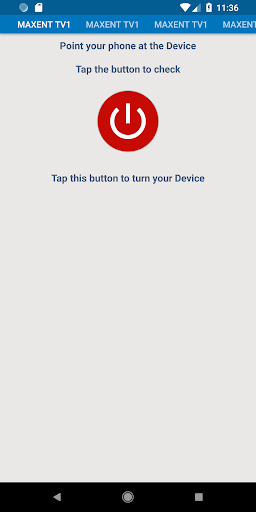
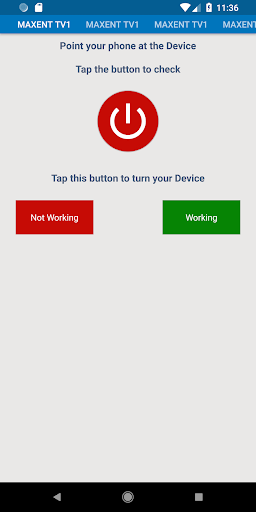
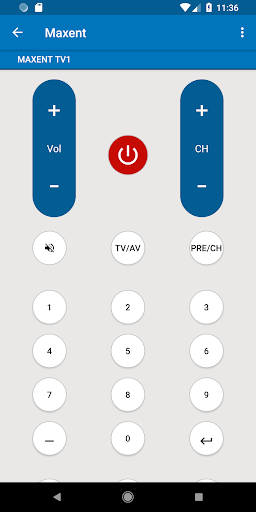
Maxent TV Remote designed by Illusions Inc I can be used very easily and you will feel like a real Maxent TV Remote because it has all the functionalities which an ordinary Maxent remote control can perform.
We have designed this with least application size in the market so that users having slow internet connections can install it easily.
Maxent TV Remote App is easy to configure by following two step guideline. We have also uploaded screenshot as a guidance for the users. Once you have Configured this Maxent Remote Control App you do not need to configure it again for the same device.
Once you have Configured this Maxent TV Remote app with you Maxent Device it can easily be found in the "Saved Devices".
This Application has the following features:
>> Easy to Install.
>> Easy to configure.
>> Needs built in IR blaster for configuration.
>> Configured Device is saved in "Saved Devices"
>> Supports multiple configures devices and can be found in "Saved Devices"
>> Supports all the functionalities which as company built ordinary remote can perform.
>> Vibration on pressing Button can be enabled and disabled.
Moreover this Maxent TV Remote Can be used as:
>> Maxent Universal TV Remote Control.
>> Maxent TV Remote Control.
>> Maxent TV Remote Control App
>> Maxent Remote App
>> Maxent TV Remote App
Disclaimer:
1. It is IR based remote controller, you should have a built-in IR transmitter or external infrared to control the TV.
2. This is not official remote control of Maxent Company. We have just collected the codes for the convenience of users. This remote just controls the functionalities of Maxent Devices.
3. Please Read the whole description before any negative feedback.
और दिखाएं

1. MEmu इंस्टॉलर को डाउनलोड करें और इंस्टॉलेशन को पूरा करें

2. MEmu शुरू करें फिर होमपेज पर Google Play खोलें

3. Google Play में Maxent TV Remote खोजें
Install
4. Maxent TV Remote डाउनलोड कर इंस्टॉल करें
5. इंस्टॉल पूरा होने पर आइकन दबाएं

6. MEmu का उपयोग करके अपने कंप्यूटर पर Maxent TV Remote का अनुभव करें
MEmu Play सबसे बेहतरीन मुफ़्त Android एमुलेटर है और 5 करोड़ लोग पहले ही इसके शानदार Android ऐप अनुभव का आनंद ले चुके हैं। MEmu 9 वर्चुअलाइज़ेशन तकनीक आपको अपने PC पर हज़ारों Android ऐप्स, यहाँ तक कि सबसे ज़्यादा ग्राफ़िक्स वाले ऐप्स भी, आसानी से चलाने की सुविधा देती है।
असीमित बैटरी या मोबाइल डेटा के साथ बेहतर ग्राफिक्स के साथ बड़ी स्क्रीन; लंबी अवधि।
कीबोर्ड और माउस या गेमपैड के उत्तम नियंत्रण के लिए संपूर्ण कीमैपिंग का समर्थन करता हैं।
एक ही पीसी पर मल्टी-इंस्टेंस मैनेजर के साथ एक समय में कई गेम खाते या कार्य कर सकते हैं।
Use Maxent TV Remote on PC by following steps: