NetMod VPN Client (V2Ray/SSH)
अपडेट किया गया
वर्तमान वर्शन
2.6.0
संसाधन

NetMod VPN Client (V2Ray/SSH) पर अपनी मोबाइल डेटा सीमा पार करने को अलविदा कहें और छोटी स्क्रीन की सीमाओं से मुक्त होकर बड़े डिस्प्ले के लाभों का अनुभव करें। अब, आप अपने कीबोर्ड और माउस का उपयोग करके फुल-स्क्रीन मोड में टॉपर्स क्लैन की शक्ति का अनुभव कर सकते हैं। MEmu Play में वे सभी बेहतरीन सुविधाएँ हैं जिनकी आप अपेक्षा करते हैं: त्वरित इंस्टॉलेशन और आसान सेटअप, सहज नियंत्रण, बैटरी की आवश्यकता नहीं, और कोई डेटा या कॉल समय सीमा नहीं। नया MEmu 9 आपके कंप्यूटर पर NetMod VPN Client (V2Ray/SSH) का उपयोग करने के लिए सबसे अच्छा विकल्प है। हमारा मालिकाना मल्टी-इंस्टेंस मैनेजर एक साथ दो या अधिक खातों को चलाने का समर्थन करता है। इससे भी महत्वपूर्ण बात यह है कि हमारा अनूठा इम्यूलेशन इंजन आपके कंप्यूटर के प्रदर्शन का पूरा उपयोग करता है, जिससे एक सहज और निर्बाध अनुभव मिलता है।
और दिखाएं
डाउनलोड करें NetMod VPN Client (V2Ray/SSH) पीसी पर MEmu एंड्रॉयड एमुलेटर के साथ बड़े पर्दे पर खेलने का आनंद लें। NetMod is a powerful and free VPN client equipped with an extensive suite of network tools, designed to give you full control over your online experience.
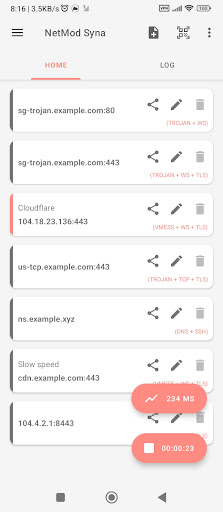
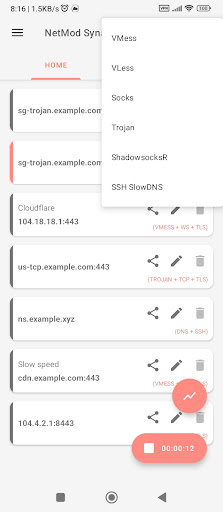
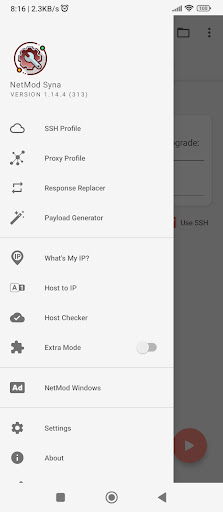
NetMod is a powerful and free VPN client equipped with an extensive suite of network tools, designed to give you full control over your online experience. Supporting a wide range of VPN protocols, including SSH, HTTP(S), Socks, VMess, VLess, Trojan, Shadowsocks, ShadowsocksR, WireGuard and DNSTT, it allows you to easily customize network traffic, bypass internet censorship, and maintain privacy online.
Among its key features, NetMod offers an SSH client for secure remote connections, and a V2Ray client based on the Xray core, providing flexibility and enhanced privacy. It includes SSH SlowDNS (DNSTT), enabling DNS tunneling to evade restrictions, and SSL/TLS tunneling to encrypt your data. You can also take advantage of proxy and VPN hotspot tethering, sharing your VPN connection effortlessly.
For advanced users, NetMod supports WebSocket, Cloudflare, and CloudFront tunneling for added security, while tunneling over VPN offers layered protection. It features an HTTP payload generator for creating and customizing payloads, as well as a host checker for troubleshooting connections. Multi-profile management makes it easy to switch between different VPN or SSH configurations, and the HTTP response replacer allows you to modify HTTP responses as needed.
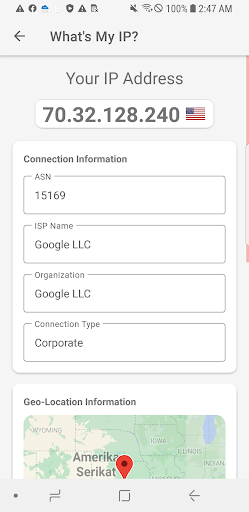
Additionally, NetMod includes tools such as private configuration files for secure management, host-to-IP and IP-to-host conversion, and an IP lookup for retrieving detailed information about any IP address. The QR code generator and scanner simplify the sharing and importing of configuration files, while app-specific connection filtering gives you control over which apps use your VPN connection. For security experts, NetMod even offers penetration testing (pentest) capabilities to help identify network vulnerabilities.
With its combination of user-friendly design and advanced networking features, NetMod is a versatile tool suitable for both casual browsing and professional, security-focused tasks.
और दिखाएं

1. MEmu इंस्टॉलर को डाउनलोड करें और इंस्टॉलेशन को पूरा करें

2. MEmu शुरू करें फिर होमपेज पर Google Play खोलें

3. Google Play में NetMod VPN Client (V2Ray/SSH) खोजें
Install
4. NetMod VPN Client (V2Ray/SSH) डाउनलोड कर इंस्टॉल करें
5. इंस्टॉल पूरा होने पर आइकन दबाएं

6. MEmu का उपयोग करके अपने कंप्यूटर पर NetMod VPN Client (V2Ray/SSH) का अनुभव करें
MEmu Play सबसे बेहतरीन मुफ़्त Android एमुलेटर है और 5 करोड़ लोग पहले ही इसके शानदार Android ऐप अनुभव का आनंद ले चुके हैं। MEmu 9 वर्चुअलाइज़ेशन तकनीक आपको अपने PC पर हज़ारों Android ऐप्स, यहाँ तक कि सबसे ज़्यादा ग्राफ़िक्स वाले ऐप्स भी, आसानी से चलाने की सुविधा देती है।
असीमित बैटरी या मोबाइल डेटा के साथ बेहतर ग्राफिक्स के साथ बड़ी स्क्रीन; लंबी अवधि।
कीबोर्ड और माउस या गेमपैड के उत्तम नियंत्रण के लिए संपूर्ण कीमैपिंग का समर्थन करता हैं।
एक ही पीसी पर मल्टी-इंस्टेंस मैनेजर के साथ एक समय में कई गेम खाते या कार्य कर सकते हैं।
Use NetMod VPN Client (V2Ray/SSH) on PC by following steps: