NewsOnAir
अपडेट किया गया
वर्तमान वर्शन
2.0.28
संसाधन

NewsOnAir पर अपनी मोबाइल डेटा सीमा पार करने को अलविदा कहें और छोटी स्क्रीन की सीमाओं से मुक्त होकर बड़े डिस्प्ले के लाभों का अनुभव करें। अब, आप अपने कीबोर्ड और माउस का उपयोग करके फुल-स्क्रीन मोड में टॉपर्स क्लैन की शक्ति का अनुभव कर सकते हैं। MEmu Play में वे सभी बेहतरीन सुविधाएँ हैं जिनकी आप अपेक्षा करते हैं: त्वरित इंस्टॉलेशन और आसान सेटअप, सहज नियंत्रण, बैटरी की आवश्यकता नहीं, और कोई डेटा या कॉल समय सीमा नहीं। नया MEmu 9 आपके कंप्यूटर पर NewsOnAir का उपयोग करने के लिए सबसे अच्छा विकल्प है। हमारा मालिकाना मल्टी-इंस्टेंस मैनेजर एक साथ दो या अधिक खातों को चलाने का समर्थन करता है। इससे भी महत्वपूर्ण बात यह है कि हमारा अनूठा इम्यूलेशन इंजन आपके कंप्यूटर के प्रदर्शन का पूरा उपयोग करता है, जिससे एक सहज और निर्बाध अनुभव मिलता है।
और दिखाएं
डाउनलोड करें NewsOnAir पीसी पर MEmu एंड्रॉयड एमुलेटर के साथ बड़े पर्दे पर खेलने का आनंद लें। The official Prasar Bharati app brings you 230+ Live Radio channels, Live TV, News, Current Affairs as well as Entertainment programs (text, podcast and videos) from Akashvani/ All India Radio (AIR) and Doordarshan (DD) networks in India.
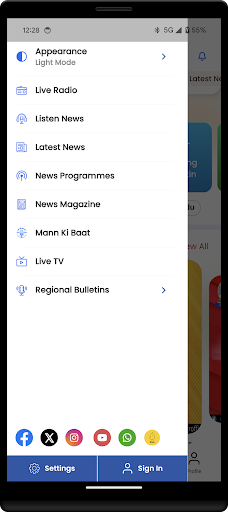
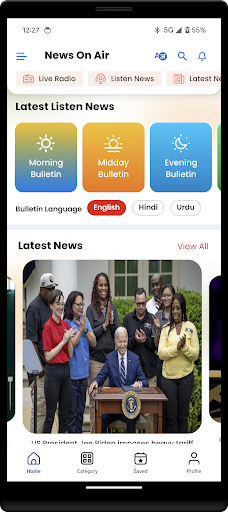
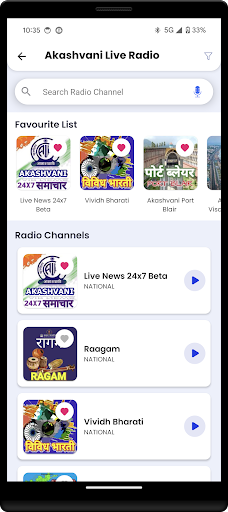
The official Prasar Bharati app brings you 230+ Live Radio channels, Live TV, News, Current Affairs as well as Entertainment programs (text, podcast and videos) from Akashvani/ All India Radio (AIR) and Doordarshan (DD) networks in India. This App is the first step by Prasar Bharati, India's Public Service Broadcaster, towards creating a truly global digital platform.
Live Radio
- More than 230 channels of AIR available live (205+ Domestic, 25 World Service).
- Covers all major regional languages of India.
- Easy search using Geo-mapping of channels
News
- Unbiased and reliable News
- News available in Text, Audio, Video and Notification Alerts
- Text news in Hindi, English, Urdu, Gujarati and Marathi.
- Audio news bulletin podcasts in almost 40 languages
- Exclusive 24x7 Live News Radio Channel
- Doordarshan News bulletin videos
- Ground Report Videos from remote parts of the Country
- News alerts for updates of news as it happens
- Twitter stream from more than 250 accounts of Prasar Bharati
Live TV
- DD News, DD India, DD Kisan and RSTV live
Podcasts
- Interesting Programmes of AIR available for anytime listening
- Audio magazines available in more than 25 languages
- Hourly News podcasts in English and Hindi
- Includes Weekly news digests of popular programs (Current Affairs, Money Talk, Vaad-Samvad, Public Speak...)
Videos
- Watch popular serials of Doordarshan
- Videos on news and current affairs
- Various programmes of all channels of Doordarshan
Store
- Purchase CDs/ DVDs from online store
Miscellaneous
- Night mode for ease of reading
- Share news with acquaintances
और दिखाएं

1. MEmu इंस्टॉलर को डाउनलोड करें और इंस्टॉलेशन को पूरा करें

2. MEmu शुरू करें फिर होमपेज पर Google Play खोलें

3. Google Play में NewsOnAir खोजें
Install
4. NewsOnAir डाउनलोड कर इंस्टॉल करें
5. इंस्टॉल पूरा होने पर आइकन दबाएं

6. MEmu का उपयोग करके अपने कंप्यूटर पर NewsOnAir का अनुभव करें
MEmu Play सबसे बेहतरीन मुफ़्त Android एमुलेटर है और 5 करोड़ लोग पहले ही इसके शानदार Android ऐप अनुभव का आनंद ले चुके हैं। MEmu 9 वर्चुअलाइज़ेशन तकनीक आपको अपने PC पर हज़ारों Android ऐप्स, यहाँ तक कि सबसे ज़्यादा ग्राफ़िक्स वाले ऐप्स भी, आसानी से चलाने की सुविधा देती है।
असीमित बैटरी या मोबाइल डेटा के साथ बेहतर ग्राफिक्स के साथ बड़ी स्क्रीन; लंबी अवधि।
कीबोर्ड और माउस या गेमपैड के उत्तम नियंत्रण के लिए संपूर्ण कीमैपिंग का समर्थन करता हैं।
एक ही पीसी पर मल्टी-इंस्टेंस मैनेजर के साथ एक समय में कई गेम खाते या कार्य कर सकते हैं।
Use NewsOnAir on PC by following steps: