NSW Trauma
अपडेट किया गया
वर्तमान वर्शन
5.1.8
संसाधन

NSW Trauma पर अपनी मोबाइल डेटा सीमा पार करने को अलविदा कहें और छोटी स्क्रीन की सीमाओं से मुक्त होकर बड़े डिस्प्ले के लाभों का अनुभव करें। अब, आप अपने कीबोर्ड और माउस का उपयोग करके फुल-स्क्रीन मोड में टॉपर्स क्लैन की शक्ति का अनुभव कर सकते हैं। MEmu Play में वे सभी बेहतरीन सुविधाएँ हैं जिनकी आप अपेक्षा करते हैं: त्वरित इंस्टॉलेशन और आसान सेटअप, सहज नियंत्रण, बैटरी की आवश्यकता नहीं, और कोई डेटा या कॉल समय सीमा नहीं। नया MEmu 9 आपके कंप्यूटर पर NSW Trauma का उपयोग करने के लिए सबसे अच्छा विकल्प है। हमारा मालिकाना मल्टी-इंस्टेंस मैनेजर एक साथ दो या अधिक खातों को चलाने का समर्थन करता है। इससे भी महत्वपूर्ण बात यह है कि हमारा अनूठा इम्यूलेशन इंजन आपके कंप्यूटर के प्रदर्शन का पूरा उपयोग करता है, जिससे एक सहज और निर्बाध अनुभव मिलता है।
और दिखाएं
MEmu Play के साथ PC पर NSW Trauma इस्तेमाल करने के शानदार अनुभव का आनंद लें। यह एक शक्तिशाली मुफ़्त Android एमुलेटर है जो आपको डेस्कटॉप वर्ज़न के लिए हज़ारों Android ऐप्स उपलब्ध कराता है। दोस्तों से जुड़ने और अपने काम को और भी बेहतर बनाने का आनंद लें! The NSW Trauma App will ensure clinicians are supported in the care of the trauma patient and are able to manage to meet the needs of the specific traumatically injured patient.
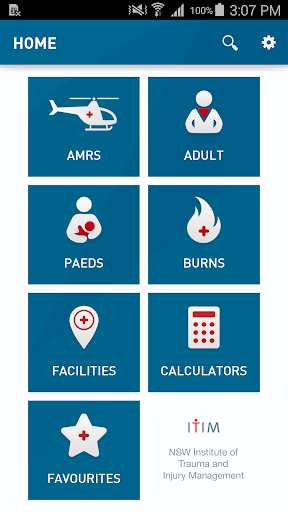
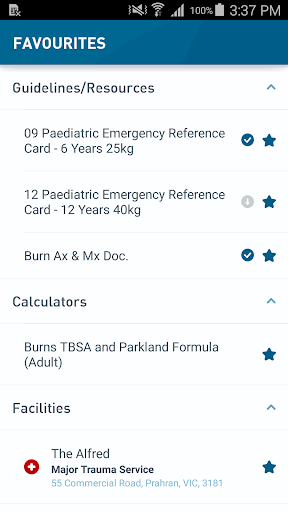
The NSW Trauma App will ensure clinicians are supported in the care of the trauma patient and are able to manage to meet the needs of the specific traumatically injured patient. Clinicians in metropolitan, rural and remote areas require standardised, easy access to clinical support tools and up-to-date, evidence-based information to deliver optimal care. This includes the provision of trauma resources for pre-hospital and intra-hospital clinicians. All clinicians require portable and versatile amenity in trauma care that can be utilised on a smart phone or tablet operable in environments such as poor cellular or WiFi access locations.
This app is developed for all medical, nursing and allied health clinicians of NSW Health and NSW Ambulance working across the trauma continuum within the state. The NSW Trauma App provides:
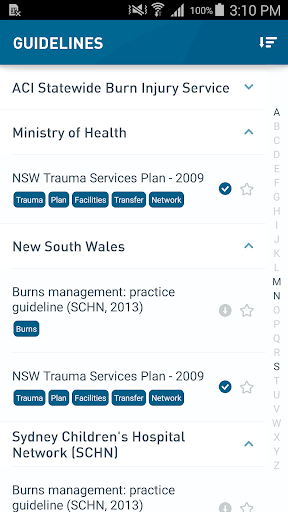
• Localised guideline repository:
The Guideline repository has been provided from bodies within NSW Health including Ambulance Service of NSW (ASNSW), Local Health Districts and trauma services. The guidelines and information, sourced from public domains, are referenced and acknowledged within the app.
• Specific burn injury resources:
The Institute of Trauma and Injury Management has worked with the NSW Burn Injury Network to provide Trauma resources specific to burns injuries including guidelines, checklists and additional resources.
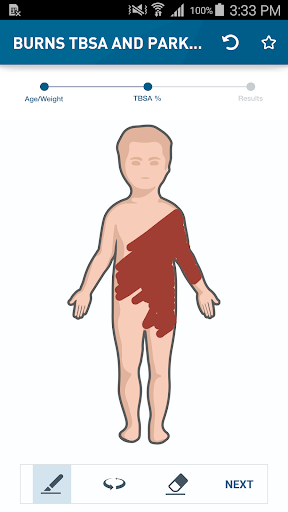
• Interactive Burns Calculator:
The calculator enables automatic determination of the total body surface area (TBSA) of burn injury by allowing the user to mark the area of burn injury on a body chart. Additionally entering a weight, time since burn and fluid already administered allows automatic calculation of the fluid requirement for the first eight hours since the time of injury and the following 16 hours, expected urine output and maintenance fluids required.
• Detailed NSW health facility information:
Provides information such as site specific details, resource availability and contact information of more than 200 facilities. This enables onsite and remote clinicians to provide location specific advice, enabling the patient to receive timely treatment and progress through the trauma system, reducing unwarranted clinical variation.
• Trauma related medical calculators, Interactive checklists and Clinical timestamps
User evaluations show that the NSW Trauma App has resulted in improving access to user friendly trauma resources informing adult and paediatric care givers; including guidelines and facility information, educational material and updated evidence-based practice.
Benefits of the app relate to patients, clinicians and the trauma system through access to appropriate and timely evidence-cased trauma care, improved patient experience, easy access to clinical support tools and improved standardisation of care.
और दिखाएं

1. MEmu इंस्टॉलर को डाउनलोड करें और इंस्टॉलेशन को पूरा करें

2. MEmu शुरू करें फिर होमपेज पर Google Play खोलें

3. Google Play में NSW Trauma खोजें
Install
4. NSW Trauma डाउनलोड कर इंस्टॉल करें
5. इंस्टॉल पूरा होने पर आइकन दबाएं

6. MEmu का उपयोग करके अपने कंप्यूटर पर NSW Trauma का अनुभव करें
MEmu Play सबसे बेहतरीन मुफ़्त Android एमुलेटर है और 5 करोड़ लोग पहले ही इसके शानदार Android ऐप अनुभव का आनंद ले चुके हैं। MEmu 9 वर्चुअलाइज़ेशन तकनीक आपको अपने PC पर हज़ारों Android ऐप्स, यहाँ तक कि सबसे ज़्यादा ग्राफ़िक्स वाले ऐप्स भी, आसानी से चलाने की सुविधा देती है।
असीमित बैटरी या मोबाइल डेटा के साथ बेहतर ग्राफिक्स के साथ बड़ी स्क्रीन; लंबी अवधि।
कीबोर्ड और माउस या गेमपैड के उत्तम नियंत्रण के लिए संपूर्ण कीमैपिंग का समर्थन करता हैं।
एक ही पीसी पर मल्टी-इंस्टेंस मैनेजर के साथ एक समय में कई गेम खाते या कार्य कर सकते हैं।
Use NSW Trauma on PC by following steps: