PDF Viewer - Document Viewer
अपडेट किया गया
वर्तमान वर्शन
1.2
संसाधन

PDF Viewer - Document Viewer पर अपनी मोबाइल डेटा सीमा पार करने को अलविदा कहें और छोटी स्क्रीन की सीमाओं से मुक्त होकर बड़े डिस्प्ले के लाभों का अनुभव करें। अब, आप अपने कीबोर्ड और माउस का उपयोग करके फुल-स्क्रीन मोड में टॉपर्स क्लैन की शक्ति का अनुभव कर सकते हैं। MEmu Play में वे सभी बेहतरीन सुविधाएँ हैं जिनकी आप अपेक्षा करते हैं: त्वरित इंस्टॉलेशन और आसान सेटअप, सहज नियंत्रण, बैटरी की आवश्यकता नहीं, और कोई डेटा या कॉल समय सीमा नहीं। नया MEmu 9 आपके कंप्यूटर पर PDF Viewer - Document Viewer का उपयोग करने के लिए सबसे अच्छा विकल्प है। हमारा मालिकाना मल्टी-इंस्टेंस मैनेजर एक साथ दो या अधिक खातों को चलाने का समर्थन करता है। इससे भी महत्वपूर्ण बात यह है कि हमारा अनूठा इम्यूलेशन इंजन आपके कंप्यूटर के प्रदर्शन का पूरा उपयोग करता है, जिससे एक सहज और निर्बाध अनुभव मिलता है।
और दिखाएं
MEmu Play के साथ PC पर PDF Viewer - Document Viewer इस्तेमाल करने के शानदार अनुभव का आनंद लें। यह एक शक्तिशाली मुफ़्त Android एमुलेटर है जो आपको डेस्कटॉप वर्ज़न के लिए हज़ारों Android ऐप्स उपलब्ध कराता है। दोस्तों से जुड़ने और अपने काम को और भी बेहतर बनाने का आनंद लें! PDF Viewer - Document Viewer is a fast, private, all-in-one file manager and.
PDF Viewer - Document Viewer is a fast, private, all-in-one file manager and
document reader. Open your PDFs and Office documents, browse every file on your
phone by category, play your media, and keep your storage tidy - all inside one
lightweight app, with nothing uploaded anywhere.
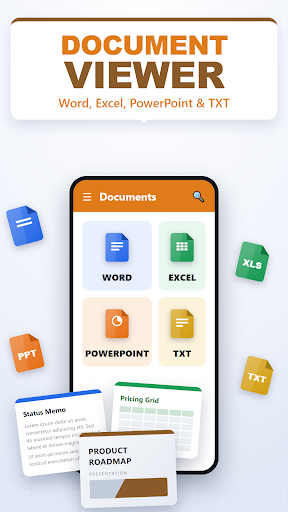
DOCUMENT READER
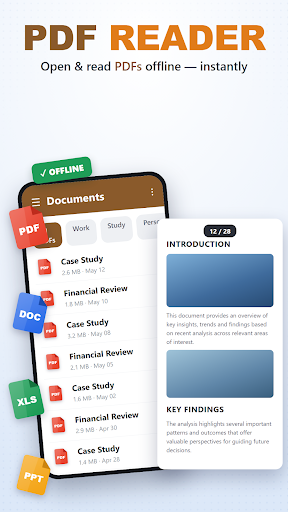
- PDF viewer: open any PDF and read it right inside the app with smooth,
page-by-page rendering and pinch-to-zoom on every page.
- Word viewer: open DOC and DOCX files.
- Excel viewer: open XLS and XLSX spreadsheets.
- PowerPoint viewer: open PPT and PPTX slide decks.
- Text viewer: open TXT files with automatic character-encoding detection.
- Documents are colour-coded by type so you always know what you are opening.
FILE MANAGER
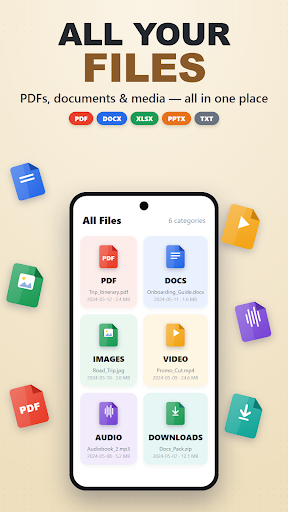
- Browse your storage grouped into clear categories: Images, Videos, Audio,
Documents, APKs, Archives and Downloads.
- Each category shows a live file count and total size.
- Select multiple files and delete them in one go, with a confirmation step so
nothing is removed by accident.
- Tap any file to open it in the right built-in viewer.
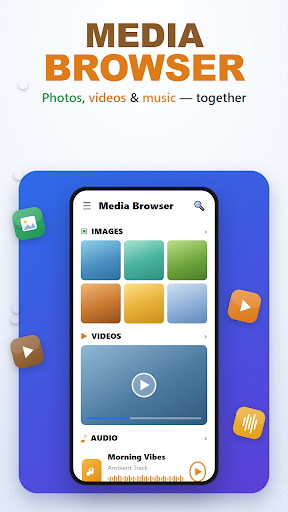
MEDIA, TOO
- Image viewer with pinch-to-zoom.
- Built-in video player.
- Built-in audio player with simple transport controls.
DASHBOARD
- See storage used vs. total and RAM used vs. total on animated gauges.
- Quick category tiles get you to your files in a single tap.
FAST & PRIVATE
- No account, no ads, no tracking, no network backend.
- Everything happens on your device - your files never leave your phone
और दिखाएं

1. MEmu इंस्टॉलर को डाउनलोड करें और इंस्टॉलेशन को पूरा करें

2. MEmu शुरू करें फिर होमपेज पर Google Play खोलें

3. Google Play में PDF Viewer - Document Viewer खोजें
Install
4. PDF Viewer - Document Viewer डाउनलोड कर इंस्टॉल करें
5. इंस्टॉल पूरा होने पर आइकन दबाएं

6. MEmu का उपयोग करके अपने कंप्यूटर पर PDF Viewer - Document Viewer का अनुभव करें
MEmu Play सबसे बेहतरीन मुफ़्त Android एमुलेटर है और 5 करोड़ लोग पहले ही इसके शानदार Android ऐप अनुभव का आनंद ले चुके हैं। MEmu 9 वर्चुअलाइज़ेशन तकनीक आपको अपने PC पर हज़ारों Android ऐप्स, यहाँ तक कि सबसे ज़्यादा ग्राफ़िक्स वाले ऐप्स भी, आसानी से चलाने की सुविधा देती है।
असीमित बैटरी या मोबाइल डेटा के साथ बेहतर ग्राफिक्स के साथ बड़ी स्क्रीन; लंबी अवधि।
कीबोर्ड और माउस या गेमपैड के उत्तम नियंत्रण के लिए संपूर्ण कीमैपिंग का समर्थन करता हैं।
एक ही पीसी पर मल्टी-इंस्टेंस मैनेजर के साथ एक समय में कई गेम खाते या कार्य कर सकते हैं।
Use PDF Viewer - Document Viewer on PC by following steps: