Pill Identifier & Med Scanner
अपडेट किया गया
वर्तमान वर्शन
3.0.3
संसाधन

Pill Identifier & Med Scanner पर अपनी मोबाइल डेटा सीमा पार करने को अलविदा कहें और छोटी स्क्रीन की सीमाओं से मुक्त होकर बड़े डिस्प्ले के लाभों का अनुभव करें। अब, आप अपने कीबोर्ड और माउस का उपयोग करके फुल-स्क्रीन मोड में टॉपर्स क्लैन की शक्ति का अनुभव कर सकते हैं। MEmu Play में वे सभी बेहतरीन सुविधाएँ हैं जिनकी आप अपेक्षा करते हैं: त्वरित इंस्टॉलेशन और आसान सेटअप, सहज नियंत्रण, बैटरी की आवश्यकता नहीं, और कोई डेटा या कॉल समय सीमा नहीं। नया MEmu 9 आपके कंप्यूटर पर Pill Identifier & Med Scanner का उपयोग करने के लिए सबसे अच्छा विकल्प है। हमारा मालिकाना मल्टी-इंस्टेंस मैनेजर एक साथ दो या अधिक खातों को चलाने का समर्थन करता है। इससे भी महत्वपूर्ण बात यह है कि हमारा अनूठा इम्यूलेशन इंजन आपके कंप्यूटर के प्रदर्शन का पूरा उपयोग करता है, जिससे एक सहज और निर्बाध अनुभव मिलता है।
और दिखाएं
MEmu Play के साथ PC पर Pill Identifier & Med Scanner इस्तेमाल करने के शानदार अनुभव का आनंद लें। यह एक शक्तिशाली मुफ़्त Android एमुलेटर है जो आपको डेस्कटॉप वर्ज़न के लिए हज़ारों Android ऐप्स उपलब्ध कराता है। दोस्तों से जुड़ने और अपने काम को और भी बेहतर बनाने का आनंद लें! A Pill Identifier & Med Scanner app is designed to help users identify and gather information about various medications quickly and accurately.
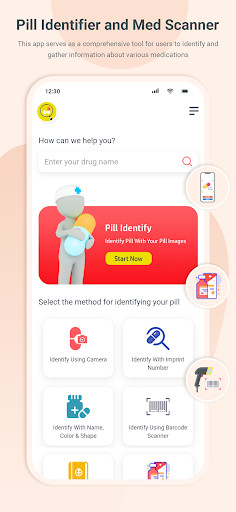
A Pill Identifier & Med Scanner app is designed to help users identify and gather information about various medications quickly and accurately. The primary features of such an app may include:
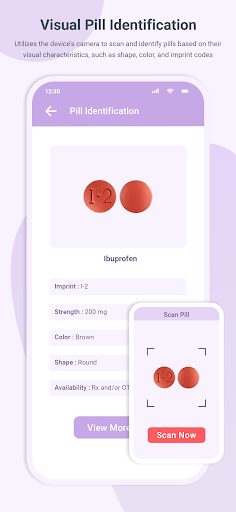
Pill Identification: Utilizes the device's camera to scan and identify pills based on visual characteristics such as shape, color, and imprint codes. Users can take a photo of the pill, and the app will attempt to match it with an extensive database.
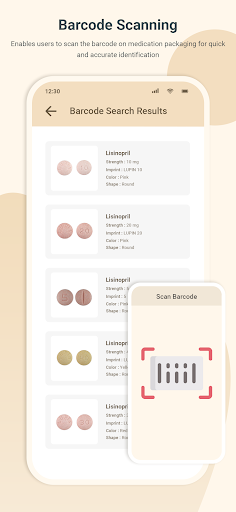
Barcode Scanning: Enables users to scan the barcode on medication packaging for quick and accurate identification. The app retrieves detailed information about the medication, including its name, dosage, and manufacturer.
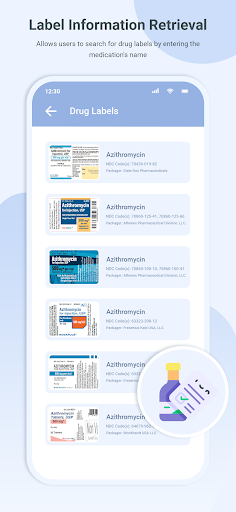
Label Information Retrieval: Allows users to search for drug labels by entering the medication's name or other relevant details. The app retrieves comprehensive information from official drug labels and package inserts.
Medication Information: Provides detailed information about medications commonly prescribed for various conditions, including dosage instructions, potential side effects, and interactions.
Drug Interactions Checker: Features a tool that checks for potential interactions between the scanned medication and other drugs. Users receive alerts about possible contraindications to ensure safety.
Dosage and Usage Guidelines: Provides users with accurate dosage information, usage guidelines, potential side effects, and any relevant warnings associated with the identified medication.
Condition Search and Information: Allows users to search for specific medical conditions, providing detailed information about symptoms, causes, risk factors, and prevalence.
User-Friendly Interface: Features an intuitive and user-friendly interface that allows easy navigation and quick access to relevant information.
Disclaimer:
This Service is designed for use by consumers in the United States. By using this app, you must read the following terms. The features and content of this app, are not meant to be a substitute for professional medical advice, treatment or diagnosis. Do not disregard or delay in getting professional medical advice due to any information you have obtained from this app. The publisher, authors, or any third party data providers associated with this app do not have any responsibility for the use of the information provided in this app.
और दिखाएं

1. MEmu इंस्टॉलर को डाउनलोड करें और इंस्टॉलेशन को पूरा करें

2. MEmu शुरू करें फिर होमपेज पर Google Play खोलें

3. Google Play में Pill Identifier & Med Scanner खोजें
Install
4. Pill Identifier & Med Scanner डाउनलोड कर इंस्टॉल करें
5. इंस्टॉल पूरा होने पर आइकन दबाएं

6. MEmu का उपयोग करके अपने कंप्यूटर पर Pill Identifier & Med Scanner का अनुभव करें
MEmu Play सबसे बेहतरीन मुफ़्त Android एमुलेटर है और 5 करोड़ लोग पहले ही इसके शानदार Android ऐप अनुभव का आनंद ले चुके हैं। MEmu 9 वर्चुअलाइज़ेशन तकनीक आपको अपने PC पर हज़ारों Android ऐप्स, यहाँ तक कि सबसे ज़्यादा ग्राफ़िक्स वाले ऐप्स भी, आसानी से चलाने की सुविधा देती है।
असीमित बैटरी या मोबाइल डेटा के साथ बेहतर ग्राफिक्स के साथ बड़ी स्क्रीन; लंबी अवधि।
कीबोर्ड और माउस या गेमपैड के उत्तम नियंत्रण के लिए संपूर्ण कीमैपिंग का समर्थन करता हैं।
एक ही पीसी पर मल्टी-इंस्टेंस मैनेजर के साथ एक समय में कई गेम खाते या कार्य कर सकते हैं।
Use Pill Identifier & Med Scanner on PC by following steps: