PixVerse AI Generator
अपडेट किया गया
वर्तमान वर्शन
1.6
संसाधन

PixVerse AI Generator पर अपनी मोबाइल डेटा सीमा पार करने को अलविदा कहें और छोटी स्क्रीन की सीमाओं से मुक्त होकर बड़े डिस्प्ले के लाभों का अनुभव करें। अब, आप अपने कीबोर्ड और माउस का उपयोग करके फुल-स्क्रीन मोड में टॉपर्स क्लैन की शक्ति का अनुभव कर सकते हैं। MEmu Play में वे सभी बेहतरीन सुविधाएँ हैं जिनकी आप अपेक्षा करते हैं: त्वरित इंस्टॉलेशन और आसान सेटअप, सहज नियंत्रण, बैटरी की आवश्यकता नहीं, और कोई डेटा या कॉल समय सीमा नहीं। नया MEmu 9 आपके कंप्यूटर पर PixVerse AI Generator का उपयोग करने के लिए सबसे अच्छा विकल्प है। हमारा मालिकाना मल्टी-इंस्टेंस मैनेजर एक साथ दो या अधिक खातों को चलाने का समर्थन करता है। इससे भी महत्वपूर्ण बात यह है कि हमारा अनूठा इम्यूलेशन इंजन आपके कंप्यूटर के प्रदर्शन का पूरा उपयोग करता है, जिससे एक सहज और निर्बाध अनुभव मिलता है।
और दिखाएं
डाउनलोड करें PixVerse AI Generator पीसी पर MEmu एंड्रॉयड एमुलेटर के साथ बड़े पर्दे पर खेलने का आनंद लें। Create Stunning AI Art with Ease!
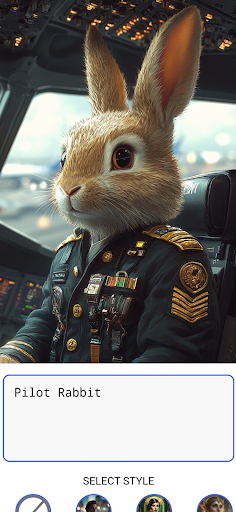
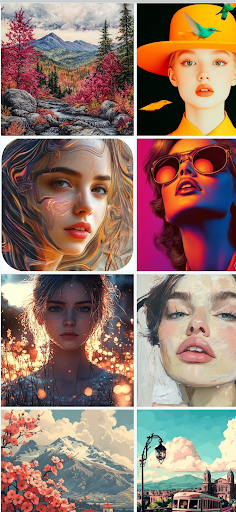
Create Stunning AI Art with Ease!
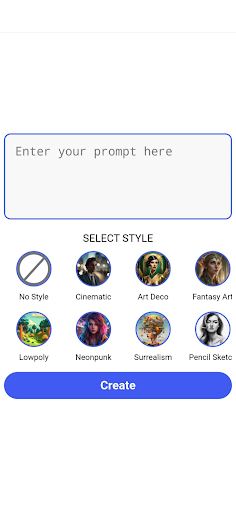
PixVerse AI Generator empowers you to turn simple ideas into beautiful artwork with just a few taps. Enter a prompt, choose from a variety of unique art styles, and watch as PixVerse transforms your imagination into high-quality images instantly!
Key Features
Simple to Use: Just type in your prompt, select an art style, and hit “Create” – it’s that easy!
Variety of Styles: From Fantasy Art to Art Deco, Lowpoly to Surrealism, and more. Discover styles that best express your vision.
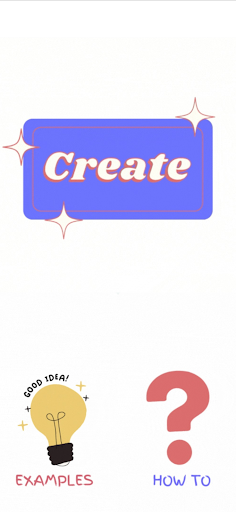
Instant Inspiration: Check out “Examples” for popular prompts and get creative ideas from the PixVerse community.
Interactive Guide: New to AI art? The “How To” section guides you step-by-step to make the most of PixVerse’s features.
High-Resolution Output: Generate images in high definition, perfect for social media, wallpapers, or personal projects.
Endless Possibilities: Create avatars, landscapes, digital art, and more with unlimited combinations.
Why Choose PixVerse AI Generator?
PixVerse stands out with its intuitive design and powerful AI engine, giving you the freedom to create art that reflects your unique style and personality. Whether you’re a hobbyist or a professional, PixVerse makes it easy to bring your ideas to life.
Download PixVerse AI Generator now and join a community of creators transforming ideas into masterpieces. Let your creativity flow, one prompt at a time!
और दिखाएं

1. MEmu इंस्टॉलर को डाउनलोड करें और इंस्टॉलेशन को पूरा करें

2. MEmu शुरू करें फिर होमपेज पर Google Play खोलें

3. Google Play में PixVerse AI Generator खोजें
Install
4. PixVerse AI Generator डाउनलोड कर इंस्टॉल करें
5. इंस्टॉल पूरा होने पर आइकन दबाएं

6. MEmu का उपयोग करके अपने कंप्यूटर पर PixVerse AI Generator का अनुभव करें
MEmu Play सबसे बेहतरीन मुफ़्त Android एमुलेटर है और 5 करोड़ लोग पहले ही इसके शानदार Android ऐप अनुभव का आनंद ले चुके हैं। MEmu 9 वर्चुअलाइज़ेशन तकनीक आपको अपने PC पर हज़ारों Android ऐप्स, यहाँ तक कि सबसे ज़्यादा ग्राफ़िक्स वाले ऐप्स भी, आसानी से चलाने की सुविधा देती है।
असीमित बैटरी या मोबाइल डेटा के साथ बेहतर ग्राफिक्स के साथ बड़ी स्क्रीन; लंबी अवधि।
कीबोर्ड और माउस या गेमपैड के उत्तम नियंत्रण के लिए संपूर्ण कीमैपिंग का समर्थन करता हैं।
एक ही पीसी पर मल्टी-इंस्टेंस मैनेजर के साथ एक समय में कई गेम खाते या कार्य कर सकते हैं।
Use PixVerse AI Generator on PC by following steps: