Proxy Server
अपडेट किया गया
वर्तमान वर्शन
35
संसाधन

Proxy Server पर अपनी मोबाइल डेटा सीमा पार करने को अलविदा कहें और छोटी स्क्रीन की सीमाओं से मुक्त होकर बड़े डिस्प्ले के लाभों का अनुभव करें। अब, आप अपने कीबोर्ड और माउस का उपयोग करके फुल-स्क्रीन मोड में टॉपर्स क्लैन की शक्ति का अनुभव कर सकते हैं। MEmu Play में वे सभी बेहतरीन सुविधाएँ हैं जिनकी आप अपेक्षा करते हैं: त्वरित इंस्टॉलेशन और आसान सेटअप, सहज नियंत्रण, बैटरी की आवश्यकता नहीं, और कोई डेटा या कॉल समय सीमा नहीं। नया MEmu 9 आपके कंप्यूटर पर Proxy Server का उपयोग करने के लिए सबसे अच्छा विकल्प है। हमारा मालिकाना मल्टी-इंस्टेंस मैनेजर एक साथ दो या अधिक खातों को चलाने का समर्थन करता है। इससे भी महत्वपूर्ण बात यह है कि हमारा अनूठा इम्यूलेशन इंजन आपके कंप्यूटर के प्रदर्शन का पूरा उपयोग करता है, जिससे एक सहज और निर्बाध अनुभव मिलता है।
और दिखाएं
MEmu Play के साथ PC पर Proxy Server इस्तेमाल करने के शानदार अनुभव का आनंद लें। यह एक शक्तिशाली मुफ़्त Android एमुलेटर है जो आपको डेस्कटॉप वर्ज़न के लिए हज़ारों Android ऐप्स उपलब्ध कराता है। दोस्तों से जुड़ने और अपने काम को और भी बेहतर बनाने का आनंद लें! This is a tool for geeks.
This is a tool for geeks. If you're a cute girl or a zoomer, just move along.
You can share a VPN connection from your phone to any device that supports a proxy, for example, to a Sony PlayStation.
New info:
1. If you have VPNs set up on your phone, you don't have to pay for each device — you can use a proxy to share the VPN to an unlimited number of devices on your local network.
2. For full immersion, on the devices behind the proxy — delete the default gateway. That way no IPv6 traffic will slip through. If this is too complicated for you, then this utility is not for you.
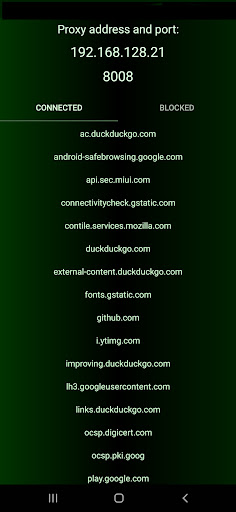
Enter the proxy server address displayed in the settings on the devices whose traffic you want to control.
The main idea is to route traffic from an access point through a proxy.
This opens up the addresses and domains that connected devices, including themselves, access in the background.
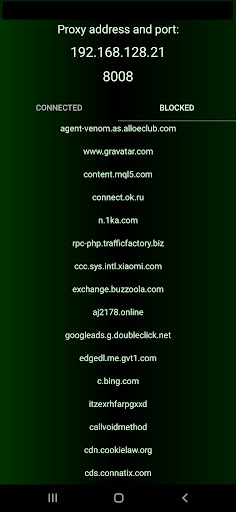
You can block any traffic. But you need to be careful not to break the site layouts. Press & hold on domain names to block or unblock them from the Internet.
You'll discover the amazing world of what your favorite websites and apps are made of, how many different sources everything is pulled from, and how it all comes together, etc.
How to set it up? The app will show you the address and port of its proxy server. Enter these settings in your Windows, and you'll be able to block telemetry, updates, or anything else with it.
The part about TTL is no longer relevant. Providers have been dealt with and no longer penalize for tethering. But it used to be a thing. Saved a lot of money on tethering, for real.
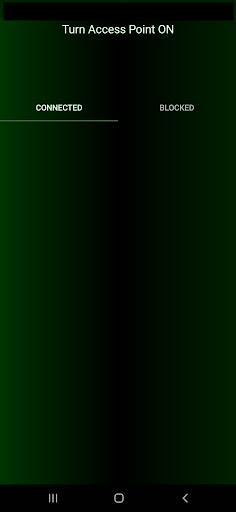
Implemented as a low-power consumption service. When connected to the access point, devices can work through this HTTP/HTTPS proxy server. The TTL of devices connected via the proxy equals the TTL of the device sharing the internet.
There is an option to block any ad networks and unwanted websites.
और दिखाएं

1. MEmu इंस्टॉलर को डाउनलोड करें और इंस्टॉलेशन को पूरा करें

2. MEmu शुरू करें फिर होमपेज पर Google Play खोलें

3. Google Play में Proxy Server खोजें
Install
4. Proxy Server डाउनलोड कर इंस्टॉल करें
5. इंस्टॉल पूरा होने पर आइकन दबाएं

6. MEmu का उपयोग करके अपने कंप्यूटर पर Proxy Server का अनुभव करें
MEmu Play सबसे बेहतरीन मुफ़्त Android एमुलेटर है और 5 करोड़ लोग पहले ही इसके शानदार Android ऐप अनुभव का आनंद ले चुके हैं। MEmu 9 वर्चुअलाइज़ेशन तकनीक आपको अपने PC पर हज़ारों Android ऐप्स, यहाँ तक कि सबसे ज़्यादा ग्राफ़िक्स वाले ऐप्स भी, आसानी से चलाने की सुविधा देती है।
असीमित बैटरी या मोबाइल डेटा के साथ बेहतर ग्राफिक्स के साथ बड़ी स्क्रीन; लंबी अवधि।
कीबोर्ड और माउस या गेमपैड के उत्तम नियंत्रण के लिए संपूर्ण कीमैपिंग का समर्थन करता हैं।
एक ही पीसी पर मल्टी-इंस्टेंस मैनेजर के साथ एक समय में कई गेम खाते या कार्य कर सकते हैं।
Use Proxy Server on PC by following steps: