Uber Russia — order taxis
अपडेट किया गया
वर्तमान वर्शन
1734351035
संसाधन

Uber Russia — order taxis पर अपनी मोबाइल डेटा सीमा पार करने को अलविदा कहें और छोटी स्क्रीन की सीमाओं से मुक्त होकर बड़े डिस्प्ले के लाभों का अनुभव करें। अब, आप अपने कीबोर्ड और माउस का उपयोग करके फुल-स्क्रीन मोड में टॉपर्स क्लैन की शक्ति का अनुभव कर सकते हैं। MEmu Play में वे सभी बेहतरीन सुविधाएँ हैं जिनकी आप अपेक्षा करते हैं: त्वरित इंस्टॉलेशन और आसान सेटअप, सहज नियंत्रण, बैटरी की आवश्यकता नहीं, और कोई डेटा या कॉल समय सीमा नहीं। नया MEmu 9 आपके कंप्यूटर पर Uber Russia — order taxis का उपयोग करने के लिए सबसे अच्छा विकल्प है। हमारा मालिकाना मल्टी-इंस्टेंस मैनेजर एक साथ दो या अधिक खातों को चलाने का समर्थन करता है। इससे भी महत्वपूर्ण बात यह है कि हमारा अनूठा इम्यूलेशन इंजन आपके कंप्यूटर के प्रदर्शन का पूरा उपयोग करता है, जिससे एक सहज और निर्बाध अनुभव मिलता है।
और दिखाएं
डाउनलोड करें Uber Russia — order taxis पीसी पर MEmu एंड्रॉयड एमुलेटर के साथ बड़े पर्दे पर खेलने का आनंद लें। Uber Russia is a smart app for affordable taxi rides.
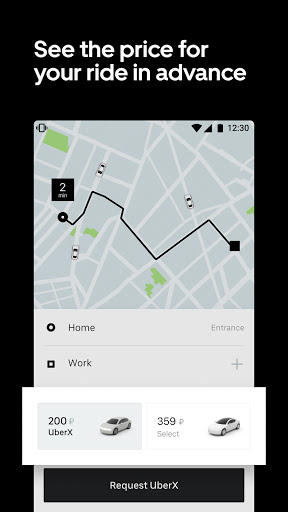
Uber Russia is a smart app for affordable taxi rides. You see the ride fare and route upfront. Just enter your destination and don't worry ever again about parking, fueling up or transport transfers.
Affordable service classes for any occasion
UberX has you covered when you need an affordable ride with fast pickup. If you're looking for a bit more comfort, choose Select for a spacious, smooth running car. When you want the best, go with Black for cars without taxi branding, complimentary bottled water and phone chargers, and professionally dressed drivers willing to go the extra mile. Uber Russia also has a Kids class if you need a child safety or booster seat.
Convenient payment methods
Pay for rides in cash or by card in the app.
Routes with several stops
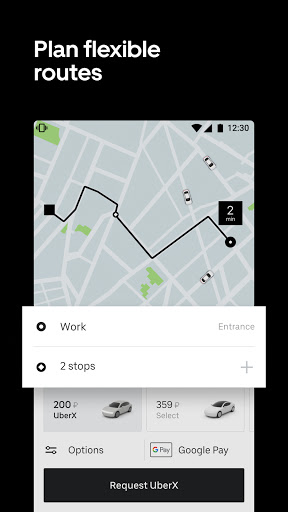
Stop at the store or drop off a friend along the way. You can enter up to 3 addresses before your destination when requesting a ride, and the Uber Russia app will map the optimal route and show you the price upfront.
Ride history
If you accidentally leave something behind after your ride, you can call the driver directly from the app's Ride History section within 24 hours. Here you can also see the car's license plate number, and where you came from and went yesterday, last weekend or a month ago. If you don't need a past ride anymore, you can always delete it.
Favorite places and smart routes
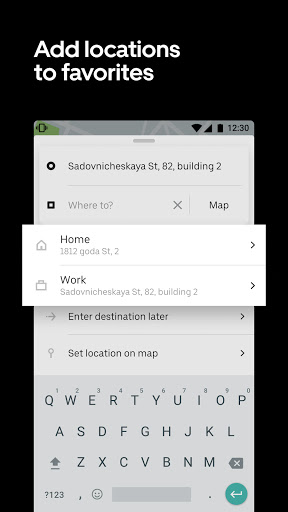
The app always shows the easiest way to reach your taxi or pickup point. Any address or point on the map can be added to your Favorites. They'll be shown as buttons on the ride request screen so you can save time by not having to enter the address manually. The app also suggests where the best pickup spots are (normally within a 2-3 minute walk) to make your trip even faster and more affordable.
You can order taxis in more than 160 cities in Russia, including Moscow, St. Petersburg, Novosibirsk, Yekaterinburg, Nizhny Novgorod, Kazan, Chelyabinsk, Omsk, Samara, Rostov-on-Don, Ufa, Krasnoyarsk, Perm, Voronezh, Volgograd, Krasnodar, and Sochi.
और दिखाएं

1. MEmu इंस्टॉलर को डाउनलोड करें और इंस्टॉलेशन को पूरा करें

2. MEmu शुरू करें फिर होमपेज पर Google Play खोलें

3. Google Play में Uber Russia — order taxis खोजें
Install
4. Uber Russia — order taxis डाउनलोड कर इंस्टॉल करें
5. इंस्टॉल पूरा होने पर आइकन दबाएं

6. MEmu का उपयोग करके अपने कंप्यूटर पर Uber Russia — order taxis का अनुभव करें
MEmu Play सबसे बेहतरीन मुफ़्त Android एमुलेटर है और 5 करोड़ लोग पहले ही इसके शानदार Android ऐप अनुभव का आनंद ले चुके हैं। MEmu 9 वर्चुअलाइज़ेशन तकनीक आपको अपने PC पर हज़ारों Android ऐप्स, यहाँ तक कि सबसे ज़्यादा ग्राफ़िक्स वाले ऐप्स भी, आसानी से चलाने की सुविधा देती है।
असीमित बैटरी या मोबाइल डेटा के साथ बेहतर ग्राफिक्स के साथ बड़ी स्क्रीन; लंबी अवधि।
कीबोर्ड और माउस या गेमपैड के उत्तम नियंत्रण के लिए संपूर्ण कीमैपिंग का समर्थन करता हैं।
एक ही पीसी पर मल्टी-इंस्टेंस मैनेजर के साथ एक समय में कई गेम खाते या कार्य कर सकते हैं।
Use Uber Russia — order taxis on PC by following steps: