Sanskrit Keyboard plugin(IAST)
अपडेट किया गया
वर्तमान वर्शन
1.0
संसाधन

Sanskrit Keyboard plugin(IAST) पर अपनी मोबाइल डेटा सीमा पार करने को अलविदा कहें और छोटी स्क्रीन की सीमाओं से मुक्त होकर बड़े डिस्प्ले के लाभों का अनुभव करें। अब, आप अपने कीबोर्ड और माउस का उपयोग करके फुल-स्क्रीन मोड में टॉपर्स क्लैन की शक्ति का अनुभव कर सकते हैं। MEmu Play में वे सभी बेहतरीन सुविधाएँ हैं जिनकी आप अपेक्षा करते हैं: त्वरित इंस्टॉलेशन और आसान सेटअप, सहज नियंत्रण, बैटरी की आवश्यकता नहीं, और कोई डेटा या कॉल समय सीमा नहीं। नया MEmu 9 आपके कंप्यूटर पर Sanskrit Keyboard plugin(IAST) का उपयोग करने के लिए सबसे अच्छा विकल्प है। हमारा मालिकाना मल्टी-इंस्टेंस मैनेजर एक साथ दो या अधिक खातों को चलाने का समर्थन करता है। इससे भी महत्वपूर्ण बात यह है कि हमारा अनूठा इम्यूलेशन इंजन आपके कंप्यूटर के प्रदर्शन का पूरा उपयोग करता है, जिससे एक सहज और निर्बाध अनुभव मिलता है।
और दिखाएं
डाउनलोड करें Sanskrit Keyboard plugin(IAST) पीसी पर MEmu एंड्रॉयड एमुलेटर के साथ बड़े पर्दे पर खेलने का आनंद लें। Sanskrit (IAST) dictionary plugin for Multiling O Keyboard.
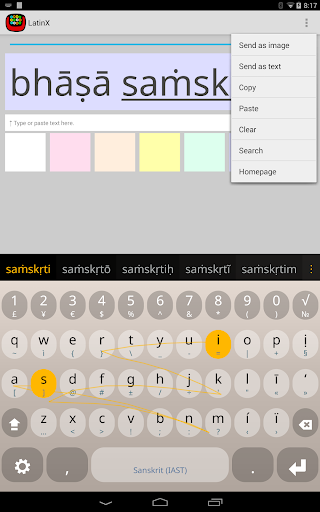
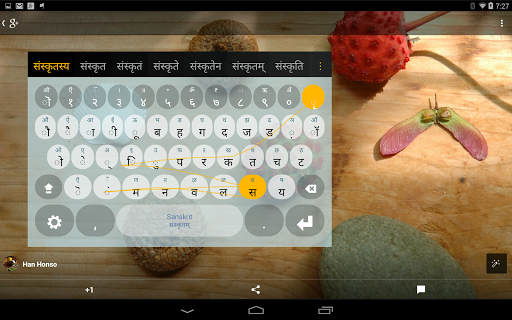
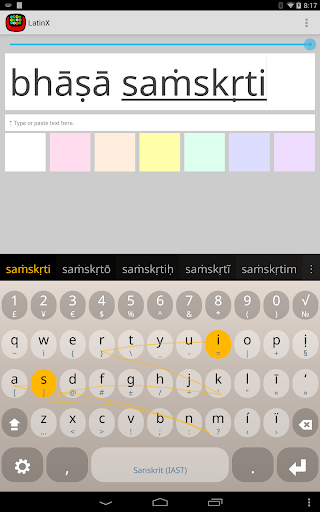
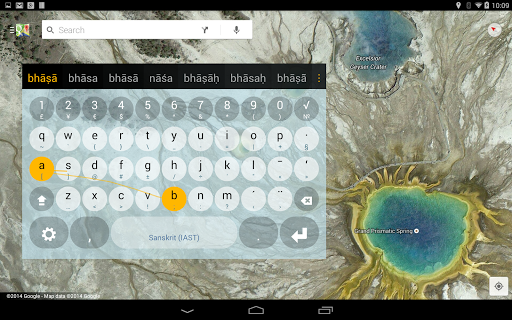
Sanskrit (IAST) dictionary plugin for Multiling O Keyboard. This is not an independent app, please install OKeyboard along with this plugin.
Instruction:
⑴ Install this plugin and Multiling O Keyboard.
⑵ Run O Keyboard and follow its setup guide.
⑶ Slide space bar to switch languages.
Please email if you have any questions.
Wikipedia:
Sanskrit (/ˈsænskrɪt/; संस्कृतम् saṃskṛtam [səmskr̩t̪əm], originally संस्कृता वाक् saṃskṛtā vāk, "refined speech") is the primary liturgical language of Hinduism, a philosophical language in Hinduism, Buddhism, and Jainism, and a scholarly literary language that was in use as a lingua franca in the Indian cultural zone. It is a standardized dialect of Old Indo-Aryan language, originating as Vedic Sanskrit and tracing its linguistic ancestry back to Proto-Indo-Iranian and ultimately to Proto-Indo-European. Today it is listed as one of the 22 scheduled languages of India[4] and is an official language of the state of Uttarakhand.[5] Sanskrit holds a prominent position in Indo-European studies.
The corpus of Sanskrit literature encompasses a rich tradition of poetry and drama as well as scientific, technical, philosophical and dharma texts. Sanskrit continues to be widely used as a ceremonial language in Hindu religious rituals and Buddhist practice in the forms of hymns and mantras. Spoken Sanskrit has been revived in some villages with traditional institutions, and there are attempts at further popularisation.
Photo: Guardian Lake by Romain Guy
और दिखाएं

1. MEmu इंस्टॉलर को डाउनलोड करें और इंस्टॉलेशन को पूरा करें

2. MEmu शुरू करें फिर होमपेज पर Google Play खोलें

3. Google Play में Sanskrit Keyboard plugin(IAST) खोजें
Install
4. Sanskrit Keyboard plugin(IAST) डाउनलोड कर इंस्टॉल करें
5. इंस्टॉल पूरा होने पर आइकन दबाएं

6. MEmu का उपयोग करके अपने कंप्यूटर पर Sanskrit Keyboard plugin(IAST) का अनुभव करें
MEmu Play सबसे बेहतरीन मुफ़्त Android एमुलेटर है और 5 करोड़ लोग पहले ही इसके शानदार Android ऐप अनुभव का आनंद ले चुके हैं। MEmu 9 वर्चुअलाइज़ेशन तकनीक आपको अपने PC पर हज़ारों Android ऐप्स, यहाँ तक कि सबसे ज़्यादा ग्राफ़िक्स वाले ऐप्स भी, आसानी से चलाने की सुविधा देती है।
असीमित बैटरी या मोबाइल डेटा के साथ बेहतर ग्राफिक्स के साथ बड़ी स्क्रीन; लंबी अवधि।
कीबोर्ड और माउस या गेमपैड के उत्तम नियंत्रण के लिए संपूर्ण कीमैपिंग का समर्थन करता हैं।
एक ही पीसी पर मल्टी-इंस्टेंस मैनेजर के साथ एक समय में कई गेम खाते या कार्य कर सकते हैं।
Use Sanskrit Keyboard plugin(IAST) on PC by following steps: