Sketch On Map: Draw Label Pins
अपडेट किया गया
वर्तमान वर्शन
1.0.0
संसाधन

Sketch On Map: Draw Label Pins पर अपनी मोबाइल डेटा सीमा पार करने को अलविदा कहें और छोटी स्क्रीन की सीमाओं से मुक्त होकर बड़े डिस्प्ले के लाभों का अनुभव करें। अब, आप अपने कीबोर्ड और माउस का उपयोग करके फुल-स्क्रीन मोड में टॉपर्स क्लैन की शक्ति का अनुभव कर सकते हैं। MEmu Play में वे सभी बेहतरीन सुविधाएँ हैं जिनकी आप अपेक्षा करते हैं: त्वरित इंस्टॉलेशन और आसान सेटअप, सहज नियंत्रण, बैटरी की आवश्यकता नहीं, और कोई डेटा या कॉल समय सीमा नहीं। नया MEmu 9 आपके कंप्यूटर पर Sketch On Map: Draw Label Pins का उपयोग करने के लिए सबसे अच्छा विकल्प है। हमारा मालिकाना मल्टी-इंस्टेंस मैनेजर एक साथ दो या अधिक खातों को चलाने का समर्थन करता है। इससे भी महत्वपूर्ण बात यह है कि हमारा अनूठा इम्यूलेशन इंजन आपके कंप्यूटर के प्रदर्शन का पूरा उपयोग करता है, जिससे एक सहज और निर्बाध अनुभव मिलता है।
और दिखाएं
MEmu Play के साथ PC पर Sketch On Map: Draw Label Pins इस्तेमाल करने के शानदार अनुभव का आनंद लें। यह एक शक्तिशाली मुफ़्त Android एमुलेटर है जो आपको डेस्कटॉप वर्ज़न के लिए हज़ारों Android ऐप्स उपलब्ध कराता है। दोस्तों से जुड़ने और अपने काम को और भी बेहतर बनाने का आनंद लें! Sketch On Map: Draw, Pin & Label Maps Easily.
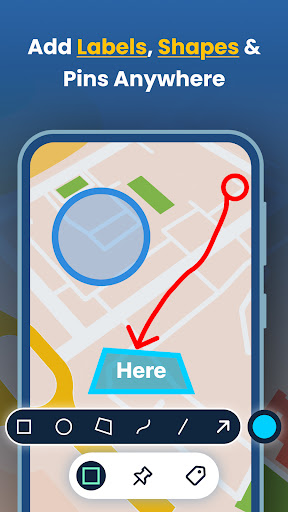
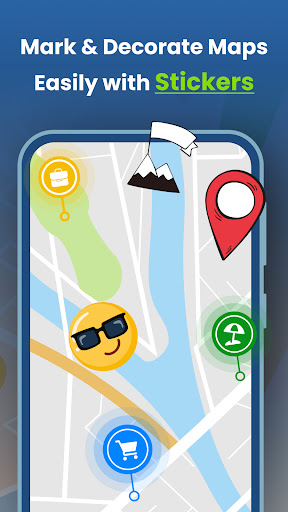
Sketch On Map: Draw, Pin & Label Maps Easily
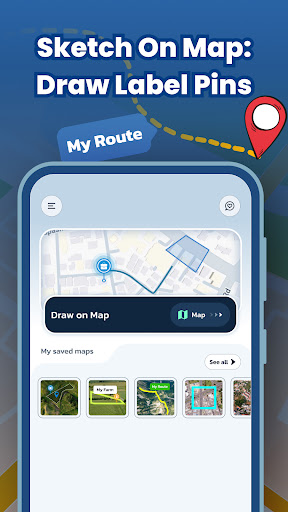
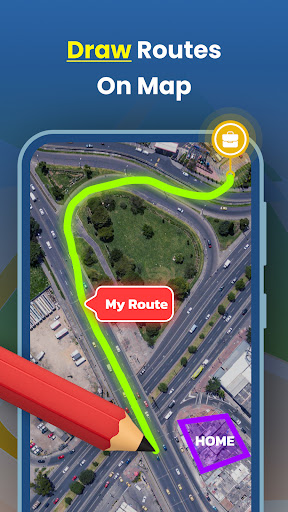
Sketch On Map makes it simple to draw routes, add pins, place labels, highlight areas, and Create & share custom maps easily.
Perfect for trip planners, students, event organizers, delivery teams, real estate work, and anyone who needs a quick custom map editor.
Draw & Sketch on the Map
• Draw routes, shapes, boundaries, and paths directly on the map with your finger
• Create quick sketches for directions, plans, and ideas
• Undo/redo drawing anytime
Highlight Areas with Custom Colors
• Choose from multiple colors
• Mark zones, borders, meeting points, parking areas, restricted areas, etc.
• Add simple shapes to differentiate regions
Add Pins & Map Icons
• Choose from useful pin categories:
Airports
Restaurants
Hotels
Shops
Custom locations
• Name each pin with your own text
• Perfect for route planning and location marking
Add Labels Anywhere
• Place text labels on any map point
• Use labels for directions, notes, landmarks, checkpoints, event spots, etc.
Save Your Maps
• See all your saved custom maps in My Saved Maps
• Edit, rename, or delete maps anytime
• Keep personal and work maps organized
Share Maps (Image or JSON File)
• Export your custom map as an image to send anywhere
• Or share as a JSON map file
• Anyone with this app can import the JSON file and see the exact same pins, drawings, shapes, and labels
Popular Ways People Use This App
Trip & Vacation Planning
Mark airports, hotels, and routes; share with family/friends.
Event Planning
Highlight parking, entry gates, stalls, meeting points and send as an image.
School & College Projects
Draw boundaries, highlight areas, label important places for geography or map studies.
Professional Use
Delivery routes, real estate plots, customer locations, service points, work mapping, and field tasks.
Personal Use
Mark places to visit, plan running/cycling routes.
Draw, Pin, Label & Share — Your Custom Map Editor in One App.
Permission:
Location Permission : We required this permission to show current location on map.
और दिखाएं

1. MEmu इंस्टॉलर को डाउनलोड करें और इंस्टॉलेशन को पूरा करें

2. MEmu शुरू करें फिर होमपेज पर Google Play खोलें

3. Google Play में Sketch On Map: Draw Label Pins खोजें
Install
4. Sketch On Map: Draw Label Pins डाउनलोड कर इंस्टॉल करें
5. इंस्टॉल पूरा होने पर आइकन दबाएं

6. MEmu का उपयोग करके अपने कंप्यूटर पर Sketch On Map: Draw Label Pins का अनुभव करें
MEmu Play सबसे बेहतरीन मुफ़्त Android एमुलेटर है और 5 करोड़ लोग पहले ही इसके शानदार Android ऐप अनुभव का आनंद ले चुके हैं। MEmu 9 वर्चुअलाइज़ेशन तकनीक आपको अपने PC पर हज़ारों Android ऐप्स, यहाँ तक कि सबसे ज़्यादा ग्राफ़िक्स वाले ऐप्स भी, आसानी से चलाने की सुविधा देती है।
असीमित बैटरी या मोबाइल डेटा के साथ बेहतर ग्राफिक्स के साथ बड़ी स्क्रीन; लंबी अवधि।
कीबोर्ड और माउस या गेमपैड के उत्तम नियंत्रण के लिए संपूर्ण कीमैपिंग का समर्थन करता हैं।
एक ही पीसी पर मल्टी-इंस्टेंस मैनेजर के साथ एक समय में कई गेम खाते या कार्य कर सकते हैं।
Use Sketch On Map: Draw Label Pins on PC by following steps: