TAGG NEO
अपडेट किया गया
वर्तमान वर्शन
1.0.12
संसाधन

TAGG NEO पर अपनी मोबाइल डेटा सीमा पार करने को अलविदा कहें और छोटी स्क्रीन की सीमाओं से मुक्त होकर बड़े डिस्प्ले के लाभों का अनुभव करें। अब, आप अपने कीबोर्ड और माउस का उपयोग करके फुल-स्क्रीन मोड में टॉपर्स क्लैन की शक्ति का अनुभव कर सकते हैं। MEmu Play में वे सभी बेहतरीन सुविधाएँ हैं जिनकी आप अपेक्षा करते हैं: त्वरित इंस्टॉलेशन और आसान सेटअप, सहज नियंत्रण, बैटरी की आवश्यकता नहीं, और कोई डेटा या कॉल समय सीमा नहीं। नया MEmu 9 आपके कंप्यूटर पर TAGG NEO का उपयोग करने के लिए सबसे अच्छा विकल्प है। हमारा मालिकाना मल्टी-इंस्टेंस मैनेजर एक साथ दो या अधिक खातों को चलाने का समर्थन करता है। इससे भी महत्वपूर्ण बात यह है कि हमारा अनूठा इम्यूलेशन इंजन आपके कंप्यूटर के प्रदर्शन का पूरा उपयोग करता है, जिससे एक सहज और निर्बाध अनुभव मिलता है।
और दिखाएं
डाउनलोड करें TAGG NEO पीसी पर MEmu एंड्रॉयड एमुलेटर के साथ बड़े पर्दे पर खेलने का आनंद लें। ** The app needs to be connected to the TAGG NEO smartwatch **.

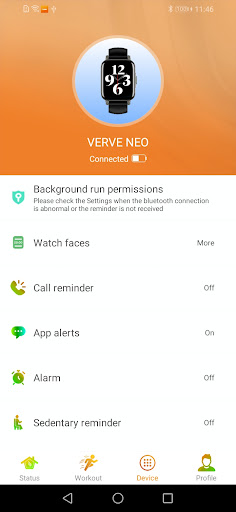
** The app needs to be connected to the TAGG NEO smartwatch **
Main functions:
** After binding with SN90/SN92 and other watches, you can make/answer calls, receive SMS, and remind of missed calls, etc. ****
Notification bar message reminder (telephone, SMS, APP message, etc.), so you won't miss important events **
** Enable phone reminder and SMS reminder function, will request permission **
Other functions:
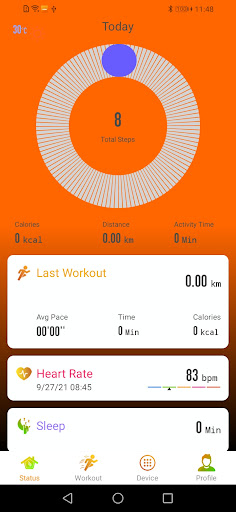
- Recording activity data in real time and summarizing weekly and monthly dynamic trend charts;
- Real-time monitoring of heart rate and monitoring of physical conditions;
-Track your sleep cycles to stay energized;
- Set daily reminders (drink water, sit for too long) to reduce sub-health;-Set daily exercise goals and push yourself;- dial market,
choose your favorite dial;
- Two-way search (looking for phone, looking for watch) - Remote control of phone (playing music, watching, taking photos)
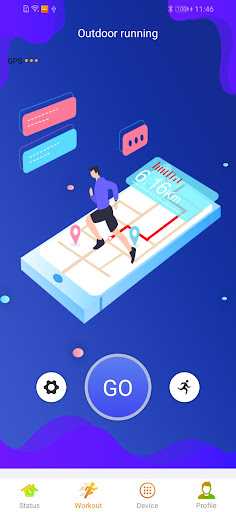
- Record of sports performance (15 sports, e.g. cycling, running)
Description of permissions: Since APP needs to complete the call notification, call receiving, caller name and other functions to
connect the device, it needs to obtain the user's call record and other relevant permissions (READ_CALL_LOG), but it will not violate
the user's privacy to obtain the user's call record through this permission (please rest assured).
और दिखाएं

1. MEmu इंस्टॉलर को डाउनलोड करें और इंस्टॉलेशन को पूरा करें

2. MEmu शुरू करें फिर होमपेज पर Google Play खोलें

3. Google Play में TAGG NEO खोजें
Install
4. TAGG NEO डाउनलोड कर इंस्टॉल करें
5. इंस्टॉल पूरा होने पर आइकन दबाएं

6. MEmu का उपयोग करके अपने कंप्यूटर पर TAGG NEO का अनुभव करें
MEmu Play सबसे बेहतरीन मुफ़्त Android एमुलेटर है और 5 करोड़ लोग पहले ही इसके शानदार Android ऐप अनुभव का आनंद ले चुके हैं। MEmu 9 वर्चुअलाइज़ेशन तकनीक आपको अपने PC पर हज़ारों Android ऐप्स, यहाँ तक कि सबसे ज़्यादा ग्राफ़िक्स वाले ऐप्स भी, आसानी से चलाने की सुविधा देती है।
असीमित बैटरी या मोबाइल डेटा के साथ बेहतर ग्राफिक्स के साथ बड़ी स्क्रीन; लंबी अवधि।
कीबोर्ड और माउस या गेमपैड के उत्तम नियंत्रण के लिए संपूर्ण कीमैपिंग का समर्थन करता हैं।
एक ही पीसी पर मल्टी-इंस्टेंस मैनेजर के साथ एक समय में कई गेम खाते या कार्य कर सकते हैं।
Use TAGG NEO on PC by following steps: