Aviva Wellness360
अपडेट किया गया
वर्तमान वर्शन
1.1.7
संसाधन

Aviva Wellness360 पर अपनी मोबाइल डेटा सीमा पार करने को अलविदा कहें और छोटी स्क्रीन की सीमाओं से मुक्त होकर बड़े डिस्प्ले के लाभों का अनुभव करें। अब, आप अपने कीबोर्ड और माउस का उपयोग करके फुल-स्क्रीन मोड में टॉपर्स क्लैन की शक्ति का अनुभव कर सकते हैं। MEmu Play में वे सभी बेहतरीन सुविधाएँ हैं जिनकी आप अपेक्षा करते हैं: त्वरित इंस्टॉलेशन और आसान सेटअप, सहज नियंत्रण, बैटरी की आवश्यकता नहीं, और कोई डेटा या कॉल समय सीमा नहीं। नया MEmu 9 आपके कंप्यूटर पर Aviva Wellness360 का उपयोग करने के लिए सबसे अच्छा विकल्प है। हमारा मालिकाना मल्टी-इंस्टेंस मैनेजर एक साथ दो या अधिक खातों को चलाने का समर्थन करता है। इससे भी महत्वपूर्ण बात यह है कि हमारा अनूठा इम्यूलेशन इंजन आपके कंप्यूटर के प्रदर्शन का पूरा उपयोग करता है, जिससे एक सहज और निर्बाध अनुभव मिलता है।
और दिखाएं
MEmu Play के साथ PC पर Aviva Wellness360 इस्तेमाल करने के शानदार अनुभव का आनंद लें। यह एक शक्तिशाली मुफ़्त Android एमुलेटर है जो आपको डेस्कटॉप वर्ज़न के लिए हज़ारों Android ऐप्स उपलब्ध कराता है। दोस्तों से जुड़ने और अपने काम को और भी बेहतर बनाने का आनंद लें! Aviva Wellness360 is a comprehensive digital platform designed to support your everyday lifestyle, wellness routines, and financial planning — all in one place.
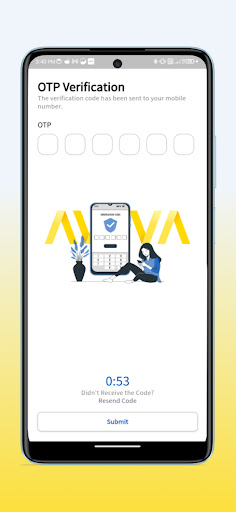
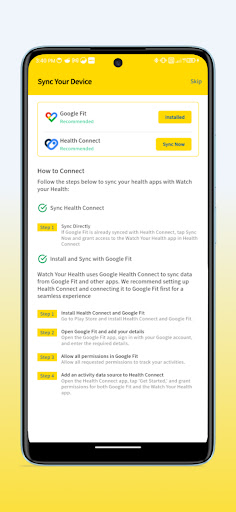
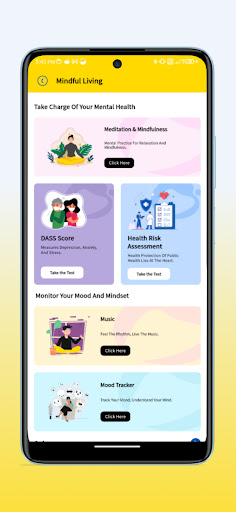
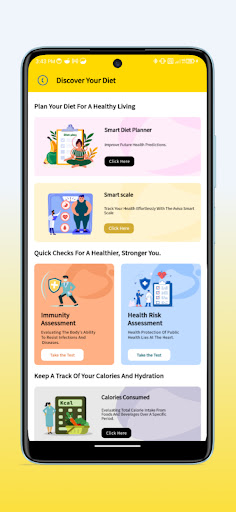
Aviva Wellness360 is a comprehensive digital platform designed to support your everyday lifestyle, wellness routines, and financial planning — all in one place. With smart tracking tools, engaging challenges, and personalized insights, it helps you stay informed, motivated, and consistent on your wellbeing journey.
Lifestyle & Activity Tracking
● Track steps, activity levels, sleep patterns, hydration, and daily routines
● Participate in walkathons, challenges, and community events
● Monitor progress toward your personal wellness goals
Smart Integrations
● Connect compatible Aviva Smart Vitals devices to sync lifestyle and activity data
● Use FaceScan technology to receive general wellness insights based on facial markers
● View your information in a simplified dashboard designed for everyday awareness
Mind & Wellness Resources
Access curated tools and content to support overall wellbeing, including:
● Guided relaxation and mindfulness sessions
● Mood tracking tools
● Nutrition planners and calorie tracking
● Self-reflection questionnaires and interactive wellness content
● Articles, blogs, quizzes, and videos from wellness contributors
Financial Planning Tools
Plan ahead with easy-to-use financial calculators for:
● Child education planning
● Retirement preparation
● Long-term savings and wealth creation
Personalized Experience
Enjoy an intuitive interface with reminders, progress summaries, and tailored suggestions to help you stay consistent and motivated.
Community Engagement
Join group challenges, share milestones, and be part of a growing community focused on healthy living and financial preparedness.
Aviva Wellness360 brings together lifestyle tracking, self-care resources, and financial planning tools in one seamless experience — designed to support everyday wellbeing.
Disclaimer
Aviva Wellness360 is intended for general wellness, lifestyle tracking, and informational purposes only. The app and its features, including FaceScan and connected device integrations, are not medical devices and are not intended to diagnose, treat, cure, prevent, or manage any medical condition. The information provided within the app should not be considered medical advice. Always consult a qualified healthcare professional for medical concerns or decisions.
और दिखाएं

1. MEmu इंस्टॉलर को डाउनलोड करें और इंस्टॉलेशन को पूरा करें

2. MEmu शुरू करें फिर होमपेज पर Google Play खोलें

3. Google Play में Aviva Wellness360 खोजें
Install
4. Aviva Wellness360 डाउनलोड कर इंस्टॉल करें
5. इंस्टॉल पूरा होने पर आइकन दबाएं

6. MEmu का उपयोग करके अपने कंप्यूटर पर Aviva Wellness360 का अनुभव करें
MEmu Play सबसे बेहतरीन मुफ़्त Android एमुलेटर है और 5 करोड़ लोग पहले ही इसके शानदार Android ऐप अनुभव का आनंद ले चुके हैं। MEmu 9 वर्चुअलाइज़ेशन तकनीक आपको अपने PC पर हज़ारों Android ऐप्स, यहाँ तक कि सबसे ज़्यादा ग्राफ़िक्स वाले ऐप्स भी, आसानी से चलाने की सुविधा देती है।
असीमित बैटरी या मोबाइल डेटा के साथ बेहतर ग्राफिक्स के साथ बड़ी स्क्रीन; लंबी अवधि।
कीबोर्ड और माउस या गेमपैड के उत्तम नियंत्रण के लिए संपूर्ण कीमैपिंग का समर्थन करता हैं।
एक ही पीसी पर मल्टी-इंस्टेंस मैनेजर के साथ एक समय में कई गेम खाते या कार्य कर सकते हैं।
Use Aviva Wellness360 on PC by following steps: