TM Tunnel VPN - Fast & Secure
अपडेट किया गया
वर्तमान वर्शन
1.9
संसाधन

TM Tunnel VPN - Fast & Secure पर अपनी मोबाइल डेटा सीमा पार करने को अलविदा कहें और छोटी स्क्रीन की सीमाओं से मुक्त होकर बड़े डिस्प्ले के लाभों का अनुभव करें। अब, आप अपने कीबोर्ड और माउस का उपयोग करके फुल-स्क्रीन मोड में टॉपर्स क्लैन की शक्ति का अनुभव कर सकते हैं। MEmu Play में वे सभी बेहतरीन सुविधाएँ हैं जिनकी आप अपेक्षा करते हैं: त्वरित इंस्टॉलेशन और आसान सेटअप, सहज नियंत्रण, बैटरी की आवश्यकता नहीं, और कोई डेटा या कॉल समय सीमा नहीं। नया MEmu 9 आपके कंप्यूटर पर TM Tunnel VPN - Fast & Secure का उपयोग करने के लिए सबसे अच्छा विकल्प है। हमारा मालिकाना मल्टी-इंस्टेंस मैनेजर एक साथ दो या अधिक खातों को चलाने का समर्थन करता है। इससे भी महत्वपूर्ण बात यह है कि हमारा अनूठा इम्यूलेशन इंजन आपके कंप्यूटर के प्रदर्शन का पूरा उपयोग करता है, जिससे एक सहज और निर्बाध अनुभव मिलता है।
और दिखाएं
डाउनलोड करें TM Tunnel VPN - Fast & Secure पीसी पर MEmu एंड्रॉयड एमुलेटर के साथ बड़े पर्दे पर खेलने का आनंद लें। TM Tunnel VPN - Unlimited Free VPN for Android It is an unlimited free and secure VPN app to browse all blocked websites, watch all videos, unblock the social network open mobile games, access the messaging apps, protect privacy and security under hotspot or any network condition.
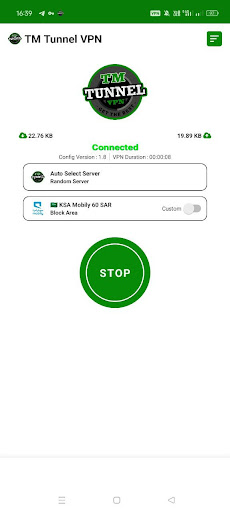
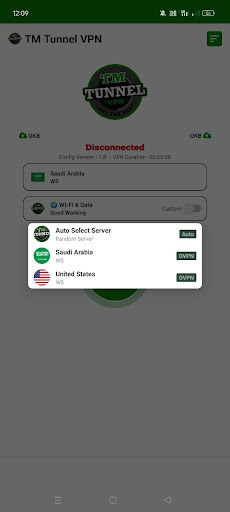
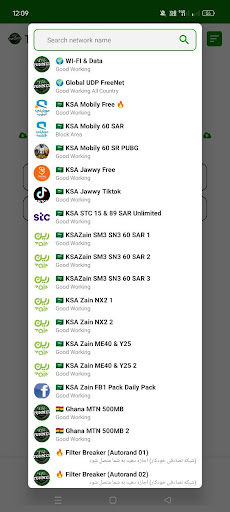
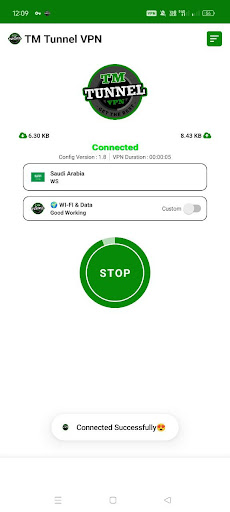
TM Tunnel VPN - Unlimited Free VPN for Android It is an unlimited free and secure VPN app to browse all blocked websites, watch all videos, unblock the social network open mobile games, access the messaging apps, protect privacy and security under hotspot or any network condition.
* Protect your privacy, keep you safe from 3rd party tracking
* Unblock geographically restricted websites
* No registration required, no settings required
* No speed limitation, no bandwidth limitation
* One-click to connect to VPN
* No root access needed
* Encrypt your internet traffic
* Top server speed & reliability
और दिखाएं

1. MEmu इंस्टॉलर को डाउनलोड करें और इंस्टॉलेशन को पूरा करें

2. MEmu शुरू करें फिर होमपेज पर Google Play खोलें

3. Google Play में TM Tunnel VPN - Fast & Secure खोजें
Install
4. TM Tunnel VPN - Fast & Secure डाउनलोड कर इंस्टॉल करें
5. इंस्टॉल पूरा होने पर आइकन दबाएं

6. MEmu का उपयोग करके अपने कंप्यूटर पर TM Tunnel VPN - Fast & Secure का अनुभव करें
MEmu Play सबसे बेहतरीन मुफ़्त Android एमुलेटर है और 5 करोड़ लोग पहले ही इसके शानदार Android ऐप अनुभव का आनंद ले चुके हैं। MEmu 9 वर्चुअलाइज़ेशन तकनीक आपको अपने PC पर हज़ारों Android ऐप्स, यहाँ तक कि सबसे ज़्यादा ग्राफ़िक्स वाले ऐप्स भी, आसानी से चलाने की सुविधा देती है।
असीमित बैटरी या मोबाइल डेटा के साथ बेहतर ग्राफिक्स के साथ बड़ी स्क्रीन; लंबी अवधि।
कीबोर्ड और माउस या गेमपैड के उत्तम नियंत्रण के लिए संपूर्ण कीमैपिंग का समर्थन करता हैं।
एक ही पीसी पर मल्टी-इंस्टेंस मैनेजर के साथ एक समय में कई गेम खाते या कार्य कर सकते हैं।
Use TM Tunnel VPN - Fast & Secure on PC by following steps: