TRAE
अपडेट किया गया
वर्तमान वर्शन
0.0.2
संसाधन

TRAE पर अपनी मोबाइल डेटा सीमा पार करने को अलविदा कहें और छोटी स्क्रीन की सीमाओं से मुक्त होकर बड़े डिस्प्ले के लाभों का अनुभव करें। अब, आप अपने कीबोर्ड और माउस का उपयोग करके फुल-स्क्रीन मोड में टॉपर्स क्लैन की शक्ति का अनुभव कर सकते हैं। MEmu Play में वे सभी बेहतरीन सुविधाएँ हैं जिनकी आप अपेक्षा करते हैं: त्वरित इंस्टॉलेशन और आसान सेटअप, सहज नियंत्रण, बैटरी की आवश्यकता नहीं, और कोई डेटा या कॉल समय सीमा नहीं। नया MEmu 9 आपके कंप्यूटर पर TRAE का उपयोग करने के लिए सबसे अच्छा विकल्प है। हमारा मालिकाना मल्टी-इंस्टेंस मैनेजर एक साथ दो या अधिक खातों को चलाने का समर्थन करता है। इससे भी महत्वपूर्ण बात यह है कि हमारा अनूठा इम्यूलेशन इंजन आपके कंप्यूटर के प्रदर्शन का पूरा उपयोग करता है, जिससे एक सहज और निर्बाध अनुभव मिलता है।
और दिखाएं
MEmu Play के साथ PC पर TRAE इस्तेमाल करने के शानदार अनुभव का आनंद लें। यह एक शक्तिशाली मुफ़्त Android एमुलेटर है जो आपको डेस्कटॉप वर्ज़न के लिए हज़ारों Android ऐप्स उपलब्ध कराता है। दोस्तों से जुड़ने और अपने काम को और भी बेहतर बनाने का आनंद लें! TRAE is a cross-device AI work assistant designed for real-world workflows.

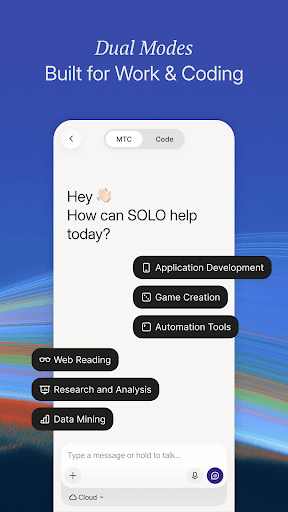
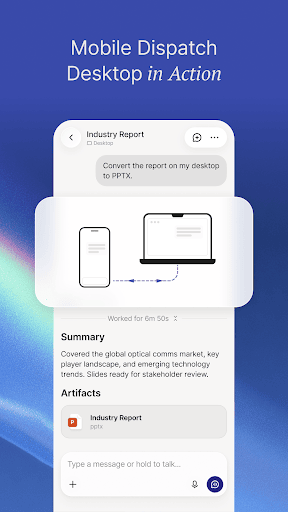
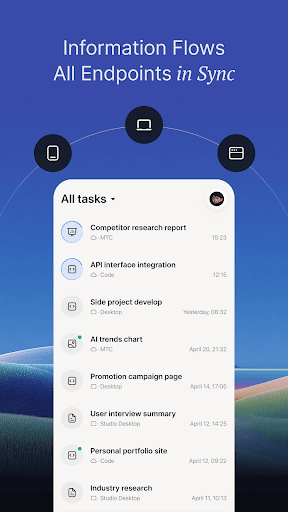
TRAE is a cross-device AI work assistant designed for real-world workflows. Dispatch tasks from your phone to the cloud or your personal computer anytime, anywhere — AI Agents handle the entire process from idea to delivery automatically.
[Core Features]
1. Cross-Device Task Dispatch: Send AI tasks to cloud environments or multiple paired personal computers. No matter where you are, a single message kicks off complex tasks — coding, document generation, data analysis, report compilation — AI executes remotely and syncs results in real time.
2. Voice & Text Input: Supports both voice and text input. Speak your ideas to trigger AI execution during commutes, between meetings, or whenever inspiration strikes.
3. Dual-Mode for Every Scenario
- Code Mode: Built for developers — code generation, unit test completion, code review, API documentation. Connect to GitHub for working on existing projects.
- MTC Mode: For general work tasks — competitive analysis, campaign copy, data reports, meeting summaries, and more. Covers product, operations, and design workflows.
4. Multi-Device Management: Manage multiple execution environments (cloud sandboxes and personal computers) from one account. Monitor all task progress from your phone with concurrent task scheduling.
5. Real-Time Task Tracking: View execution status for every task (In Progress / Action Needed / Completed) with sub-step progress display. Tasks continue running in the background with push notifications for key milestones.
6. Artifact Preview & File Management: Preview AI-generated code, documents, and charts directly on your phone. View code changes with Unified Diff View and stay on top of deliverables.
7. Device Pairing & Secure Authorization: Pair your computer via scan or command with folder-level authorization management for secure data control.
[Who Is It For]
- Engineers & Developers: Concurrent multi-device scheduling, async task handoffs, instant CI fixes and code generation on the go.
- Product & Operations: Trigger document compilation, competitive analysis, and data reports away from your desk — dispatch now, use at your workstation.
- Designers & Creatives: Capture ideas instantly, voice-dispatch tasks and let AI auto-complete context and draft for you.
और दिखाएं

1. MEmu इंस्टॉलर को डाउनलोड करें और इंस्टॉलेशन को पूरा करें

2. MEmu शुरू करें फिर होमपेज पर Google Play खोलें

3. Google Play में TRAE खोजें
Install
4. TRAE डाउनलोड कर इंस्टॉल करें
5. इंस्टॉल पूरा होने पर आइकन दबाएं

6. MEmu का उपयोग करके अपने कंप्यूटर पर TRAE का अनुभव करें
MEmu Play सबसे बेहतरीन मुफ़्त Android एमुलेटर है और 5 करोड़ लोग पहले ही इसके शानदार Android ऐप अनुभव का आनंद ले चुके हैं। MEmu 9 वर्चुअलाइज़ेशन तकनीक आपको अपने PC पर हज़ारों Android ऐप्स, यहाँ तक कि सबसे ज़्यादा ग्राफ़िक्स वाले ऐप्स भी, आसानी से चलाने की सुविधा देती है।
असीमित बैटरी या मोबाइल डेटा के साथ बेहतर ग्राफिक्स के साथ बड़ी स्क्रीन; लंबी अवधि।
कीबोर्ड और माउस या गेमपैड के उत्तम नियंत्रण के लिए संपूर्ण कीमैपिंग का समर्थन करता हैं।
एक ही पीसी पर मल्टी-इंस्टेंस मैनेजर के साथ एक समय में कई गेम खाते या कार्य कर सकते हैं।
Use TRAE on PC by following steps: