UGREEN NAS
अपडेट किया गया
वर्तमान वर्शन
1.13.0
संसाधन

UGREEN NAS पर अपनी मोबाइल डेटा सीमा पार करने को अलविदा कहें और छोटी स्क्रीन की सीमाओं से मुक्त होकर बड़े डिस्प्ले के लाभों का अनुभव करें। अब, आप अपने कीबोर्ड और माउस का उपयोग करके फुल-स्क्रीन मोड में टॉपर्स क्लैन की शक्ति का अनुभव कर सकते हैं। MEmu Play में वे सभी बेहतरीन सुविधाएँ हैं जिनकी आप अपेक्षा करते हैं: त्वरित इंस्टॉलेशन और आसान सेटअप, सहज नियंत्रण, बैटरी की आवश्यकता नहीं, और कोई डेटा या कॉल समय सीमा नहीं। नया MEmu 9 आपके कंप्यूटर पर UGREEN NAS का उपयोग करने के लिए सबसे अच्छा विकल्प है। हमारा मालिकाना मल्टी-इंस्टेंस मैनेजर एक साथ दो या अधिक खातों को चलाने का समर्थन करता है। इससे भी महत्वपूर्ण बात यह है कि हमारा अनूठा इम्यूलेशन इंजन आपके कंप्यूटर के प्रदर्शन का पूरा उपयोग करता है, जिससे एक सहज और निर्बाध अनुभव मिलता है।
और दिखाएं
MEmu Play के साथ PC पर UGREEN NAS इस्तेमाल करने के शानदार अनुभव का आनंद लें। यह एक शक्तिशाली मुफ़्त Android एमुलेटर है जो आपको डेस्कटॉप वर्ज़न के लिए हज़ारों Android ऐप्स उपलब्ध कराता है। दोस्तों से जुड़ने और अपने काम को और भी बेहतर बनाने का आनंद लें! UGREEN NAS - an efficient application designed for UGOS Pro system management.
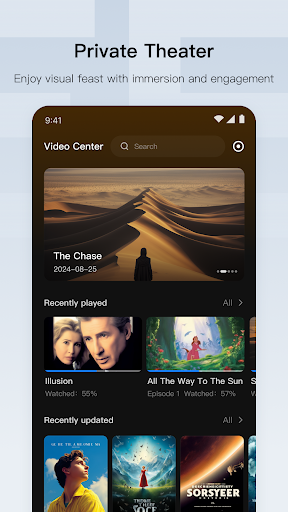
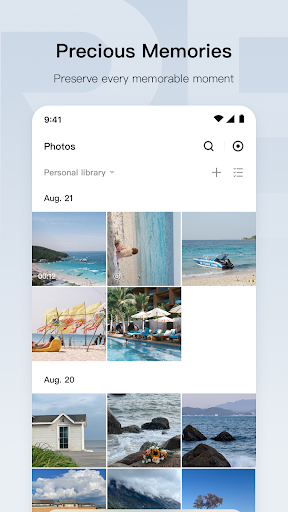
UGREEN NAS - an efficient application designed for UGOS Pro system management. It empowers you to manage your personal data seamlessly across all your devices and thus enjoy a smarter, more personalized experience.
【Control Panel】
• User Management: Assign access permissions flexibly.
• Hardware & Power: Configure buzzer, fan, and hard drive sleep modes, etc.
• Network: Set up internal/external network connections and web server configurations.
• File Service: Configure file protocols, including SMB, FTP, NFS, etc.
• Update & Restore: Online update system and restore configuration.
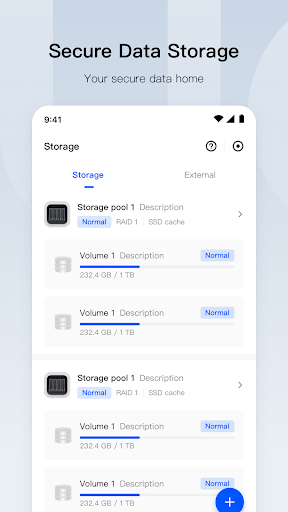
【Storage】
• Supports multiple storage modes: Basic, JBOD, and RAID modes.
• Visual monitoring of hard drives, volumes, and SSD caches.
• Online capacity expansion with Hot Spare support for enhanced security and speed.
• Intelligent monitoring of hard drive status and storage capacity.
【App Center】
• Filter by usage scenarios and download desired applications.
• Supports offline manual installation.
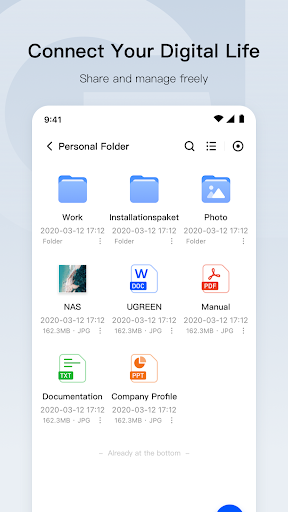
【Files】
• Intelligent filter, search, and file categorization features.
• One-click file sharing. Supports accessing contents in sharing links without login.
• Supports adjusting user access permissions for shared folders.
• Supports accessing via multiple protocols (e.g.: SMB, FTP, and WebDAV).
【Photos】
• View your photos and videos in timeline view and custom your personal people album.
• Custom conditions to create albums to manage cherished moments.
• Display sources and detailed information of photos and videos.
【Theater】
• Automatically generate elaborate poster walls and build your personal library.
• Supports filtering by film names, actors, etc.
• Match film information accurately.
• Automatically categorize series films for a seamless experience.
【Security】
• Integrated ClamAV engine for full virus scanning.
• Supports scheduled scan and real-time protection for data security.
और दिखाएं

1. MEmu इंस्टॉलर को डाउनलोड करें और इंस्टॉलेशन को पूरा करें

2. MEmu शुरू करें फिर होमपेज पर Google Play खोलें

3. Google Play में UGREEN NAS खोजें
Install
4. UGREEN NAS डाउनलोड कर इंस्टॉल करें
5. इंस्टॉल पूरा होने पर आइकन दबाएं

6. MEmu का उपयोग करके अपने कंप्यूटर पर UGREEN NAS का अनुभव करें
MEmu Play सबसे बेहतरीन मुफ़्त Android एमुलेटर है और 5 करोड़ लोग पहले ही इसके शानदार Android ऐप अनुभव का आनंद ले चुके हैं। MEmu 9 वर्चुअलाइज़ेशन तकनीक आपको अपने PC पर हज़ारों Android ऐप्स, यहाँ तक कि सबसे ज़्यादा ग्राफ़िक्स वाले ऐप्स भी, आसानी से चलाने की सुविधा देती है।
असीमित बैटरी या मोबाइल डेटा के साथ बेहतर ग्राफिक्स के साथ बड़ी स्क्रीन; लंबी अवधि।
कीबोर्ड और माउस या गेमपैड के उत्तम नियंत्रण के लिए संपूर्ण कीमैपिंग का समर्थन करता हैं।
एक ही पीसी पर मल्टी-इंस्टेंस मैनेजर के साथ एक समय में कई गेम खाते या कार्य कर सकते हैं।
Use UGREEN NAS on PC by following steps: