UPSC BOOKS : Old & New NCERT
अपडेट किया गया
वर्तमान वर्शन
1.6.0
संसाधन

UPSC BOOKS : Old & New NCERT पर अपनी मोबाइल डेटा सीमा पार करने को अलविदा कहें और छोटी स्क्रीन की सीमाओं से मुक्त होकर बड़े डिस्प्ले के लाभों का अनुभव करें। अब, आप अपने कीबोर्ड और माउस का उपयोग करके फुल-स्क्रीन मोड में टॉपर्स क्लैन की शक्ति का अनुभव कर सकते हैं। MEmu Play में वे सभी बेहतरीन सुविधाएँ हैं जिनकी आप अपेक्षा करते हैं: त्वरित इंस्टॉलेशन और आसान सेटअप, सहज नियंत्रण, बैटरी की आवश्यकता नहीं, और कोई डेटा या कॉल समय सीमा नहीं। नया MEmu 9 आपके कंप्यूटर पर UPSC BOOKS : Old & New NCERT का उपयोग करने के लिए सबसे अच्छा विकल्प है। हमारा मालिकाना मल्टी-इंस्टेंस मैनेजर एक साथ दो या अधिक खातों को चलाने का समर्थन करता है। इससे भी महत्वपूर्ण बात यह है कि हमारा अनूठा इम्यूलेशन इंजन आपके कंप्यूटर के प्रदर्शन का पूरा उपयोग करता है, जिससे एक सहज और निर्बाध अनुभव मिलता है।
और दिखाएं
MEmu Play के साथ PC पर UPSC BOOKS : Old & New NCERT इस्तेमाल करने के शानदार अनुभव का आनंद लें। यह एक शक्तिशाली मुफ़्त Android एमुलेटर है जो आपको डेस्कटॉप वर्ज़न के लिए हज़ारों Android ऐप्स उपलब्ध कराता है। दोस्तों से जुड़ने और अपने काम को और भी बेहतर बनाने का आनंद लें! UPSC BOOKS: Old & New NCERT is a complete and reliable study app designed for aspirants preparing for UPSC Civil Services Examination, State PSC, SSC, Banking, Railway, Defense, and other government job exams in India.
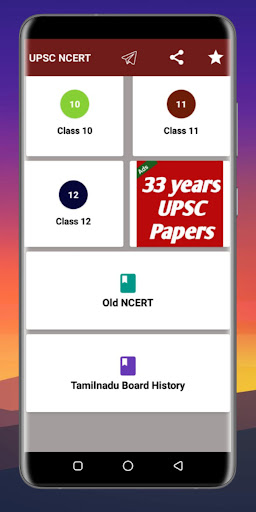
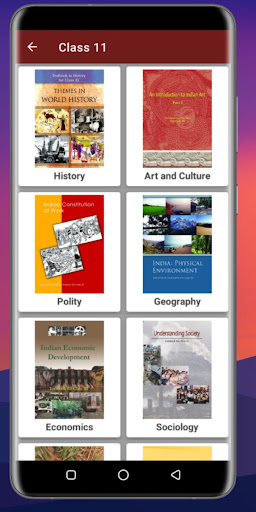
UPSC BOOKS: Old & New NCERT is a complete and reliable study app designed for aspirants preparing for UPSC Civil Services Examination, State PSC, SSC, Banking, Railway, Defense, and other government job exams in India.
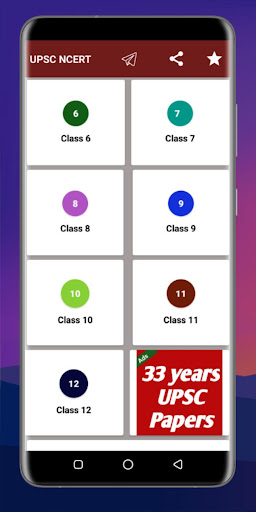
This app provides NCERT Books from Class 6 to Class 12, including both Old NCERT and New NCERT editions, in PDF format with offline access. NCERT books are considered the foundation of UPSC preparation, and almost every UPSC topper recommends reading NCERT multiple times for strong conceptual clarity.
The app helps aspirants build a solid base for UPSC Prelims and Mains by offering authentic, government-approved NCERT textbooks in a simple and organized manner.
Complete NCERT Books Collection
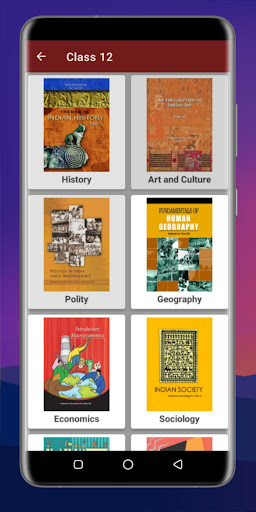
All important NCERT books are available class-wise and subject-wise:
Class 6 to Class 12 NCERT Books
Old NCERT and New NCERT included
Easy navigation and organized structure
Subjects Covered
History NCERT (Ancient, Medieval, Modern, World History)
Geography NCERT (Physical, Indian & World Geography, Environment)
Political Science / Polity NCERT
Economics NCERT
Science NCERT (Physics, Chemistry, Biology basics)
Environment & Ecology
Sociology & Social Science
Mathematics basics
⭐ Key Features
Free UPSC study material
Offline NCERT books – study without internet
Old & New NCERT editions in one app
PDF format for easy reading
Simple and user-friendly interface
Time-saving and portable digital library
Why NCERT is Important for UPSC
UPSC focuses on conceptual understanding, not rote learning. NCERT books:
Explain topics in simple language
Strengthen static portion for Prelims
Help in writing clear answers for Mains
Improve accuracy and eliminate confusion
This app is ideal for beginners starting UPSC preparation as well as advanced aspirants revising NCERT.
Who Should Use This App?
UPSC Civil Services aspirants
State PSC candidates
SSC & Banking aspirants
Railway and Defense exam candidates
Teachers and self-learners
Important Note
This app provides NCERT textbooks only. For complete UPSC preparation, aspirants should also study current affairs, standard reference books, previous year questions, and test series.
Why Choose UPSC BOOKS: Old & New NCERT?
Best NCERT app for UPSC preparation
Free and offline NCERT PDFs
Trusted foundation source
Clean and distraction-free design
Download UPSC BOOKS: Old & New NCERT now and strengthen your UPSC foundation with the most trusted NCERT books.
Source of Information:- https://ncert.nic.in/
Disclaimer : This app is not affiliated with, endorsed by, or sponsored by any government agency or organisation. It does not represent or facilitate services provided by any government entity.
और दिखाएं

1. MEmu इंस्टॉलर को डाउनलोड करें और इंस्टॉलेशन को पूरा करें

2. MEmu शुरू करें फिर होमपेज पर Google Play खोलें

3. Google Play में UPSC BOOKS : Old & New NCERT खोजें
Install
4. UPSC BOOKS : Old & New NCERT डाउनलोड कर इंस्टॉल करें
5. इंस्टॉल पूरा होने पर आइकन दबाएं

6. MEmu का उपयोग करके अपने कंप्यूटर पर UPSC BOOKS : Old & New NCERT का अनुभव करें
MEmu Play सबसे बेहतरीन मुफ़्त Android एमुलेटर है और 5 करोड़ लोग पहले ही इसके शानदार Android ऐप अनुभव का आनंद ले चुके हैं। MEmu 9 वर्चुअलाइज़ेशन तकनीक आपको अपने PC पर हज़ारों Android ऐप्स, यहाँ तक कि सबसे ज़्यादा ग्राफ़िक्स वाले ऐप्स भी, आसानी से चलाने की सुविधा देती है।
असीमित बैटरी या मोबाइल डेटा के साथ बेहतर ग्राफिक्स के साथ बड़ी स्क्रीन; लंबी अवधि।
कीबोर्ड और माउस या गेमपैड के उत्तम नियंत्रण के लिए संपूर्ण कीमैपिंग का समर्थन करता हैं।
एक ही पीसी पर मल्टी-इंस्टेंस मैनेजर के साथ एक समय में कई गेम खाते या कार्य कर सकते हैं।
Use UPSC BOOKS : Old & New NCERT on PC by following steps: