Varlens - DSLR in Phone
अपडेट किया गया
वर्तमान वर्शन
1.9.4
संसाधन

Varlens - DSLR in Phone पर अपनी मोबाइल डेटा सीमा पार करने को अलविदा कहें और छोटी स्क्रीन की सीमाओं से मुक्त होकर बड़े डिस्प्ले के लाभों का अनुभव करें। अब, आप अपने कीबोर्ड और माउस का उपयोग करके फुल-स्क्रीन मोड में टॉपर्स क्लैन की शक्ति का अनुभव कर सकते हैं। MEmu Play में वे सभी बेहतरीन सुविधाएँ हैं जिनकी आप अपेक्षा करते हैं: त्वरित इंस्टॉलेशन और आसान सेटअप, सहज नियंत्रण, बैटरी की आवश्यकता नहीं, और कोई डेटा या कॉल समय सीमा नहीं। नया MEmu 9 आपके कंप्यूटर पर Varlens - DSLR in Phone का उपयोग करने के लिए सबसे अच्छा विकल्प है। हमारा मालिकाना मल्टी-इंस्टेंस मैनेजर एक साथ दो या अधिक खातों को चलाने का समर्थन करता है। इससे भी महत्वपूर्ण बात यह है कि हमारा अनूठा इम्यूलेशन इंजन आपके कंप्यूटर के प्रदर्शन का पूरा उपयोग करता है, जिससे एक सहज और निर्बाध अनुभव मिलता है।
और दिखाएं
डाउनलोड करें Varlens - DSLR in Phone पीसी पर MEmu एंड्रॉयड एमुलेटर के साथ बड़े पर्दे पर खेलने का आनंद लें। Varlens is an ultimate pro camera app.
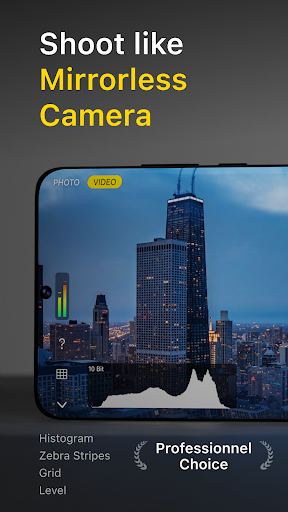
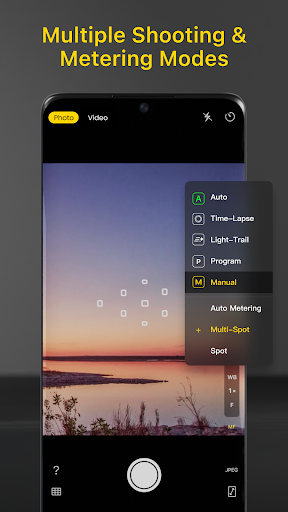
Varlens is an ultimate pro camera app.
# DSLR-level photography
- 5 MODES: Auto, Time-lapse, Light Trail, Manual, Program
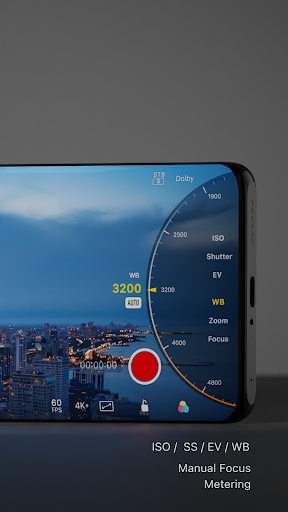
- Manual control ISO, Shutter, EV, White Balance, Focus, and multiple Metering modes
- Grid, Level, Histogram, Zebra Stripe, Focus Peaking
- Mirror Front Camera
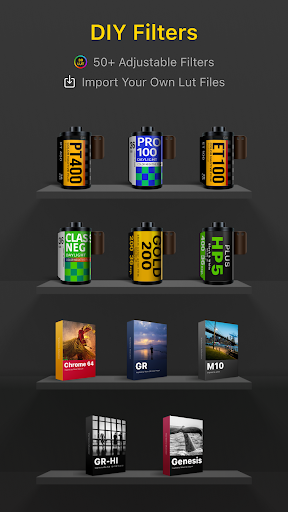
# Classic Filters. Analog Presets, Easy to Self-made
- Dozens of selected B&W and Retro Film, Master and Cinematic Art filters, all carefully designed and perfectly restored
- SELF-MADE filters, via Importing 3DLUT(.cube, .3dl) cinematic color grading files
- Tune filter's style such as intensity, exposure, grain and frame
# Professional Photo Editing
- Exclusively HSL+ tool, pick up and blend color locally, better than Lightroom and VSCO
- Exposure, Brightness, Contrast, Highlights, Shadows, Saturation, Tint, De-noise, Grain, Vignette, Curves, Split Tone and more
- High-definition, high-quality processing of the whole process, from shooting, saving, to photo editing, NON-Destructive original image
- Artistic Photo Frame, with displaying camera manufacturer, model name and other EXIF shooting parameters
- Self-made Logo
# Cinematic Video
- REAL-TIME color grading filters, capture slow motion video, up to 120 fps high speed
- Pause and continue recording video, one-time production, no need for video editing
- Stereo recording, two-channel pickup display
# Extreme Experience
- Left-hand interface
- Big UI
- More preferences in advanced
All names of modes, parameters, format in Varlens are consistent with professional photography and cameras
It's very suitable for snap shoot, selfie, street scene, documentary, portrait, kids/children, flower, pet, food, still life, travel, wedding photography
Photography beginners can use Varlens as an entry-level mirrorless camera
Advanced photography enthusiasts can give full play to the various functions provided by Varlens and use mobile phones to capture the extreme light and shadow effects.
Terms of Service: https://varlens.zineapi.com/service/term
Privacy Policy: https://varlens.zineapi.com/en-US/service/privacy-policy
और दिखाएं

1. MEmu इंस्टॉलर को डाउनलोड करें और इंस्टॉलेशन को पूरा करें

2. MEmu शुरू करें फिर होमपेज पर Google Play खोलें

3. Google Play में Varlens - DSLR in Phone खोजें
Install
4. Varlens - DSLR in Phone डाउनलोड कर इंस्टॉल करें
5. इंस्टॉल पूरा होने पर आइकन दबाएं

6. MEmu का उपयोग करके अपने कंप्यूटर पर Varlens - DSLR in Phone का अनुभव करें
MEmu Play सबसे बेहतरीन मुफ़्त Android एमुलेटर है और 5 करोड़ लोग पहले ही इसके शानदार Android ऐप अनुभव का आनंद ले चुके हैं। MEmu 9 वर्चुअलाइज़ेशन तकनीक आपको अपने PC पर हज़ारों Android ऐप्स, यहाँ तक कि सबसे ज़्यादा ग्राफ़िक्स वाले ऐप्स भी, आसानी से चलाने की सुविधा देती है।
असीमित बैटरी या मोबाइल डेटा के साथ बेहतर ग्राफिक्स के साथ बड़ी स्क्रीन; लंबी अवधि।
कीबोर्ड और माउस या गेमपैड के उत्तम नियंत्रण के लिए संपूर्ण कीमैपिंग का समर्थन करता हैं।
एक ही पीसी पर मल्टी-इंस्टेंस मैनेजर के साथ एक समय में कई गेम खाते या कार्य कर सकते हैं।
Use Varlens - DSLR in Phone on PC by following steps: