
WeTV: Asian & Local Drama
अपडेट किया गया
वर्तमान वर्शन
संसाधन

WeTV: Asian & Local Drama पर अपनी मोबाइल डेटा सीमा पार करने को अलविदा कहें और छोटी स्क्रीन की सीमाओं से मुक्त होकर बड़े डिस्प्ले के लाभों का अनुभव करें। अब, आप अपने कीबोर्ड और माउस का उपयोग करके फुल-स्क्रीन मोड में टॉपर्स क्लैन की शक्ति का अनुभव कर सकते हैं। MEmu Play में वे सभी बेहतरीन सुविधाएँ हैं जिनकी आप अपेक्षा करते हैं: त्वरित इंस्टॉलेशन और आसान सेटअप, सहज नियंत्रण, बैटरी की आवश्यकता नहीं, और कोई डेटा या कॉल समय सीमा नहीं। नया MEmu 9 आपके कंप्यूटर पर WeTV: Asian & Local Drama का उपयोग करने के लिए सबसे अच्छा विकल्प है। हमारा मालिकाना मल्टी-इंस्टेंस मैनेजर एक साथ दो या अधिक खातों को चलाने का समर्थन करता है। इससे भी महत्वपूर्ण बात यह है कि हमारा अनूठा इम्यूलेशन इंजन आपके कंप्यूटर के प्रदर्शन का पूरा उपयोग करता है, जिससे एक सहज और निर्बाध अनुभव मिलता है।
और दिखाएं
डाउनलोड करें WeTV: Asian & Local Drama पीसी पर MEmu एंड्रॉयड एमुलेटर के साथ बड़े पर्दे पर खेलने का आनंद लें। Finally, here comes the place to watch original and popular shows, dramas and variety shows!

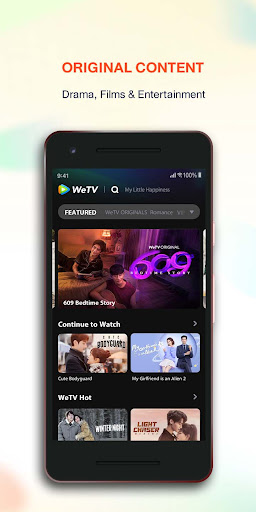
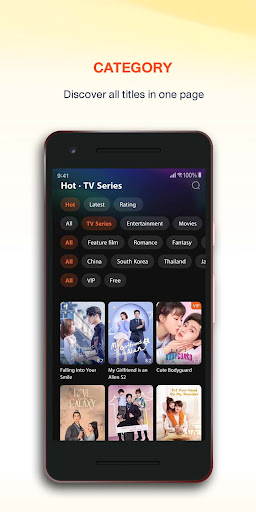
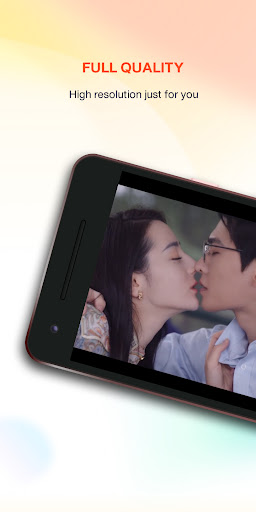
Finally, here comes the place to watch original and popular shows, dramas and variety shows! WeTV presents selected and top-hit shows and dramas for you to stream with premium watching experience.
Features that you may like:
Category selection: Movies, dramas, and variety shows are categorized into different pages. We make it easier for you to find a specific category that you want to explore more.
Continue to watch: We help you to remember where you left last time and pick up from there directly.
Video definition adjustment: You can select different picture qualities based on your demand. When you are watching with cellular data, you may select 360P to save your data. You can also enjoy Blu-ray picture quality (Full HD) to upgrade the watching experience.
Subtitles: We provide multiple languages and subtitles for you to choose from. You can also switch language based on your preference.
Screen control: You can swipe your screen up and down with your finger to adjust volume and brightness and swipe left and right to skip back or forward the video.
Your feedback is valuable for WeTV. Whenever you encounter any errors or problems while using WeTV, please send us your feedback or comment to our email at service@wetv.vip to help us improve our service. For our latest content and timely support , please visit our official website: https://wetv.vip
और दिखाएं

1. MEmu इंस्टॉलर को डाउनलोड करें और इंस्टॉलेशन को पूरा करें

2. MEmu शुरू करें फिर होमपेज पर Google Play खोलें

3. Google Play में WeTV: Asian & Local Drama खोजें
Install
4. WeTV: Asian & Local Drama डाउनलोड कर इंस्टॉल करें
5. इंस्टॉल पूरा होने पर आइकन दबाएं

6. MEmu का उपयोग करके अपने कंप्यूटर पर WeTV: Asian & Local Drama का अनुभव करें
MEmu Play सबसे बेहतरीन मुफ़्त Android एमुलेटर है और 5 करोड़ लोग पहले ही इसके शानदार Android ऐप अनुभव का आनंद ले चुके हैं। MEmu 9 वर्चुअलाइज़ेशन तकनीक आपको अपने PC पर हज़ारों Android ऐप्स, यहाँ तक कि सबसे ज़्यादा ग्राफ़िक्स वाले ऐप्स भी, आसानी से चलाने की सुविधा देती है।
असीमित बैटरी या मोबाइल डेटा के साथ बेहतर ग्राफिक्स के साथ बड़ी स्क्रीन; लंबी अवधि।
कीबोर्ड और माउस या गेमपैड के उत्तम नियंत्रण के लिए संपूर्ण कीमैपिंग का समर्थन करता हैं।
एक ही पीसी पर मल्टी-इंस्टेंस मैनेजर के साथ एक समय में कई गेम खाते या कार्य कर सकते हैं।
Use WeTV: Asian & Local Drama on PC by following steps: