Zyvora
अपडेट किया गया
वर्तमान वर्शन
संसाधन

Zyvora पर अपनी मोबाइल डेटा सीमा पार करने को अलविदा कहें और छोटी स्क्रीन की सीमाओं से मुक्त होकर बड़े डिस्प्ले के लाभों का अनुभव करें। अब, आप अपने कीबोर्ड और माउस का उपयोग करके फुल-स्क्रीन मोड में टॉपर्स क्लैन की शक्ति का अनुभव कर सकते हैं। MEmu Play में वे सभी बेहतरीन सुविधाएँ हैं जिनकी आप अपेक्षा करते हैं: त्वरित इंस्टॉलेशन और आसान सेटअप, सहज नियंत्रण, बैटरी की आवश्यकता नहीं, और कोई डेटा या कॉल समय सीमा नहीं। नया MEmu 9 आपके कंप्यूटर पर Zyvora का उपयोग करने के लिए सबसे अच्छा विकल्प है। हमारा मालिकाना मल्टी-इंस्टेंस मैनेजर एक साथ दो या अधिक खातों को चलाने का समर्थन करता है। इससे भी महत्वपूर्ण बात यह है कि हमारा अनूठा इम्यूलेशन इंजन आपके कंप्यूटर के प्रदर्शन का पूरा उपयोग करता है, जिससे एक सहज और निर्बाध अनुभव मिलता है।
और दिखाएं
MEmu Play के साथ PC पर Zyvora इस्तेमाल करने के शानदार अनुभव का आनंद लें। यह एक शक्तिशाली मुफ़्त Android एमुलेटर है जो आपको डेस्कटॉप वर्ज़न के लिए हज़ारों Android ऐप्स उपलब्ध कराता है। दोस्तों से जुड़ने और अपने काम को और भी बेहतर बनाने का आनंद लें! Discover a fresh entertainment experience with Zyvora, designed for exploring movies, TV shows, web series, dramas, and popular digital entertainment.
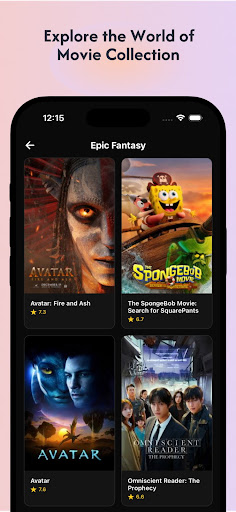

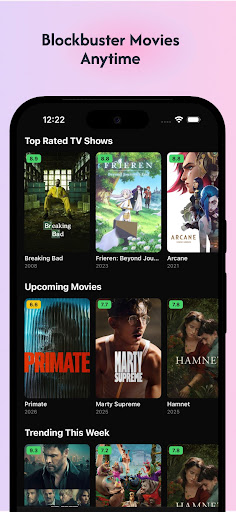

Discover a fresh entertainment experience with Zyvora, designed for exploring movies, TV shows, web series, dramas, and popular digital entertainment. Browse different categories, discover interesting titles, and find stories that match your mood.
From exciting action and adventure to romance, comedy, drama, thriller, fantasy, and family entertainment, explore a wide variety of content through a simple and convenient experience.
Movies for Every Mood
Explore different movie genres and discover stories for every occasion:
• Action & adventure
• Romance
• Comedy
• Drama
• Thriller & suspense
• Mystery
• Fantasy
• Science fiction
• Family entertainment
• International movies
• Regional cinema
• Popular films
Whether you want an exciting adventure, a romantic story, a funny movie, or a suspenseful thriller, explore different categories and discover something new.
Explore Web Series & TV Shows
Discover web series and TV shows across multiple genres. Explore romantic series, emotional dramas, comedy shows, action stories, mystery, thriller, fantasy, and more.
Find engaging storylines, memorable characters, unexpected twists, and new series to explore.
Entertainment That Fits Your Mood
Choose entertainment based on what you feel like watching. Explore comedy when you want something light, romance for an emotional story, action for excitement, or thriller and mystery for suspense.
Zyvora makes it easier to browse different entertainment categories and discover titles that match your interests.
Search, Browse & Discover
Find movies and series through an easy-to-use interface. Search for titles, explore categories, check available information, and discover new entertainment without unnecessary complexity.
Whether you have a specific title in mind or simply want to find something interesting, explore a variety of options in one place.
Keep Discovering
Explore movies, TV shows, web series, drama, romance, comedy, action, thriller, fantasy, and more. Discover new stories, explore different genres, and keep building your entertainment list.
Start exploring Zyvora and discover your next movie, series, or favorite story today.
और दिखाएं

1. MEmu इंस्टॉलर को डाउनलोड करें और इंस्टॉलेशन को पूरा करें

2. MEmu शुरू करें फिर होमपेज पर Google Play खोलें

3. Google Play में Zyvora खोजें
Install
4. Zyvora डाउनलोड कर इंस्टॉल करें
5. इंस्टॉल पूरा होने पर आइकन दबाएं

6. MEmu का उपयोग करके अपने कंप्यूटर पर Zyvora का अनुभव करें
MEmu Play सबसे बेहतरीन मुफ़्त Android एमुलेटर है और 5 करोड़ लोग पहले ही इसके शानदार Android ऐप अनुभव का आनंद ले चुके हैं। MEmu 9 वर्चुअलाइज़ेशन तकनीक आपको अपने PC पर हज़ारों Android ऐप्स, यहाँ तक कि सबसे ज़्यादा ग्राफ़िक्स वाले ऐप्स भी, आसानी से चलाने की सुविधा देती है।
असीमित बैटरी या मोबाइल डेटा के साथ बेहतर ग्राफिक्स के साथ बड़ी स्क्रीन; लंबी अवधि।
कीबोर्ड और माउस या गेमपैड के उत्तम नियंत्रण के लिए संपूर्ण कीमैपिंग का समर्थन करता हैं।
एक ही पीसी पर मल्टी-इंस्टेंस मैनेजर के साथ एक समय में कई गेम खाते या कार्य कर सकते हैं।
Use Zyvora on PC by following steps: