Architect: Land of Exiles
Updated
Current Version
1.12.22
Offered By

With your passion for Architect: Land of Exiles, you shouldn’t have to limit yourself to the small screen of a phone. Play like a pro and take full control of the game using a keyboard and mouse. MEmu gives you everything you’re looking for. Download and play Architect: Land of Exiles on PC. Play as long as you want — no more worries about battery life, mobile data, or unexpected calls. The all-new MEmu 9 is the best way to play Architect: Land of Exiles on PC. With our expertly designed keymapping system, Architect: Land of Exiles feels just like a real PC game. The MEmu multi-instance manager lets you run two or more accounts on the same device at the same time. Most importantly, our exclusive emulation engine unlocks your PC’s full potential, delivering smooth and seamless performance.
Show more
Download Architect: Land of Exiles on PC with MEmu Android Emulator. Enjoy playing on big screen. ◈ Game Introduction ◈.



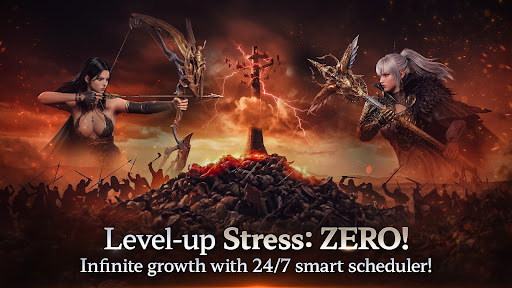
◈ Game Introduction ◈
The ""Abandoned Land,"" where chaos and ambition coexist around the Tower of Titans.
Will you be able to uncover the secrets of the world waiting for you there and become the Heir who has been awaited for ten thousand years?
A new era and opportunity just for you—experience it now in Architect.
◈ Game Features ◈
■ Breathtaking Beauty, A World Beyond Reality
An original worldview, intricate details, and free customization.
A vivid, sophisticated seamless world brought to life with Unreal Engine 5.
Experience firsthand the realistic and grand world unfolding before your eyes.
■ An Opportunity to Flourish Strategically: Non-Target & Battle Stance System
A meticulous combat system designed for various situations, featuring non-targeting, hack-and-slash, and parrying.
Subdue enemies with Battle Stances in PvE, PvP, and large-scale battles to perfect your own combat style.
■ A Thrilling Opportunity for Discovery: Hidden Exploration Elements Everywhere
When you grow tired of combat, take a moment to look at the surrounding scenery.
Explore a vast world spanning mountain peaks, deep canyons, and across the sea.
Leave your footprints across the ""Abandoned Land"" by finding hidden puzzles and treasures.
■ An Opportunity to Unite Everyone's Strength: Cooperative Content
From giant boss raids and gimmick-filled party dungeons to relentless monster waves...
Join forces with your allies to overcome countless obstacles and feel the true meaning of cooperation.
■ An Opportunity to Seize Glory: 'The Tower of Titans'
The gathering place for mercenaries striving to become the true Heir: The Tower of Titans.
Utilize hidden routes and geographical advantages to deploy diverse tactics.
Conquer the ancient ""Guardian Golem"" to incapacitate your enemies and become the ruler of the tower everyone looks up to.
[App Permissions Guide]
Architect collects the following permissions during installation to ensure smooth gameplay.
[Optional Permissions]
You can use the game even if you do not agree to the optional permissions, and you can withdraw your consent after agreeing.
Notifications: Permission to receive informational and promotional push notifications.
Tracking Permission: To provide customized advertisements and analyze service usage.
Show more

1. Download MEmu installer and finish the setup

2. Start MEmu then open Google Play on the desktop

3. Search Architect: Land of Exiles in Google Play
Install
4. Download and Install Architect: Land of Exiles
5. On install completion click the icon to start

6. Enjoy playing Architect: Land of Exiles on PC with MEmu
MEmu Play is the best Android emulator and 100 million people already enjoy its superb Android gaming experience. The MEmu virtualization technology empowers you to play thousands of Android games smoothly on your PC, even the most graphic-intensive ones.
Bigger screen with better graphics; Long duration, without limitation of battery or mobile data.
Full Keymapping support for precise control of keyboard and mouse or gamepad.
Multiple game accounts or tasks on single PC at one time with Multi-Instance manager.
Play Architect: Land of Exiles on PC by following steps: