Braincup
Updated
Current Version
3.1.0
Offered By

With your passion for Braincup, you shouldn’t have to limit yourself to the small screen of a phone. Play like a pro and take full control of the game using a keyboard and mouse. MEmu gives you everything you’re looking for. Download and play Braincup on PC. Play as long as you want — no more worries about battery life, mobile data, or unexpected calls. The all-new MEmu 9 is the best way to play Braincup on PC. With our expertly designed keymapping system, Braincup feels just like a real PC game. The MEmu multi-instance manager lets you run two or more accounts on the same device at the same time. Most importantly, our exclusive emulation engine unlocks your PC’s full potential, delivering smooth and seamless performance.
Show more
Download Braincup on PC with MEmu Android Emulator. Enjoy playing on big screen. Train your brain with fun mini games that challenge your memory, focus, logic and math skills.
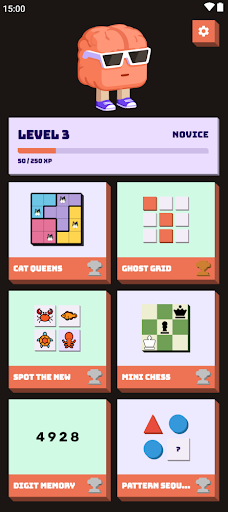
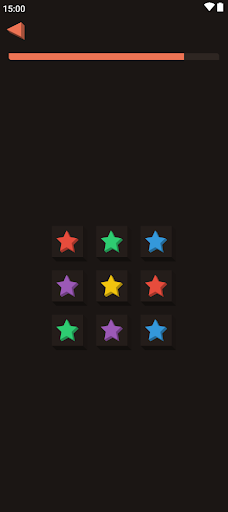
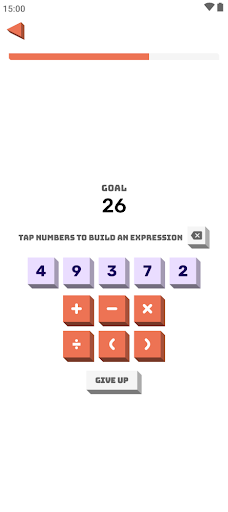
Train your brain with fun mini games that challenge your memory, focus, logic and math skills. Braincup offers 42 brain training exercises designed to sharpen your mind and improve concentration.
Mental Calculation:
Follow the mathematical expressions. Use the result as the base for the next calculation.
Chain Calculation:
Solve complex formulas step by step.
Sherlock Calculation:
Find a formula to reach the goal using only the given numbers and operators.
Fraction Calculation:
Solve the fractions.
Value Comparison:
Select the expression with the highest value.
Bubble Sum:
Add the numbers on the floating bubbles.
Quick Sum:
Numbers flash one at a time. Add them up and enter the total.
Anomaly Puzzle:
Find the figure that stands out.
Pattern Sequence:
Work out the rule running along each row of the grid, then pick the piece that completes it.
Path Finder:
Start at the marked position and follow the arrow instructions to find the destination.
Visual Memory:
Memorize the shapes on the grid, then identify the hidden shape after the timer ends.
Ghost Grid:
Watch the tiles light up one by one, then tap them back in the same order.
Color Confusion:
Tap all cells where the word matches its font color.
Colored Shapes:
Add up the points from the correct statements.
Orbit Tracker:
Watch the highlighted balls, then track them as they move.
Flash Crowd:
Dots flash briefly on each side. Tap the side that had more dots.
Mini Sudoku:
Fill the small grid so every row, column and block contains each number exactly once.
Mini Chess:
Checkmate the CPU before it checkmates you.
Solo Chess:
Capture pieces one by one until only the king remains. Every move must capture.
Lights Out:
Turn off every light. Each tap toggles the cell and its four neighbours.
Sliding Puzzle:
Slide tiles into the empty space to put them back in order.
Shikaku:
Divide the whole grid into rectangles. Each rectangle holds exactly one number, equal to its area.
Nurikabe:
Paint cells to build the sea around numbered islands without forming any 2x2 block.
Cat Queens:
Place one cat in every row, column and color zone. No two cats may touch, not even diagonally.
Knot:
Connect each pair of colored dots with a path. Paths may not cross and must cover every cell.
Tower of Hanoi:
Move the full stack to the right peg.
Schulte Table:
Tap the numbers in order from 1 upwards as fast as you can.
Flags:
Identify the country by its flag.
Digit Memory:
Memorize a digit sequence, solve a quick math problem, then recall the digits.
Spot the New:
Tap the animal you have not seen before.
N-Back:
Watch the shapes flash by, then tap the one at the position asked.
Wordle:
Guess the hidden five-letter word in six tries.
Matchstick Riddles:
Move matchsticks to fix broken equations.
Peg Solitaire:
Jump pegs to clear the board down to one peg.
Sudoku:
Classic full-size Sudoku with multiple difficulties.
Chess:
Full chess vs CPU or pass-and-play with a friend.
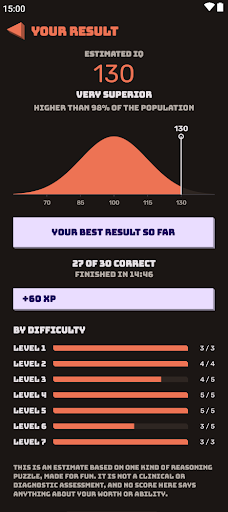
IQ Test:
30 matrix puzzles in 15 minutes, with an estimated IQ. Just for fun.
Missing Operators:
Find the missing operators (+, -, *, /) that make the equation true.
Bulls & Cows:
Guess the secret 4-digit number with unique digits.
Simon Says:
Each round lights up one new pad. Tap the whole sequence back from the start, earlier pads included.
Prism Clear:
Swap matching tiles to clear lines of three or more. Empty the whole board to win.
Trio:
Find three cards that share a shape, a count or a fill.
The game has several achievements and each exercise has medals to keep you motivated.
No tracking. Open source.
Show more

1. Download MEmu installer and finish the setup

2. Start MEmu then open Google Play on the desktop

3. Search Braincup in Google Play
Install
4. Download and Install Braincup
5. On install completion click the icon to start

6. Enjoy playing Braincup on PC with MEmu
MEmu Play is the best Android emulator and 100 million people already enjoy its superb Android gaming experience. The MEmu virtualization technology empowers you to play thousands of Android games smoothly on your PC, even the most graphic-intensive ones.
Bigger screen with better graphics; Long duration, without limitation of battery or mobile data.
Full Keymapping support for precise control of keyboard and mouse or gamepad.
Multiple game accounts or tasks on single PC at one time with Multi-Instance manager.
Play Braincup on PC by following steps: