Color Sort: Stack Sorting Game
Updated
Current Version
1.1.1
Offered By

With your passion for Color Sort: Stack Sorting Game, you shouldn’t have to limit yourself to the small screen of a phone. Play like a pro and take full control of the game using a keyboard and mouse. MEmu gives you everything you’re looking for. Download and play Color Sort: Stack Sorting Game on PC. Play as long as you want — no more worries about battery life, mobile data, or unexpected calls. The all-new MEmu 9 is the best way to play Color Sort: Stack Sorting Game on PC. With our expertly designed keymapping system, Color Sort: Stack Sorting Game feels just like a real PC game. The MEmu multi-instance manager lets you run two or more accounts on the same device at the same time. Most importantly, our exclusive emulation engine unlocks your PC’s full potential, delivering smooth and seamless performance.
Show more
Download Color Sort: Stack Sorting Game on PC with MEmu Android Emulator. Enjoy playing on big screen. Color Sort is an engaging color sorting game that challenges your problem-solving skills and keeps your mind active.
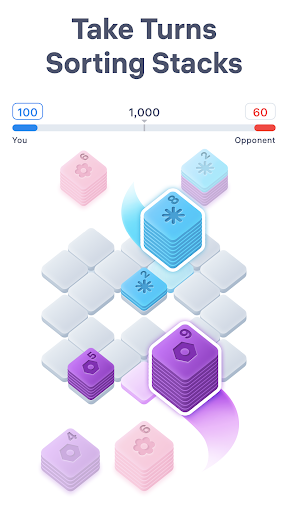
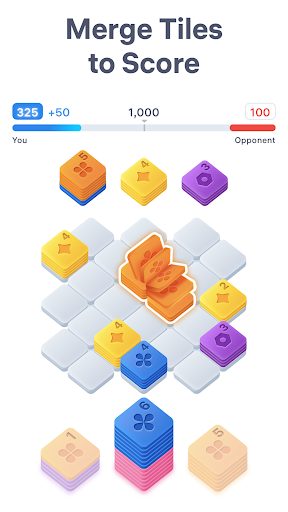
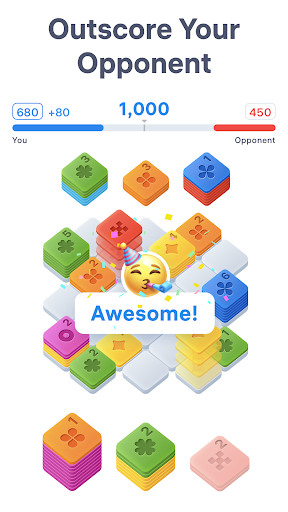
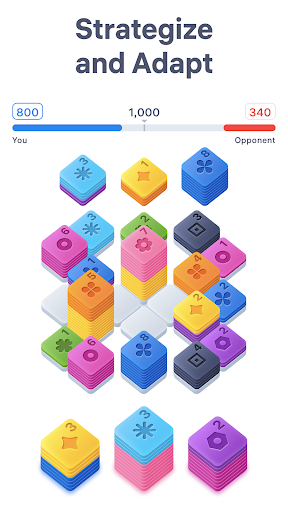
Color Sort is an engaging color sorting game that challenges your problem-solving skills and keeps your mind active. The sort puzzle offers an exciting head-to-head competition: take turns placing color stacks, and outscore your opponent to win!
Why You’ll Love Color Sort:
• Challenging Yet Relaxing
Color sorting games will keep your mind sharp and engaged while also providing a calming escape. With competitive gameplay, each turn presents a new challenge, requiring you to think strategically and adapt to your opponent’s moves to win the sorting game. Inspired by the logic of popular hexa games, Color Sort offers a test of your problem-solving skills, ensuring that your mind stays active and focused.
• Simple, Intuitive Gameplay
Designed with simplicity in mind, Color Sort lets you focus on what’s important: solving puzzles. No complicated controls or stressful time limits. While many hexa puzzle games rely on hexagonal tiles, Color Sort offers a fresh take with intuitive square stacks that merge by color. The color stack game’s straightforward mechanics make it easy to pick up and play, whether you have a few minutes or a few hours for the color sort puzzle. Just tap, place stacks, and watch your score grow.
• Turn-Based Sorting Battles
Compete in head-to-head matches, take turns placing stacks, and plan your moves carefully. The first player to reach the target wins, so think ahead and outscore your opponent in this stacking game. Color Sort captures the strategic feel of a hexa puzzle, but with easy-to-grasp square tile stacking and smooth, intuitive gameplay.
How to Play Color Sort:
Your mission in the Color Sort puzzle is to outsmart your opponent by making strategic moves and being the first to hit the winning score. Every decision matters, and the key to success in this stacking game is to thoughtfully match stacks by color on the grid.
Players take turns placing stacks. Each player places three stacks at a time, then the other player places their three stacks, and so on. Plan ahead, anticipate your opponent’s moves, and adapt your strategy to stay ahead in this Color Sort game.
You’ll start with three stacks of tiles below the board in this sorting game. Each stack contains one or a mix of colors. You need to strategically place the piles onto the board to create color matches and manage the available space. You must place all three stacks and let your opponent place theirs before receiving another set of three to continue playing sorting games.
To place a color stack, tap it and move it to the desired spot on the board. Two stacks of the same color placed next to each other will merge, clearing some space.
When a stack on the color sorting game’s board reaches 10 tiles of the same color, it will disappear, clearing additional space and earning you points. The first player to reach the target score wins the match!
How to Become a Color Sort Master?
The challenge is to keep the board clean and your score climbing in this engaging color stacking game. Just like in a hexa puzzle, to increase your chances of winning, always try to position the stacks this color sort puzzle gives you in a way that encourages merging while leaving enough room for future tiles. Careful placement is crucial to maintaining control of the stacking game’s board while competing against your opponent.
Color Sort is ideal for players who enjoy a mix of relaxation and mental challenge. Whether you’re looking to de-stress or keep your mind sharp, this color stack game offers a unique and rewarding puzzle battle experience.
Start playing Color Sort today and challenge yourself in strategic sorting games!
Terms of Use:
https://easybrain.com/terms
Privacy Policy:
https://easybrain.com/privacy
Show more

1. Download MEmu installer and finish the setup

2. Start MEmu then open Google Play on the desktop

3. Search Color Sort: Stack Sorting Game in Google Play
Install
4. Download and Install Color Sort: Stack Sorting Game
5. On install completion click the icon to start

6. Enjoy playing Color Sort: Stack Sorting Game on PC with MEmu
MEmu Play is the best Android emulator and 100 million people already enjoy its superb Android gaming experience. The MEmu virtualization technology empowers you to play thousands of Android games smoothly on your PC, even the most graphic-intensive ones.
Bigger screen with better graphics; Long duration, without limitation of battery or mobile data.
Full Keymapping support for precise control of keyboard and mouse or gamepad.
Multiple game accounts or tasks on single PC at one time with Multi-Instance manager.
Play Color Sort: Stack Sorting Game on PC by following steps: