SSS冒險家
Updated
Current Version
1.2.0
Offered By

With your passion for SSS冒險家, you shouldn’t have to limit yourself to the small screen of a phone. Play like a pro and take full control of the game using a keyboard and mouse. MEmu gives you everything you’re looking for. Download and play SSS冒險家 on PC. Play as long as you want — no more worries about battery life, mobile data, or unexpected calls. The all-new MEmu 9 is the best way to play SSS冒險家 on PC. With our expertly designed keymapping system, SSS冒險家 feels just like a real PC game. The MEmu multi-instance manager lets you run two or more accounts on the same device at the same time. Most importantly, our exclusive emulation engine unlocks your PC’s full potential, delivering smooth and seamless performance.
Show more
Download SSS冒險家 on PC with MEmu Android Emulator. Enjoy playing on big screen. 冒險沒有上限,SSS只是起點!
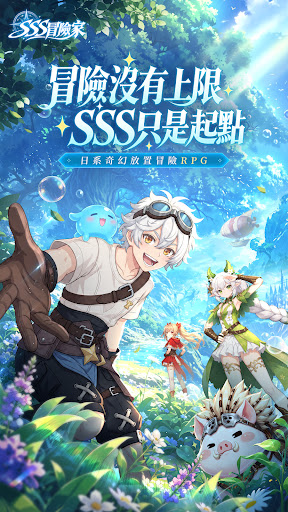
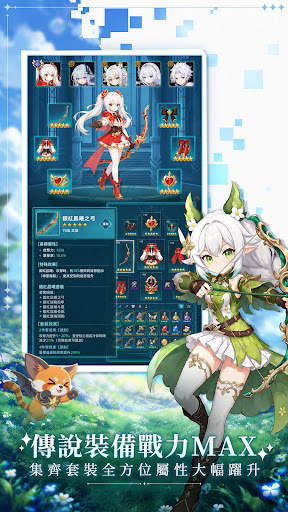
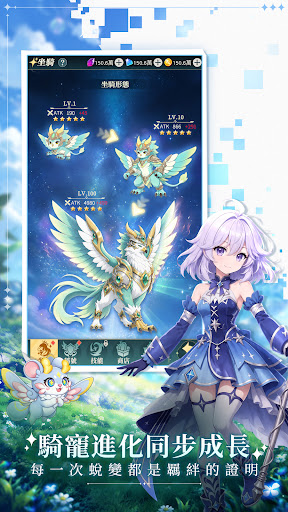
冒險沒有上限,SSS只是起點!
立即下載,領取最新iPhone手機!
這裡沒有複雜的操作和逼課的套路,你可自由選擇你的冒險方向——是召集同伴討伐BOSS,還是躺平掛機輕鬆遊玩?都可以!
經典耐玩的玩法副本,豪華豐厚的掉落獎勵,SSS只是我們的起點,因為自由的冒險沒有上限!
==============遊戲特色===========
【豐富時裝外觀系統】預約即可領取限定造型,多元風格自由搭配,打造獨一無二的角色形象
【輕鬆養成放置玩法】自動推圖成長無壓力,閒暇時間也能持續累積資源,循序漸進提升戰力
【副本獎勵大量掉落】資源獲取門檻低,平民玩家也能穩步培育角色,掛機也能輕鬆養成
【完善裝備進化體系】裝備持續強化升級,解鎖華麗特效與屬性,一步步向頂尖戰力邁進
【自由轉職體系】眾多職業路線任你選擇,靈活切換發展方向,搭配多元戰鬥流派
【開放跨服交易市場】玩家自由互通道具資源,萬人同場交易,打造靈活自由的經濟生態
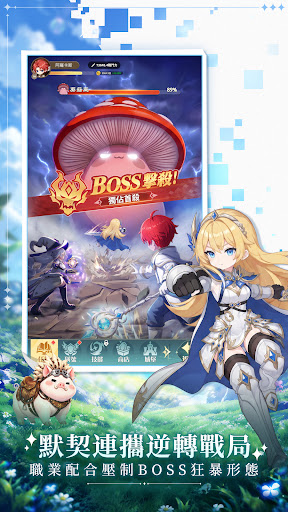
【日系奇幻美學,多名夥伴共戰】
精緻日系動畫風美術,眾多風格鮮明的冒險夥伴等候召喚。善用職業間的默契連攜,搭配技能組合逆轉戰局,合力壓制 BOSS 狂暴形態,感受策略配合的戰鬥爽感。
【傳說裝備收集,養成無止境】
海量傳說級裝備可刷取,收集成套後全方位大幅提升屬性。刷副本、打 BOSS 即可收穫豐厚掉落,不斷強化角色,打造屬於你的最強冒險者。
【騎寵進化,羈絆相伴】
各式華麗騎寵可同步成長,伴隨冒險一路蛻變。每一次升級進化,都是你與騎寵之間羈絆的證明,不只是代步坐騎,更是戰場上可靠的助力。
【單手暢玩,豐富副本闖關】
豎屏介面單手就能操作,隨時隨地展開驚險闖關。經典耐玩的特色副本持續開放,一路推進章節、挑戰各式敵人,持續解鎖更多冒險內容。
【溫馨提示】
※遊戲軟體分級管理辦法:輔導十二歲級。
※遊戲部分情節涉及暴力、戀愛交友,十二歲以上之人始得使用。
※本遊戲為免費使用,內另有提供購買虛擬遊戲幣、物品等付費服務。
※請依個人興趣、能力、進行體驗,請注意遊戲時間,避免沉迷於遊戲。
公司名稱:芓蒔合創股份有限公司
住所(位址):台北市大同區迪化街一段63號
隱私協議: https://www.crncoclt.com/site/privacy-policy
用戶條款: https://www.crncoclt.com/site/service-policy
Show more

1. Download MEmu installer and finish the setup

2. Start MEmu then open Google Play on the desktop

3. Search SSS冒險家 in Google Play
Install
4. Download and Install SSS冒險家
5. On install completion click the icon to start

6. Enjoy playing SSS冒險家 on PC with MEmu
MEmu Play is the best Android emulator and 100 million people already enjoy its superb Android gaming experience. The MEmu virtualization technology empowers you to play thousands of Android games smoothly on your PC, even the most graphic-intensive ones.
Bigger screen with better graphics; Long duration, without limitation of battery or mobile data.
Full Keymapping support for precise control of keyboard and mouse or gamepad.
Multiple game accounts or tasks on single PC at one time with Multi-Instance manager.
Play SSS冒險家 on PC by following steps: