織夢花園:森系輕經營
Updated
Current Version
1.3.91
Offered By

With your passion for 織夢花園:森系輕經營, you shouldn’t have to limit yourself to the small screen of a phone. Play like a pro and take full control of the game using a keyboard and mouse. MEmu gives you everything you’re looking for. Download and play 織夢花園:森系輕經營 on PC. Play as long as you want — no more worries about battery life, mobile data, or unexpected calls. The all-new MEmu 9 is the best way to play 織夢花園:森系輕經營 on PC. With our expertly designed keymapping system, 織夢花園:森系輕經營 feels just like a real PC game. The MEmu multi-instance manager lets you run two or more accounts on the same device at the same time. Most importantly, our exclusive emulation engine unlocks your PC’s full potential, delivering smooth and seamless performance.
Show more
Download 織夢花園:森系輕經營 on PC with MEmu Android Emulator. Enjoy playing on big screen. *Dream Garden: Forest-Themed Light Management* – Planting gentleness in life, delivering flowers to your hands.


*Dream Garden: Forest-Themed Light Management* – Planting gentleness in life, delivering flowers to your hands.
Have you ever wanted a moment of peace, to not reply to messages, not be rushed, and not have to be someone else's "obligation"? In *Dream Garden: Forest-Themed Light Management*, you can take a break, not have to push yourself, and simply create a gentle moment for yourself.
50,000 bouquets of real flowers are waiting for you to take home! Head over to the official Facebook page to participate now and bring flowers home!
Plant flowers, reap flowers | Turn your heartfelt wishes into tangible happiness. The chance to receive real flowers is right in front of you! 50,000 bouquets of real flowers are waiting for you to take home. Plant and care for flowers in the game yourself, bringing joy into reality. The rules are simple, just click to participate!
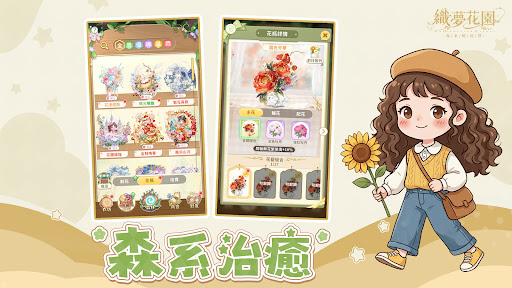
Forest-themed Healing | Light Management, Live a Life Without Rushing
One-click flower harvesting, easy and worry-free, collect all mature flowers at once, resources and rewards are instantly credited, boosting your flower-growing efficiency!
Elf Raising | Meet Your Companion in the Forest
Raise your own elf companion, let them evolve as your garden grows, unlock their appearance and abilities, making your gardening experience more personal and engaging.
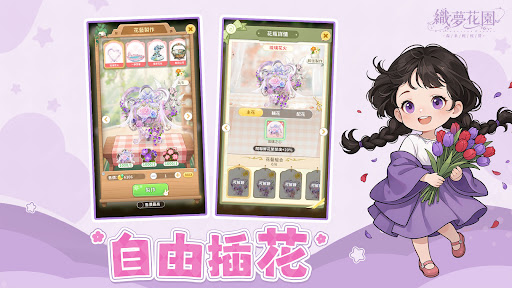
Free Flower Arrangement | Create Your Own Floral Style
Tired of the same old designs? Unlock rare flower species and limited color schemes, freely mix and match vases and decorations to create your own unique garden style.
Dress up as you like | Every outfit is a reflection of your mood.
Collect various clothing and makeup items, freely mix and match styles, from casual dresses to elfin looks. While managing your garden, create your own unique character image and experience the dual fun of garden × fashion development.
This is *Dream Garden: Forest-Themed Light Management*
A place where you can let go of your tension and return to a state of relaxed breathing.
Welcome to plant a flower and plant your own healing moments.
※ This game is classified as: Optional Rating 12 according to the Game Software Rating Management Regulations.
※ The game contains [violence].
※ Please experience the game according to your personal interests and abilities. Please be mindful of your game time and avoid addiction.
※ Republic Technology Co., Ltd. is the authorized distributor in Taiwan.
※ Member Service Terms: https://pogohopper.com/zmsl/tw/service.html
※ Privacy Policy: https://pogohopper.com/zmsl/tw/privacy.html
Show more

1. Download MEmu installer and finish the setup

2. Start MEmu then open Google Play on the desktop

3. Search 織夢花園:森系輕經營 in Google Play
Install
4. Download and Install 織夢花園:森系輕經營
5. On install completion click the icon to start

6. Enjoy playing 織夢花園:森系輕經營 on PC with MEmu
MEmu Play is the best Android emulator and 100 million people already enjoy its superb Android gaming experience. The MEmu virtualization technology empowers you to play thousands of Android games smoothly on your PC, even the most graphic-intensive ones.
Bigger screen with better graphics; Long duration, without limitation of battery or mobile data.
Full Keymapping support for precise control of keyboard and mouse or gamepad.
Multiple game accounts or tasks on single PC at one time with Multi-Instance manager.
Play 織夢花園:森系輕經營 on PC by following steps: