
Monchanic
Updated
Current Version
Offered By

With your passion for Monchanic, you shouldn’t have to limit yourself to the small screen of a phone. Play like a pro and take full control of the game using a keyboard and mouse. MEmu gives you everything you’re looking for. Download and play Monchanic on PC. Play as long as you want — no more worries about battery life, mobile data, or unexpected calls. The all-new MEmu 9 is the best way to play Monchanic on PC. With our expertly designed keymapping system, Monchanic feels just like a real PC game. The MEmu multi-instance manager lets you run two or more accounts on the same device at the same time. Most importantly, our exclusive emulation engine unlocks your PC’s full potential, delivering smooth and seamless performance.
Show more
Download Monchanic on PC with MEmu Android Emulator. Enjoy playing on big screen. Pre-registration is now live!
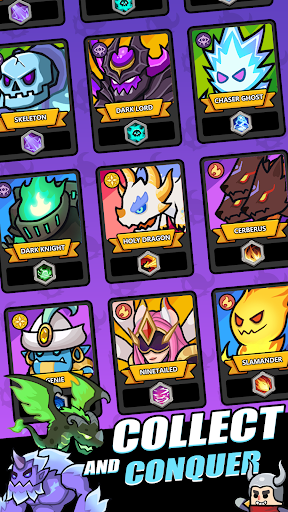
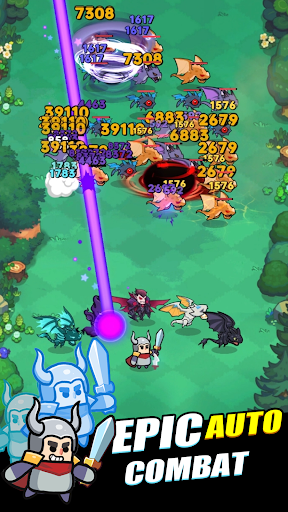
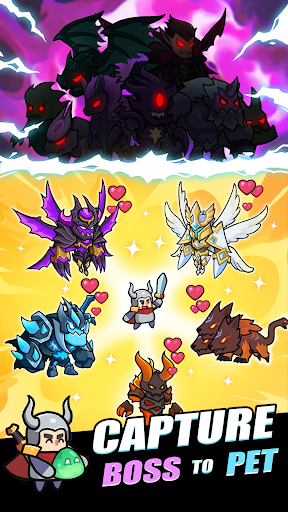
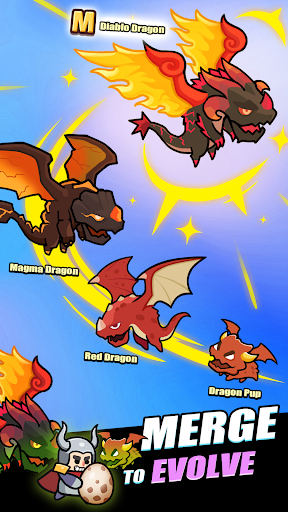
Pre-registration is now live! Sign up now to receive the epic skin “King Arthur”!
Forge Legends While You Sleep!
Embark on a self-evolving adventure across magical kingdoms! Assemble ultimate pet squads, craft god-tier gear, and conquer infinite stages with idle mastery – your fingertips command an entire auto-battling empire!
[AFK Progress = Nonstop Loot]
Heroes never rest! Earn treasure chests 24/7 even offline. Commute, work, or sleep – return to mountains of loot. True legends let time forge their power!
[90+ Evolvable Pets | Skill Synergy System]
Collect adorable baby creatures and evolve them into 7-tier battle dominators! Each pet boasts 1 cinematic active skill + expandable passive skill slots. Synthesize duplicates to trigger glorious evolutions – watch that cuddly lava pup become an apocalyptic magma dragon!
[Smart Gear Crafting | Build Your Meta]
Transform rusty blades into divine armaments through endless synthesis! Customize gear with unique suffixes to empower pet skills. Create OP builds like "Crit-Strike Dragon Riders" or "Lifesteal Shadowstalkers" – strategy beats stats!
[Loot Box Roulette | Equal Thrills for All]
Every chest sparks dopamine:
• Pull SSR-tier Frost Phoenixes from boss drops
• Outsmart thieving Mimic Chests in trap rooms
• Spin the Fate Wheel during limited-time events
20+ surprise mechanics keep each login thrilling!
[Casual-Friendly | Hardcore-Approved]
Auto-battle saves time, deep strategy steals your soul! Experiment with pet synergies, crunch gear math, master skill rotations... Our "idle" game hides chess-level tactics beneath its pick-up-and-play surface.
Your legend grows even while you sleep – when will YOU claim the throne?
Contact Us
FB:https://www.facebook.com/profile.php?id=61574669620950
Discord:https://discord.gg/DKDeDyFCXn
Show more

1. Download MEmu installer and finish the setup

2. Start MEmu then open Google Play on the desktop

3. Search Monchanic in Google Play
Install
4. Download and Install Monchanic
5. On install completion click the icon to start

6. Enjoy playing Monchanic on PC with MEmu
MEmu Play is the best Android emulator and 100 million people already enjoy its superb Android gaming experience. The MEmu virtualization technology empowers you to play thousands of Android games smoothly on your PC, even the most graphic-intensive ones.
Bigger screen with better graphics; Long duration, without limitation of battery or mobile data.
Full Keymapping support for precise control of keyboard and mouse or gamepad.
Multiple game accounts or tasks on single PC at one time with Multi-Instance manager.
Play Monchanic on PC by following steps: