MOTU Skeletor: Until Next Time
Updated
Current Version
0.2.7
Offered By

With your passion for MOTU Skeletor: Until Next Time, you shouldn’t have to limit yourself to the small screen of a phone. Play like a pro and take full control of the game using a keyboard and mouse. MEmu gives you everything you’re looking for. Download and play MOTU Skeletor: Until Next Time on PC. Play as long as you want — no more worries about battery life, mobile data, or unexpected calls. The all-new MEmu 9 is the best way to play MOTU Skeletor: Until Next Time on PC. With our expertly designed keymapping system, MOTU Skeletor: Until Next Time feels just like a real PC game. The MEmu multi-instance manager lets you run two or more accounts on the same device at the same time. Most importantly, our exclusive emulation engine unlocks your PC’s full potential, delivering smooth and seamless performance.
Show more
Download MOTU Skeletor: Until Next Time on PC with MEmu Android Emulator. Enjoy playing on big screen. The meme comes to life!
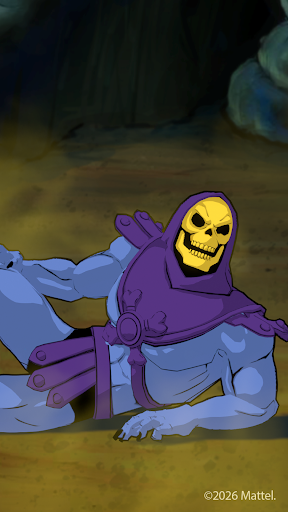
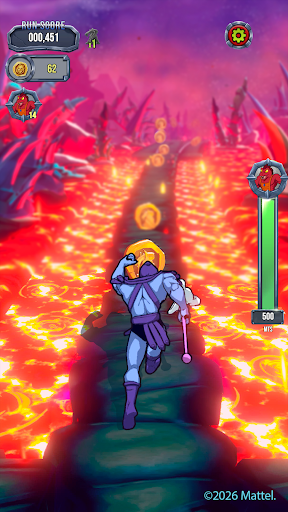
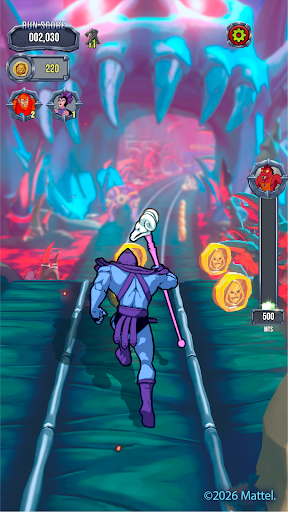
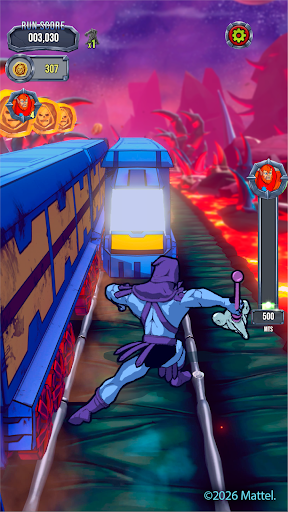
The meme comes to life! Run away as Skeletor in this fast-paced Masters of the Universe endless runner. Swipe, dodge, and turbo-charge through Snake Mountain in a nonstop pursuit across He-Man’s Eternia. Fueled by magic, sorcery, and pure momentum, every run pushes your reflexes further as danger builds and the path ahead grows more intense.
Swipe to Survive: Master smooth swipe controls as you dash forward, leap over traps, and outrun devious obstacles. Each run becomes a rising test of timing, focus, and nerve.
Eternia-Powered Action: Activate powerful abilities, summon Panthor, and unleash villain energy as you push deeper into the chase. The pace builds. The stakes rise. The momentum never breaks.
Heroes, Magic, and Sorcery: From the Man-At-Arms to Evil-Lyn, unlock iconic heroes and devious villains from the world of Masters of the Universe. Each ally and enemy of He-Man brings distinct abilities fueled by magic, sorcery, and power, giving you new ways to dominate every run.
Retro Style, Modern Speed: Inspired by the classic era, the game blends bold retro visuals with fluid modern runner gameplay and collectible items inspired by Masters of the Universe’s treasured history. Snake Mountain, lava caverns, and legendary strongholds come alive in a vibrant, high-energy adventure.
Seasonal Events: Every new season brings unique and exciting gameplay, new things to collect, and more!
Whether you're chasing the next high score with every villain perk or upgrading your Snake Mountain lair, the run keeps calling you back. Run faster. Swipe smarter. Until next time!
Show more

1. Download MEmu installer and finish the setup

2. Start MEmu then open Google Play on the desktop

3. Search MOTU Skeletor: Until Next Time in Google Play
Install
4. Download and Install MOTU Skeletor: Until Next Time
5. On install completion click the icon to start

6. Enjoy playing MOTU Skeletor: Until Next Time on PC with MEmu
MEmu Play is the best Android emulator and 100 million people already enjoy its superb Android gaming experience. The MEmu virtualization technology empowers you to play thousands of Android games smoothly on your PC, even the most graphic-intensive ones.
Bigger screen with better graphics; Long duration, without limitation of battery or mobile data.
Full Keymapping support for precise control of keyboard and mouse or gamepad.
Multiple game accounts or tasks on single PC at one time with Multi-Instance manager.
Play MOTU Skeletor: Until Next Time on PC by following steps:












































