RCS - Real Combat Simulator
Updated
Current Version
1.1.3
Offered By

With your passion for RCS - Real Combat Simulator, you shouldn’t have to limit yourself to the small screen of a phone. Play like a pro and take full control of the game using a keyboard and mouse. MEmu gives you everything you’re looking for. Download and play RCS - Real Combat Simulator on PC. Play as long as you want — no more worries about battery life, mobile data, or unexpected calls. The all-new MEmu 9 is the best way to play RCS - Real Combat Simulator on PC. With our expertly designed keymapping system, RCS - Real Combat Simulator feels just like a real PC game. The MEmu multi-instance manager lets you run two or more accounts on the same device at the same time. Most importantly, our exclusive emulation engine unlocks your PC’s full potential, delivering smooth and seamless performance.
Show more
Download RCS - Real Combat Simulator on PC with MEmu Android Emulator. Enjoy playing on big screen. RCS: Real Combat Simulator – Rule the Skies!
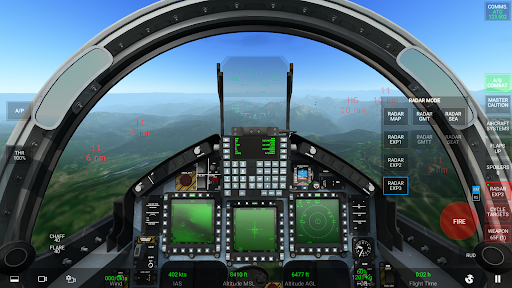
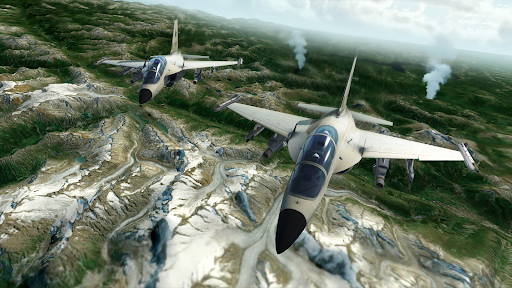
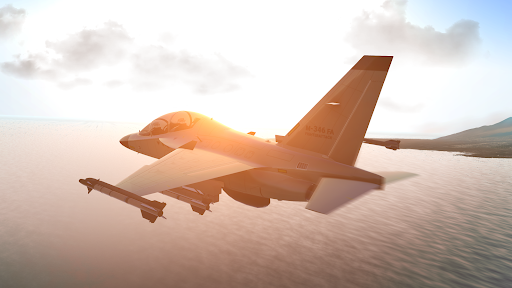
RCS: Real Combat Simulator – Rule the Skies!
The Ultimate Military Flight Combat Experience on Mobile
Take control in the most advanced military flight simulator: pilot legendary fighter jets, engage in epic dogfights, master air-to-air and air-to-ground combat, and prove your skill as an elite combat pilot.
Fly and Fight Anywhere in the World!
-Master takeoffs, landings, and full combat missions
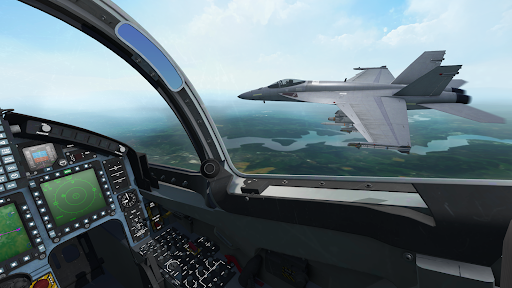
-Pilot state-of-the-art jets with realistic avionics and detailed cockpits
-Access thousands of global airports and military airbases
-Train with interactive tutorials and sharpen your combat skills
Realistic Fighter Jets:
Fly faithfully recreated aircraft with dynamic cockpits, authentic flight physics, and full weapons systems
-A-10C Thunderbolt II – The armored close-air-support powerhouse, featuring the GAU-8 Avenger cannon and precision strike capability.
-F/A-18 Super Hornet – A versatile carrier-based multirole jet with advanced avionics and a wide weapons loadout, perfect for dogfighting and precision strikes.
-M-346FA Master – A modern, agile fighter-trainer equipped with digital displays and advanced sensors.
-F-16C Fighting Falcon – The iconic multirole fighter, prized for its speed, agility, and versatility. Equipped with advanced radar, fly-by-wire controls, and a wide array of precision air-to-air and air-to-ground weapons.
More aircraft coming soon!
Immersive Combat Features:
-Global battle zones with real-world weather and time-of-day effects
-Advanced radar and targeting systems for air and ground threats
-Full arsenal of missiles, bombs, cannons, and countermeasures
-High-speed maneuvers and satellite-based terrain
Mission Editor & Multiplayer:
-Create custom missions: set objectives, control weather, and define enemy AI
-Build your own lobbies, design scenarios, and fly missions together in real-time multiplayer
-Choose Your Battlefield – Select from realistic global locations and military airbases.
-Share your creations and relive your best battles with advanced replay tools
Personalize Your Experience:
-Customize your jet with authentic liveries and camo patterns
-Capture cinematic dogfights with advanced in-game cameras
-Share your combat highlights with the RCS community
An internet connection is required for full simulation and multiplayer features. Some features may require a subscription.
Download now the ultimate military flight simulator! Fly modern fighter jets, join intense air combat missions, and dominate the skies in RCS: Real Combat Simulator.
TERMS OF USE: https://www.rortos.com/terms-of-use/
Support: rcs@rortos.com
Show more

1. Download MEmu installer and finish the setup

2. Start MEmu then open Google Play on the desktop

3. Search RCS - Real Combat Simulator in Google Play
Install
4. Download and Install RCS - Real Combat Simulator
5. On install completion click the icon to start

6. Enjoy playing RCS - Real Combat Simulator on PC with MEmu
MEmu Play is the best Android emulator and 100 million people already enjoy its superb Android gaming experience. The MEmu virtualization technology empowers you to play thousands of Android games smoothly on your PC, even the most graphic-intensive ones.
Bigger screen with better graphics; Long duration, without limitation of battery or mobile data.
Full Keymapping support for precise control of keyboard and mouse or gamepad.
Multiple game accounts or tasks on single PC at one time with Multi-Instance manager.
Play RCS - Real Combat Simulator on PC by following steps: