SMS 2.0 (BETA)
Updated
Current Version
2.0.2
Offered By

With your passion for SMS 2.0 (BETA), you shouldn’t have to limit yourself to the small screen of a phone. Play like a pro and take full control of the game using a keyboard and mouse. MEmu gives you everything you’re looking for. Download and play SMS 2.0 (BETA) on PC. Play as long as you want — no more worries about battery life, mobile data, or unexpected calls. The all-new MEmu 9 is the best way to play SMS 2.0 (BETA) on PC. With our expertly designed keymapping system, SMS 2.0 (BETA) feels just like a real PC game. The MEmu multi-instance manager lets you run two or more accounts on the same device at the same time. Most importantly, our exclusive emulation engine unlocks your PC’s full potential, delivering smooth and seamless performance.
Show more
Download SMS 2.0 (BETA) on PC with MEmu Android Emulator. Enjoy playing on big screen. ▶▶ New Hero ◀◀ Winter, the Imugi Who Dreams of Ascension.
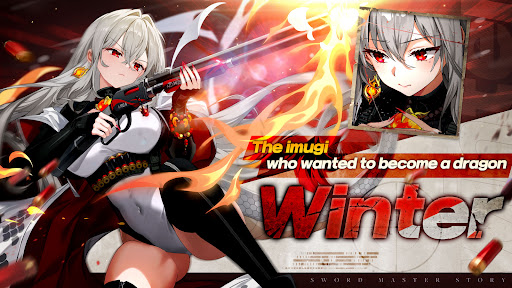
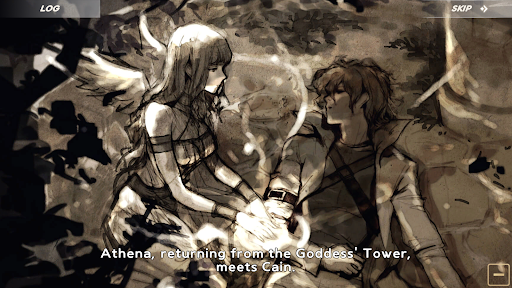
▶▶ New Hero ◀◀ Winter, the Imugi Who Dreams of Ascension
"We have to pull this off. If it's us, we can do it."
An imugi who trained for a thousand years and still never became a dragon.
As she raises the war-torn Kingdom of Lanis back up, Winter joins Cain's party.
Now, make the dream of becoming a dragon come true together with Winter.
-------------------------------------------------------
You, the one and only Sword Master in this world, fight for peace after the betrayal of the empire.
Gather allies to help you and join forces for endless adventures and battles!
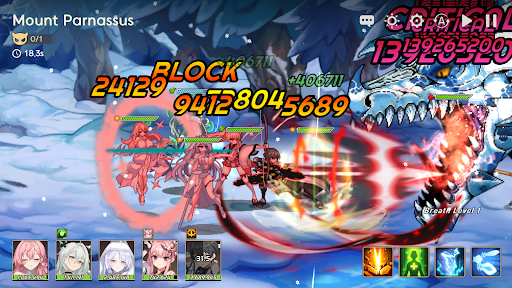
With a really fast attack and brilliant skills given by the Dual Blade, Enjoy an action RPG that never gets boring!
■ Hack & Slash
• Double the pleasure and fun thanks to brilliant skill animations!
• Exciting Action RPG that can be enjoyed even in idle mode!
• A fantastic combination of attractive illustrations and unique pixel graphics!
■ Adventure and Story
• Gather the goddesses as companions to participate in endless battles and earn rewards!
• If you clear stages faster, you can get better rewards!
• Discover the hidden truth through a new story every 10 stages.
■ Character Collection RPG
• Summon 40 unique heroes from mythology and legendary equipment.
• Strategically deploy heroes of 4 different classes and 5 different attributes to win the battle!
• The more characters you collect, the more the Buff will go up! Complete your character collection!
■ Growth and equipment
• Characters can become stronger through 'Level Up', 'Rebirth', and 'Transcendence'!
• With a variety of costumes, they not only look more glamorous, but their abilities will also go UP!
• Acquire more than 50 types of weapons and armor, and explode your potential with ' Reinforcement ' and 'Transcendence'!
• Open the 'Ideal Stone' to increase the additional stats and 'Magic Resistance' of all characters!
■ Guild System
• Protect your territory from outside forces with your guild members!
• Clear the Guild Dungeon and challenge the Guild to a higher level!
■ Various contents
• Explore “Endless Dungeons”, such as the Dark Dragon, Dark Lord's Tower and the Gold Dungeon, that will stimulate infinite growth and challenges!
• Catch the strongest boss with Sword Masters from all over the world in “Boss Raid”!
• Challenge other users in ‘Global PVP’ and become a true Sword Master in another world!
• Once a week, go to the “Demon Tower” to rescue Cain! Don't forget to take a break in the 'Spa'!
Show more

1. Download MEmu installer and finish the setup

2. Start MEmu then open Google Play on the desktop

3. Search SMS 2.0 (BETA) in Google Play
Install
4. Download and Install SMS 2.0 (BETA)
5. On install completion click the icon to start

6. Enjoy playing SMS 2.0 (BETA) on PC with MEmu
MEmu Play is the best Android emulator and 100 million people already enjoy its superb Android gaming experience. The MEmu virtualization technology empowers you to play thousands of Android games smoothly on your PC, even the most graphic-intensive ones.
Bigger screen with better graphics; Long duration, without limitation of battery or mobile data.
Full Keymapping support for precise control of keyboard and mouse or gamepad.
Multiple game accounts or tasks on single PC at one time with Multi-Instance manager.
Play SMS 2.0 (BETA) on PC by following steps: