The Ninth Relic
Updated
Current Version
1758105160
Offered By

With your passion for The Ninth Relic, you shouldn’t have to limit yourself to the small screen of a phone. Play like a pro and take full control of the game using a keyboard and mouse. MEmu gives you everything you’re looking for. Download and play The Ninth Relic on PC. Play as long as you want — no more worries about battery life, mobile data, or unexpected calls. The all-new MEmu 9 is the best way to play The Ninth Relic on PC. With our expertly designed keymapping system, The Ninth Relic feels just like a real PC game. The MEmu multi-instance manager lets you run two or more accounts on the same device at the same time. Most importantly, our exclusive emulation engine unlocks your PC’s full potential, delivering smooth and seamless performance.
Show more
Download The Ninth Relic on PC with MEmu Android Emulator. Enjoy playing on big screen. Pre-register now to unlock special rewards, including mounts and pets!


Pre-register now to unlock special rewards, including mounts and pets!
Welcome to The Ninth Relic — a lighthearted fantasy MMORPG where freedom and relaxation come first!
Here, you’re not tied down by destiny or forced into epic missions. Instead, you can enjoy thrilling battles, explore dungeons at your own pace, and share fun moments with friends. Whether you love action, fashion, or simply connecting with others, this world offers a place for you.
[Game Features]
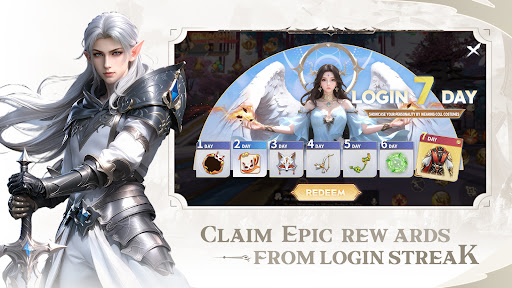
Daily Rewards, Easy Start
Log in every day to receive gifts that help you grow steadily. With 7-day login rewards, you’ll unlock useful resources, costumes, and rare items to kickstart your adventure. Come back often and enjoy surprises without pressure.
Your Style, Your Story
Create your own unique hero! With in-depth character customization, you can adjust every detail of your appearance. From facial features to outfits, your imagination sets the limit. Express yourself and stand out in the crowd.
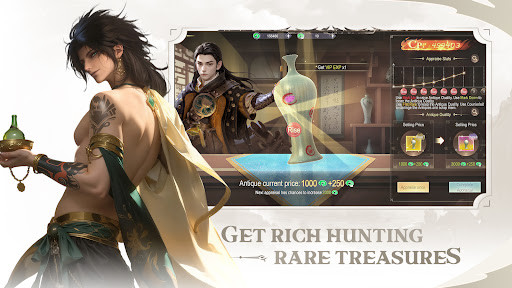
Mystery Appraisal System
During your adventures, you may come across mysterious items waiting to be appraised.
Successful appraisals may reveal rare treasures or powerful equipment. Some items may turn out to be ordinary, adding a fun twist of surprise to the journey. Every discovery brings excitement — will this be your lucky find?
Diverse Dungeons & Epic Boss Battles
Challenge dungeons solo or join forces with others:
Solo Play: Test your personal skill and strategy.
Co-op Battles: Team up with friends, combine tactics, and take down mighty bosses.
Every boss has unique patterns and requires timing and cooperation. Victory brings everyone a chance to earn rare drops and valuable loot!
Social Fun Everywhere
Adventure isn’t just about combat — it’s about connection:
Team up with friends for dungeons and events.
Chat across the world channel and meet new allies.
Join guilds to unlock large-scale activities and build a community together.
Play Your Way, No Pressure
In The Ninth Relic, the journey is yours to define:
Want action? Dive into dungeons and boss fights.
Want to relax? Try new looks, decorate your space, or simply hang out with friends.
There’s no strict timer, no rush to compete — only friendship, and surprises, all at your pace.
No pressure. Play at your pace.
Step into The Ninth Relic and begin a lighthearted fantasy adventure today!
We welcome any questions about the game. Feel free to contact us anytime!
Discord: https://discord.gg/9H3Q3GjYJQ
YouTube: https://www.youtube.com/c/EYOUGAME_OFFICIAL
Instagram: https://www.instagram.com/eyougame_official/
Support: https://www.eyougame.com/v2/contact
Show more

1. Download MEmu installer and finish the setup

2. Start MEmu then open Google Play on the desktop

3. Search The Ninth Relic in Google Play
Install
4. Download and Install The Ninth Relic
5. On install completion click the icon to start

6. Enjoy playing The Ninth Relic on PC with MEmu
MEmu Play is the best Android emulator and 100 million people already enjoy its superb Android gaming experience. The MEmu virtualization technology empowers you to play thousands of Android games smoothly on your PC, even the most graphic-intensive ones.
Bigger screen with better graphics; Long duration, without limitation of battery or mobile data.
Full Keymapping support for precise control of keyboard and mouse or gamepad.
Multiple game accounts or tasks on single PC at one time with Multi-Instance manager.
Play The Ninth Relic on PC by following steps: