War Zone
Updated
Current Version
0.0.4.4
Offered By

With your passion for War Zone, you shouldn’t have to limit yourself to the small screen of a phone. Play like a pro and take full control of the game using a keyboard and mouse. MEmu gives you everything you’re looking for. Download and play War Zone on PC. Play as long as you want — no more worries about battery life, mobile data, or unexpected calls. The all-new MEmu 9 is the best way to play War Zone on PC. With our expertly designed keymapping system, War Zone feels just like a real PC game. The MEmu multi-instance manager lets you run two or more accounts on the same device at the same time. Most importantly, our exclusive emulation engine unlocks your PC’s full potential, delivering smooth and seamless performance.
Show more
Download War Zone on PC with MEmu Android Emulator. Enjoy playing on big screen. HELLO BRAVE SOLDIER, WELCOME TO WAR ZONE .


HELLO BRAVE SOLDIER, WELCOME TO WAR ZONE
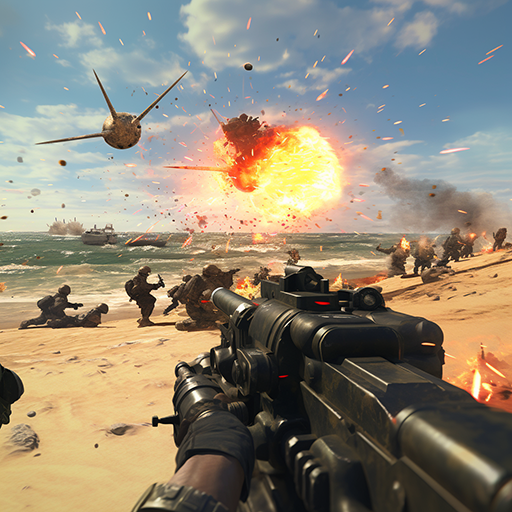
Welcome to the world of War Zone: Fight For Homeland; a world of intense warfare, explosion for brave shooters to come and explore. There are so many powerful machine guns and a variety of weapons are ready for the hero to pick up.
War Zone: Fight For Homeland is an action shooting game where you become a shooter defending your land from multiple battleships, fighter planes, battle tanks, battle robots and rockets of the enemy.
Trying to survive till the end of every battle is your duty in War Zone.
How to play:
In War Zone: Fight For Homeland, players have the task of protecting their ground and fight against the onslaught attack of enemies to survive. You will have to shoot and destroy their army ( from infantry, heavy tanks to aircraft equipped with missiles, etc.)
Fight back the enemy weapon systems include MB78 tanks, Fuchs APCs with turrets and missile launchers, battleships, Cobra Attack helicopters, CH53 Sikorsky, F101 jets, aircrafts and C-130 Hercules that transport rockets, bazookas, machine guns...
In the beginning of War Zone, the enemy's military will appear sparsely by the beach but as the tasks become more difficult in later stages, attackers are more crowded and the rain of firing guns, rockets and missiles will pour down on your tank. You will see the invader’s helicopters and fighter planes everywhere in the sky, constantly throwing bullets at your position.
It’s your duty to find the way to shoot back and win the war.
Strike back as hard as you can, soldier.
Some key features:
Over 10 different locations in War Zone: Fight For Homeland await you.
Weapons ranging from 50 mm machine guns to heat fuse rockets, javelin launchers, NLAW...
Hundreds of fighters, ships, guns, drones along with other weapons and vehicles.
Each warfare in War Zone: Fight For Homeland, you will get support attacks from B58 bombers.
Realistic weapons (Bazooka, M60 machine gun, 75 mm AT, Gatling ...). Some of your weapons even have rockets attached on a side to strengthen your power.
More than 50 types of battle tanks you can find in War Zone.
The invaders have powerful weapons, such as: MB78 tanks, Fuchs APCs with turrets and missile launchers, fighter planes, Cobra attack helicopters, CH-53 Sikorsky, F101 jets and C-130 Hercules transport aircraft …
Offline FPS Feature
Don't have an internet connection?
You can still play War Zone: Fight For Homeland in offline mode.
The campaigns you play online, still can be played without Wi-fi connection.
Meeting your comrade brothers
Many new friends from across the world are waiting to chat with you.
Let’s join War Zone community and share your stories, experiences in the game with them
Play War Zone: Fight For Homeland
An online and offline battle game, for free, now !!!!!!!!!!!!!!!!!!!!!!!!!!!!!!!!!
SUPPORT
If you have any questions or suggestions, please send us an email: support@horusvn.com
Show more

1. Download MEmu installer and finish the setup

2. Start MEmu then open Google Play on the desktop

3. Search War Zone in Google Play
Install
4. Download and Install War Zone
5. On install completion click the icon to start

6. Enjoy playing War Zone on PC with MEmu
MEmu Play is the best Android emulator and 100 million people already enjoy its superb Android gaming experience. The MEmu virtualization technology empowers you to play thousands of Android games smoothly on your PC, even the most graphic-intensive ones.
Bigger screen with better graphics; Long duration, without limitation of battery or mobile data.
Full Keymapping support for precise control of keyboard and mouse or gamepad.
Multiple game accounts or tasks on single PC at one time with Multi-Instance manager.
Play War Zone on PC by following steps: